
Last Updated on July 30, 2026 by Digiinte.com Team
Posting consistently across multiple platforms every single day is not a realistic long-term routine for most businesses or creators. Automation tools solve this by letting you plan, schedule, and analyze your social content in batches instead of logging into five different apps daily.
- Key Takeaways
- What Social Media Automation Actually Solves
- Straightforward Scheduling Tools
- Team and Enterprise Analytics Tools
- Content Recycling Tools
- Agency and Multi-Client Tools
- Budget-Friendly and AI-Assisted Tools
- Content Marketing Integration Tool
- Quick Comparison Table
- How to Choose the Right Tool for Your Situation
- Common Social Media Automation Mistakes
- Frequently Asked Questions
- Conclusion
This guide covers the 12 best social media automation tools, organized around real differences in what each one does best, straightforward scheduling, content recycling, agency-scale management, and analytics-heavy platforms, along with genuine pros, cons, and detailed pricing for each, so you can pick based on your actual situation rather than a generic ranked list. If social media automation is just one piece of a bigger marketing setup you are putting together, our guide on 10 digital marketing tools every small business needs covers the rest of that toolkit.
Key Takeaways
- Buffer and Later remain the most approachable starting points for solopreneurs and small businesses wanting simple, reliable scheduling.
- Hootsuite and Sprout Social are built for larger teams, offering deeper analytics and collaboration at a higher price point.
- SocialBee and MeetEdgar both specialize in recycling evergreen content automatically, useful for accounts that do not want to constantly produce brand new posts.
- Agorapulse and Sendible are strong choices specifically for agencies managing multiple client accounts.
- Publer, Zoho Social, and Metricool all offer genuinely capable automation at a lower price point than the enterprise-focused options.
- No tool automates strategy itself. Automation handles the repetitive publishing work, but content quality and audience engagement still require human judgment.
- Match the tool to your actual team size and content style rather than picking the most feature-rich option available.
What Social Media Automation Actually Solves
Automation tools generally handle three related but distinct jobs, scheduling posts in advance so you are not manually publishing in real time, monitoring and responding to engagement from one unified inbox instead of switching between apps, and reporting on performance so you know what is actually working. Different tools lean more heavily into one of these three jobs than the others, which is exactly why the right choice depends on which of these three problems is costing you the most time right now.
Straightforward Scheduling Tools
These tools focus on the core job of planning and publishing content across platforms, without heavy enterprise features you may not need.
1. Buffer
Buffer has built a long-standing reputation as one of the simplest, most approachable scheduling tools available, particularly for individuals and small teams who do not want a steep learning curve. It launched years ago with a singular focus on making scheduling painless, and that same philosophy still shapes the product today, a clean interface, a short learning curve, and pricing that scales gently rather than jumping straight into enterprise territory. For anyone who has felt overwhelmed opening a bloated, feature-heavy platform just to schedule a week of posts, Buffer’s stripped-down approach tends to feel like a relief rather than a limitation.
What It Does: Lets you queue posts across multiple platforms using a clean drag-and-drop calendar, with built-in analytics showing which posts perform best and simple team collaboration for approval workflows.
Key Features:
- Visual Instagram grid planning with first-comment hashtag scheduling
- Simple drag-and-drop content calendar across connected channels
- Built-in analytics highlighting your best-performing posts
- Lightweight team collaboration and approval features
Pricing:
- Free plan – 3 social channels, 10 scheduled posts per channel
- Essentials plan – $5/month per channel, adds analytics and engagement tools
- Team plan – $10/month per channel, adds collaboration features
Pros:
- Genuinely simple interface that new users pick up quickly
- Affordable, transparent per-channel pricing
- Strong Instagram-specific planning tools
Cons:
- Lacks deeper social listening or CRM features larger teams may need
- Analytics are solid but less detailed than enterprise competitors
- Automation is largely limited to scheduling rather than broader workflow automation
Why choose it? Most alternatives on this list either bury simple scheduling under enterprise complexity or charge a flat team fee regardless of how many channels you actually use. Buffer’s per-channel pricing means a solo creator with two accounts pays a fraction of what a five-account business does, and the interface never asks you to learn features you will not touch.
If your main problem is simply getting consistent without overpaying for tools built for a much bigger team, Buffer solves that directly. For a local business specifically, pairing consistent social posting with our local SEO tips for small businesses covers both sides of getting found nearby.
Best for: Small businesses and solopreneurs who want reliable, uncomplicated scheduling without paying for enterprise features they will not use.

2. Later
Later takes a visually driven approach, built specifically around brands and creators who prioritize Instagram, TikTok, and Pinterest content planning. It grew out of the Instagram scheduling boom, when visual consistency on a grid became a genuine marketing concern for brands and influencers alike, and that visual-first DNA still defines the product, everything is built around seeing your content before it goes live, not just queuing it blindly.
What It Does: Provides a drag-and-drop visual calendar so you can preview exactly how your Instagram grid will look before publishing, alongside scheduling for several other major platforms and a built-in link-in-bio tool.
Key Features:
- Visual drag-and-drop content calendar with grid preview
- AI-assisted hashtag suggestions
- Link-in-bio page builder to drive traffic from Instagram and TikTok
- Scheduling support across Instagram, TikTok, Pinterest, Facebook, and more
Pricing:
- Starter plan – around $16.67/month, 1 user, 1 social set, 30 posts per profile
- Growth plan – around $30/month, 3 users, analytics, 150 posts per profile
- Advanced plan – around $53/month, 6 users, team collaboration tools
Pros:
- Visual planning is genuinely useful for image and video heavy brands
- Link-in-bio tool adds real value beyond pure scheduling
- Approachable for creators without a marketing background
Cons:
- Less suited to text-heavy platforms like LinkedIn or X
- Analytics are lighter compared to Hootsuite or Sprout Social
- Higher-tier plans needed to unlock deeper team collaboration
Why choose it? If your brand lives or dies by how your feed looks as a whole, not just how individual posts perform, Later’s visual grid preview solves a problem most competitors do not even attempt to address. A fashion brand, photographer, or lifestyle creator gets more practical value from seeing the full grid before publishing than from another analytics dashboard they will rarely open.
Best for: Content creators and visually driven brands prioritizing Instagram, TikTok, and Pinterest.
Team and Enterprise Analytics Tools
These platforms handle larger volumes, more team members, and deeper reporting, at a correspondingly higher price point.
3. Hootsuite
Hootsuite remains one of the most recognized names in social media management, built around a centralized dashboard for larger teams managing multiple accounts. It was among the earliest dedicated social media management platforms to reach wide adoption, and its longevity shows in just how comprehensive its feature set has become, sometimes to the point where newer, smaller teams find themselves paying for depth they do not yet need.
What It Does: Combines scheduling, a unified inbox for monitoring mentions and messages across platforms, and built-in analytics and reporting, all accessible from one dashboard regardless of how many accounts you manage.
Key Features:
- Bulk post scheduling across many connected accounts
- Unified inbox for real-time monitoring and response
- Built-in analytics and custom reporting
- Team approval workflows and role permissions
Pricing:
- Professional plan – $99/month, 1 user, 10 accounts
- Team plan – $249/month, 3 users, 20 accounts
- Enterprise plan – custom pricing for large teams and brands
Pros:
- Comprehensive feature set covering scheduling, monitoring, and reporting in one place
- Strong support for team collaboration and approval chains
- Well established with extensive documentation and integrations
Cons:
- Noticeably more expensive than solo-focused tools like Buffer
- Can feel overwhelming for a single user managing just one or two accounts
- Lower-tier plans restrict some of the more advanced features
Why choose it? When multiple people need to draft, review, and approve content before it goes live across a dozen or more accounts, Hootsuite’s structure genuinely earns its higher price. The unified inbox alone can save a social media team hours weekly compared to checking each platform’s native app separately, and that time savings compounds quickly once you are managing accounts at scale.
Best for: Larger teams and agencies that need centralized scheduling, monitoring, and reporting across many accounts.
4. Sprout Social
Sprout Social positions itself around deep analytics, social listening, and CRM-style features, aimed at enterprises that treat social media as a core business function. It has increasingly marketed itself less as a scheduling tool and more as a full social intelligence platform, reflecting a broader shift among larger brands who want social media data feeding directly into business decisions, not just a content calendar.
What It Does: Combines scheduling with a unified inbox, detailed performance reporting, and social listening tools that track brand mentions and broader conversation trends across platforms.
Key Features:
- Advanced social listening and brand mention tracking
- Detailed, exportable performance reports
- CRM-style contact history for customer interactions
- Competitive analysis tools on higher tiers
Pricing:
- Standard plan – $199/month, 5 social profiles, basic features
- Professional plan – $299/month, unlimited profiles, competitive analysis
- Advanced plan – $399/month, unlimited keywords, deeper automation
Pros:
- Genuinely deep analytics and social listening capabilities
- Strong CRM-style features for tracking customer interactions over time
- Well suited for demonstrating clear ROI in reporting
Cons:
- Among the more expensive options on this list
- Steeper learning curve than simpler scheduling tools
- Likely more than a small business or solo creator actually needs
Why choose it? If leadership at your company wants hard numbers proving social media’s business impact, not just vanity metrics like likes, Sprout Social’s reporting depth is built specifically to answer that. The social listening features also catch brand mentions and sentiment shifts competitors and simpler tools would miss entirely, valuable for any brand where reputation monitoring matters as much as posting.
Best for: Enterprises and larger brands that need in-depth analytics and social listening alongside scheduling.
Content Recycling Tools
These platforms specialize in automatically reusing and reshuffling existing content, reducing the pressure to constantly create something brand new.

5. SocialBee
SocialBee organizes content into categories, then automates posting based on rules you set for how often each category should appear in your queue. This category-first design philosophy sets it apart from calendar-based competitors, instead of thinking in terms of specific dates, you think in terms of content types, promotional, educational, entertaining, and let the platform handle the actual timing and rotation.
What It Does: Lets you group posts by category, promotional, educational, entertaining, and automatically cycles through them according to a schedule you define, ensuring variety without manual daily planning.
Key Features:
- Category-based content organization and rotation
- Automatic evergreen content recycling
- Post variation for tailoring content per platform
- AI-assisted caption generation
Pricing:
- Bootstrap plan – $24/month, 1 user, 5 social profiles
- Accelerate plan – $40/month, 1 user, 10 profiles, bulk scheduling
- Pro plan – $82/month, 3 users, 25 profiles, advanced analytics
Pros:
- Category-based organization genuinely simplifies maintaining content variety
- Evergreen recycling extends the useful life of older posts
- Reasonably priced relative to enterprise competitors
Cons:
- Lacks built-in social listening features
- Real-time engagement tools are more limited than dedicated inbox-focused platforms
- Advanced analytics reserved for higher-tier plans
Why choose it? Accounts that rely on a consistent content mix, say, always balancing promotional posts with genuinely helpful tips, tend to drift out of balance when scheduled manually. SocialBee’s category system enforces that balance automatically, which matters more than it sounds for accounts trying to avoid feeling overly sales-focused. Ecommerce sellers balancing social promotion with on-site optimization may also find our guide on how to do SEO for a Shopify store useful alongside this.
Best for: Marketers and small businesses who want organized, automatically recycled content without daily manual planning.
6. MeetEdgar
MeetEdgar takes content recycling further than most competitors, building its entire product around the idea that good content deserves to be shared more than once. It emerged specifically as a reaction against the throwaway nature of most social scheduling, where a post gets published once and effectively disappears into the feed forever, even if it performed well and remains just as relevant months later.
What It Does: Automatically pulls from a categorized library of your past posts and refills your queue when it runs low, meaning a single piece of evergreen content can keep generating engagement long after it was first published.
Key Features:
- Automatic queue refilling from a categorized content library
- Evergreen content resurfacing based on category rules
- Flat-rate pricing regardless of posting frequency
- Browser extension for quickly adding new content to the library
Pricing:
- Edgar Lite plan – around $29.99/month, core recycling features
- Edgar plan – around $49.99/month, adds more integrations and variations
Pros:
- Genuinely hands-off once your content library and categories are set up
- Flat pricing structure is predictable regardless of posting volume
- Extends the lifespan of strong-performing older content automatically
Cons:
- Smaller platform integration list compared to larger competitors
- Less suited to real-time, reactive content given its recycling-first design
- Initial setup organizing your content library takes some upfront time investment
Why choose it? If you already have months or years of solid content sitting unused after its first publish, MeetEdgar essentially turns that backlog into an ongoing, self-sustaining content engine, with far less day-to-day effort than any calendar-based competitor requires.
Best for: Accounts with a solid library of evergreen content who want maximum automation with minimal ongoing manual scheduling.
Agency and Multi-Client Tools
These platforms are built specifically around managing several distinct client accounts from one system, with client-facing reporting.
7. Agorapulse
Agorapulse combines scheduling, a unified social inbox, and team workflows, aimed squarely at agencies and teams managing engagement across multiple accounts. It has positioned itself specifically around the messy, high-volume reality of agency work, where dozens of comments and messages across several client accounts need sorting, assigning, and responding to every single day without anything slipping through the cracks.
What It Does: Provides a centralized inbox for managing comments, messages, and mentions across connected accounts, alongside scheduling and reporting features with role-based permissions for team members.
Key Features:
- Unified social inbox across all connected accounts
- Approval workflows with role-based permissions
- Detailed, exportable reporting
- Bulk publishing and content queuing
Pricing:
- Standard plan – $79/month, 10 social profiles
- Professional plan – $119/month, 10 profiles, advanced analytics
- Advanced plan – $149/month, 10 profiles, custom workflows
Pros:
- Unified inbox genuinely simplifies engagement across many accounts
- Strong approval workflow support for team-based content review
- Solid reporting suitable for client-facing summaries
Cons:
- Advanced features require higher-tier, costlier plans
- Fewer third-party integrations compared to some larger competitors
- Pricing can add up quickly for agencies managing many client accounts
Why choose it? Agencies juggling client comments and DMs across a dozen accounts lose real time switching between native apps just to check for new messages. Agorapulse’s unified inbox turns that into a single daily check-in, and the approval workflow means junior team members can draft freely while a manager retains final sign-off before anything reaches a client’s audience.
Best for: Agencies and marketing teams needing strong collaboration and engagement tools across multiple accounts.
8. Sendible
Sendible is built with agencies specifically in mind, offering customizable, white-label reporting that can be branded for individual clients. Where many competitors treat reporting as an internal dashboard feature, Sendible treats it as a client deliverable, something you can hand directly to a client under your own agency’s branding rather than a visibly third-party tool’s logo.
What It Does: Supports bulk scheduling across many accounts at once, monitors brand mentions, and generates client-ready reports that can be customized with your own agency branding rather than the platform’s.
Key Features:
- White-label, brandable client reporting
- Bulk scheduling across many connected profiles
- Direct integrations with Canva and Google Drive
- Brand mention monitoring
Pricing:
- Creator plan – $29/month, 1 user, 6 social profiles
- Traction plan – $89/month, 4 users, 24 profiles, bulk scheduling
- Scale plan – $199/month, 7 users, 49 profiles, automated reports
Pros:
- White-label reporting is a genuine differentiator for client-facing agency work
- Strong integrations with design and storage tools speed up content creation
- Scales cleanly from small agencies up to larger operations
Cons:
- Interface complexity can be a hurdle when first getting started
- Pricing rises quickly as you add more users and profiles
- Less AI-driven automation compared to some newer competitors
Why choose it? For an agency, being able to hand a client a polished, agency-branded report rather than a screenshot from a third-party dashboard genuinely affects how professional the relationship feels. Sendible was built around exactly that client-facing polish, not just the internal scheduling mechanics most competitors focus on.
Best for: Agencies and consultants who need white-label, client-ready reporting across multiple managed accounts.
Budget-Friendly and AI-Assisted Tools
These options bring genuinely useful automation to a lower price point, often with AI features built in from the start.
9. Publer
Publer combines AI-assisted content creation with bulk scheduling at a notably lower price point than most competitors on this list. It has grown a loyal following specifically among cost-conscious creators and small business owners who assumed AI-assisted scheduling was reserved for pricier platforms, undercutting much of the market while still including genuinely useful automation features.
What It Does: Schedules posts across multiple platforms, uses AI to help generate captions and relevant hashtags, and automatically recycles evergreen content to extend its reach over time.
Key Features:
- AI-assisted caption and hashtag generation
- Evergreen content recycling
- Branded watermarking and link preview customization
- Bulk scheduling across connected accounts
Pricing:
- Free plan – 1 user, 3 social accounts, 10 scheduled posts per account
- Professional plan – around $4/month, unlimited scheduled posts, AI tools
- Business plan – around $8/month, adds analytics and priority support
Pros:
- Genuinely affordable while still including AI-assisted content tools
- Evergreen content recycling extends the value of existing posts
- Solid feature set relative to its low price point
Cons:
- Lacks the CRM or deep social listening features larger competitors offer
- Team collaboration features are limited on lower-tier plans
- Analytics are less detailed than premium alternatives
Why choose it? Publer proves that AI-assisted scheduling does not have to come with an enterprise price tag. For a freelancer or very small business watching every dollar of software spend, getting AI caption help and content recycling for a few dollars a month is difficult to match anywhere else on this list. If you want to extend that AI assistance beyond just captions, our roundup of 12 free AI tools that actually save content writers time covers tools for drafting, research, and repurposing too.
Best for: Budget-conscious small businesses and freelancers who still want AI-assisted scheduling.
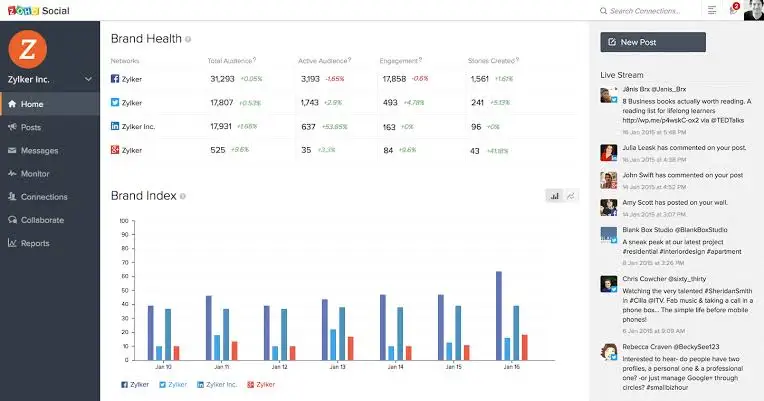
10. Zoho Social
Zoho Social benefits from integration with the broader Zoho software ecosystem, appealing to businesses already using other Zoho products for CRM or operations. As part of Zoho’s much larger suite of business software, it was designed less as a standalone bet and more as a natural extension for companies already trusting Zoho with their sales, support, or finance operations.
What It Does: Handles scheduling, monitoring, and reporting across major platforms, with particularly smooth integration into Zoho CRM for businesses tracking social engagement alongside sales and customer data.
Key Features:
- SmartQ optimal posting time suggestions based on your own audience data
- Direct Zoho CRM integration
- Monitoring dashboard for mentions and keywords
- Team collaboration with role-based access
Pricing:
- Standard plan – around $10/month, core scheduling and monitoring
- Professional plan – around $30/month, adds team collaboration
- Premium plan – around $40/month, adds advanced monitoring and CRM integration
Pros:
- Strong value if already using other Zoho products like their CRM
- SmartQ posting time suggestions are based on your actual audience data
- Competitively priced relative to feature depth offered
Cons:
- Less well known, meaning a smaller community and fewer third-party tutorials
- Most value is unlocked specifically when paired with other Zoho tools
- Interface can feel less polished than more design-focused competitors
Why choose it? A business already running its sales and support through Zoho gains something competitors simply cannot offer, social engagement data flowing directly into the same CRM record as a customer’s purchase and support history, giving a genuinely unified view of each customer relationship.
Best for: Businesses already using Zoho’s broader software suite who want social media management integrated into that ecosystem.
11. Metricool
Metricool leans heavily into analytics and reporting while still offering solid scheduling, appealing to users who care most about understanding performance data. It grew out of a genuine gap in the market, marketers who wanted deep, cross-channel analytics without paying enterprise-level prices for it, and that analytics-first identity remains its clearest differentiator today.
What It Does: Schedules content across major platforms while providing detailed analytics dashboards covering engagement, follower growth, and content performance, alongside competitor tracking features.
Key Features:
- Cross-channel analytics dashboard, including website and ad data
- Competitor performance tracking
- Scheduling across major social platforms
- Custom, exportable reports
Pricing:
- Free plan – limited accounts and reporting
- Starter plan – around $18/month, expanded accounts and analytics
- Advanced plan – around $45/month, deeper reporting and team features
Pros:
- Strong analytics depth relative to its price point
- Combines social, website, and ad performance data in one dashboard
- Competitor tracking adds useful competitive context
Cons:
- Scheduling features feel secondary to its analytics-first focus
- Interface presents a lot of data at once, which can overwhelm new users
- Less suited to teams prioritizing engagement and inbox management over reporting
Why choose it? If you already have scheduling handled but keep exporting data into spreadsheets to understand what is actually working, Metricool’s analytics-first design solves that specific pain point directly, without paying Sprout Social level pricing for it.
Best for: Users who prioritize detailed analytics and cross-channel performance tracking alongside basic scheduling.
Content Marketing Integration Tool
This option ties social scheduling directly into a broader content marketing calendar rather than treating it as a separate function.
12. CoSchedule
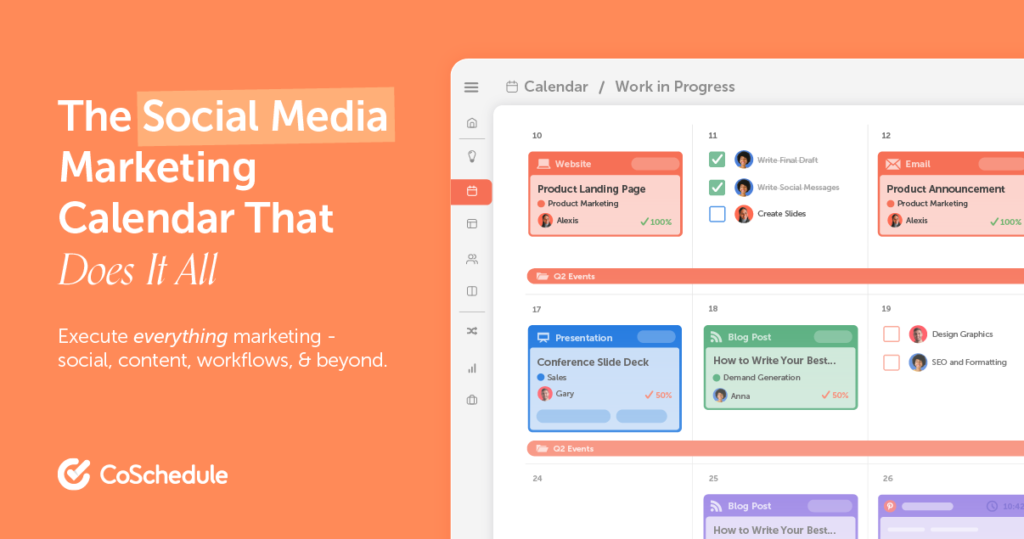
CoSchedule centers around a marketing calendar that combines blog, email, and social media scheduling into a single, unified view. It was built on the premise that social media rarely operates in isolation for a content-driven business, a new blog post typically needs a matching email and several social posts promoting it, and CoSchedule’s entire structure exists to plan all of that together rather than juggling three separate tools.
What It Does: Lets you plan and schedule social posts alongside blog publishing and email campaigns on one calendar, with a ReQueue feature that automatically reshares top-performing older content.
Key Features:
- Unified marketing calendar for blog, email, and social
- ReQueue automatic resharing of top-performing content
- Direct WordPress integration for promoting new posts
- Team approval workflows
Pricing:
- Free Calendar plan – 1 user, 1 social profile
- Social Calendar plan – $19/month, 3 users, 3 profiles, analytics and reports
- Marketing Suite – custom pricing for larger teams with advanced automation
Pros:
- Genuinely useful for teams managing blog, email, and social content together
- ReQueue automates resharing strong-performing content without manual effort
- WordPress integration streamlines promoting new posts automatically
Cons:
- Less focused on real-time engagement and social listening
- Full marketing suite pricing can climb quickly for larger teams
- Best value requires actually using its broader content calendar, not just social scheduling
Why choose it? For a blogger or content marketer, promoting a new post across social channels the moment it publishes is a recurring, repetitive task. CoSchedule’s WordPress integration and unified calendar remove that manual step entirely, something a pure social scheduler like Buffer or Later was never built to handle.
Best for: Content marketers and bloggers who want social scheduling unified with their broader content calendar.
Quick Comparison Table
| Tool | Core Strength | Free Plan | Best For |
| Buffer | Simple scheduling | Yes, 3 channels | Small businesses and solopreneurs |
| Later | Visual planning | Yes, limited | Instagram, TikTok, Pinterest creators |
| Hootsuite | Team collaboration | No | Larger teams and agencies |
| Sprout Social | Deep analytics and listening | No | Enterprises needing detailed reporting |
| SocialBee | Category-based recycling | No | Organized, varied content scheduling |
| MeetEdgar | Evergreen content recycling | No | Maximizing reach from existing content |
| Agorapulse | Unified inbox and workflows | No | Agencies managing engagement at scale |
| Sendible | White-label agency reporting | No | Agencies with multiple clients |
| Publer | AI-assisted, affordable | Yes, 3 accounts | Budget-conscious small businesses |
| Zoho Social | Zoho ecosystem integration | Limited trial | Existing Zoho users |
| Metricool | Analytics-first | Yes, limited | Performance and competitor tracking |
| CoSchedule | Content calendar integration | Yes, 1 profile | Bloggers and content marketers |
How to Choose the Right Tool for Your Situation
Rather than picking based on feature count alone, match the tool to your actual constraints.
- If you are a solo creator or very small team, start with Buffer, Later, or Publer, all approachable without unnecessary complexity.
- If you manage a larger team needing approval workflows and deep reporting, Hootsuite or Sprout Social justify their higher price.
- If you have a library of strong evergreen content, SocialBee or MeetEdgar will extend its value automatically.
- If you run an agency managing multiple client accounts, Agorapulse or Sendible offer the collaboration and white-label reporting that arrangement requires.
- If analytics and performance tracking matter more to you than scheduling itself, Metricool deserves a closer look.
Common Social Media Automation Mistakes
Even with the right tool, a few habits undermine the value automation is supposed to provide.
- Scheduling months of content at once and never revisiting it, missing opportunities to respond to current events or trending conversations.
- Treating automated posting as a replacement for genuine engagement, rather than freeing up time to actually engage with comments and messages.
- Using identical captions across every platform instead of adapting tone and format to each one’s audience expectations.
- Ignoring the analytics a tool provides, scheduling consistently without ever reviewing what is actually resonating.
- Over-relying on content recycling without periodically refreshing the underlying library with genuinely new material.
Frequently Asked Questions
Conclusion
The best social media automation tools are not defined by the longest feature list, they are defined by how well they match your actual team size, content style, and budget. Buffer and Later suit solo creators and small businesses, Hootsuite and Sprout Social justify their cost for larger teams needing deep reporting, SocialBee and MeetEdgar make the most of existing evergreen content, and Agorapulse and Sendible serve agencies managing multiple clients well.
- 10 Digital Marketing Tools Every Small Business Needs
- Top 20 Free SEO Tools Every Website Owner Should Use
- 12 Free AI Tools That Actually Save Content Writers Time
- 8 Local SEO Tips for Small Businesses
- How to Do SEO for a Shopify Store: Complete 2026 Guide
Pick one tool that matches where you are right now rather than the tool with the most impressive marketing page, and give it a real trial period before deciding whether to upgrade or switch. And since consistent posting only helps if people can also find you organically, our roundup of the top 20 free SEO tools is worth pairing with whichever automation tool you choose.
Ready to get started? Sign up for a free trial of whichever tool matches your team size from this list today, and schedule your next week of content in one sitting instead of posting manually each day.

Behind every post at digiinte.com is a team of experienced SEO analysts and digital growth specialists. Our insights are backed by real data, industry research, and hands-on campaign experience — so you get advice that actually moves the needle.