

Last Updated on November 23, 2026 by Digiinte.com Team
Pick the wrong keyword tool and you can spend six months writing posts that nobody searches for. Pick the right one and a small blog can start winning traffic within weeks. The best keyword research tool in 2027 is not always the most expensive one. It is the one that fits your budget, your market and the way you work.
Some tools are great at finding low difficulty topics. Others are better at spying on competitors or spotting trends early. This guide compares nine tools that bloggers, marketers and site owners use every day. You will see what each one costs, what you get for free, and how to find keywords with low competition and high search volume without guessing.
Key Takeaways
- No single winner: Semrush and Ahrefs lead on data depth. Google’s own tools lead on free access and first party data.
- Free is real: Google Keyword Planner, Search Console and Google Trends cost nothing. Search Console shows actual queries from your own site, not estimates.
- Volume is an estimate: Every third party tool guesses search volume with its own model, so compare two tools before you trust a number.
- Low KD method: Filter by difficulty first and volume second, then check the live results by hand.
- Start free, upgrade later: Pay only when daily limits start slowing you down. Prices in this guide were checked in November 2026 and can change.
What Is a Keyword Research Tool?
A keyword research tool is software that shows what people type into search engines, how often they search it, and how hard it is to rank for. Most tools also suggest related ideas, questions and search intent. You use that data to pick topics your website can realistically rank for.
Why Your Choice of Tool Matters More in 2027
Search results now carry AI answers, featured snippets and video blocks. Broad head terms are harder to win than they used to be. Specific phrases and clear questions are easier to rank for, and easier for AI assistants to quote.
A good tool helps you find exactly those phrases. It gives you a difficulty score, usually on a 0 to 100 scale, so you can skip the keywords that big brands have locked down. That single filter saves most new sites months of wasted effort.
Quick Comparison of the 9 Tools
| Tool | Best for | Free option | Starting paid price |
| Semrush | All in one SEO research | Free plan, 10 reports a day | SEO plan: $139 a month, or $117.33 a month billed yearly |
| Ahrefs | Competitor and backlink data | Free Keyword Generator (Ahrefs Free has no Keywords Explorer) | Starter: $29 a month (limited). Lite: $129 a month |
| Google Keyword Planner | Free volume and bid data | Free with a Google Ads account | Free |
| Google Search Console | Your own real queries | Free | Free |
| KWFinder | Low difficulty long tail ideas | 5 lookups per 24 hours | Basic: $30.50 a month, or $18.85 a month billed yearly |
| SE Ranking | Research plus rank tracking | 14 day trial, no free plan | Core: $129 a month, or $103.20 a month billed yearly |
| Ubersuggest | Budget friendly all rounder | Free account with limits | Individual: from about $12 a month (varies by region) |
| AnswerThePublic | Questions and content ideas | 3 searches a day | Starter: $10 to $20 a month (varies by region) |
| Google Trends | Seasonality and rising topics | Free | Free |
Prices come from each tool’s own pricing page as of November 2026. Plans, limits and regional prices change often, so confirm before you buy.
The 9 Best Keyword Research Tools in 2027
1. Semrush
Semrush is the tool most agencies open first. Its Keyword Magic Tool turns one seed phrase into thousands of ideas, each with volume, difficulty, intent and cost per click. It also offers Personal Keyword Difficulty, which tells you how hard a keyword is for your own site rather than for the average site. The free plan gives you 10 reports a day, which is enough to test it properly.
Best for: Agencies, serious bloggers and anyone who wants research, competitor data and content tools in one place.
Pros
- Very large keyword database with strong filters for difficulty, intent and word count
- Personal Keyword Difficulty saves time on new sites
- Free plan needs no credit card
Cons
- The cheapest paid plan treats keyword research as basic, so you may need a higher tier
- Costs more than most tools on this list
Website: https://www.semrush.com/

2. Ahrefs
Ahrefs is famous for backlink data, and its Keywords Explorer carries that strength into keyword research. You can see which pages rank for a term and how many sites link to them, which makes the real effort of ranking easy to judge. Ahrefs Free does not include Keywords Explorer, but the separate free Keyword Generator gives you a taste.
Best for: Marketers who want to judge ranking difficulty by looking at competitors’ links and pages.
Pros
- Clear view of who ranks and why
- Starter plan at $29 a month is a cheap way into Keywords Explorer
- Free Keyword Generator for quick ideas
Cons
- Starter has tight limits on credits, rows and keyword lists
- Full access starts at the $129 Lite plan
Website: https://ahrefs.com/
3. Google Keyword Planner
Keyword Planner lives inside Google Ads, so the data comes straight from Google. It shows new keyword ideas, average monthly searches and bid ranges. You need a Google Ads account with billing details and a campaign set up before you can use it, though you do not have to spend on ads to look at the numbers.
Best for: Beginners who want free data straight from Google, and anyone planning both SEO and paid ads.
Pros
- Completely free to use
- Location and language filters
- Data comes from Google itself
Cons
- Built for advertisers, so the competition column describes ad competition, not SEO difficulty
- Accounts with little ad spend often see wide volume ranges instead of exact numbers
Website: https://ads.google.com/home/tools/keyword-planner/
4. Google Search Console
Search Console does not guess. Its Performance report shows the real queries that bring people to your site, with impressions, clicks and average position. This makes it the best place to find pages that rank on page two and only need a small push. You can only look at sites you own and have verified.
Best for: Site owners who already have some traffic and want to find quick wins.
Pros
- Free and based on real data, not estimates
- Splits data by query, page, country and device
- Great for refreshing old posts
Cons
- Shows only your own site
- Cannot show competitor keywords or brand new ideas
Website: https://search.google.com/search-console/about
5. KWFinder by Mangools
KWFinder is built around one job: finding long tail keywords that are easy to rank for. The interface is clean and simple, which helps if big platforms feel overwhelming. Mangools says the tool works with billions of related keywords. A free account gives you 5 lookups per 24 hours.
Best for: Beginners and small sites hunting for low difficulty, long tail keywords.
Pros
- Simple layout that new users pick up fast
- Strong focus on low difficulty ideas
- Entry plan costs $18.85 a month on yearly billing
Cons
- Free lookups run out quickly
- Fewer extras than Semrush or Ahrefs
Website: https://mangools.com/kwfinder
6. SE Ranking
SE Ranking mixes keyword research with rank tracking and site audits. Its keyword tool covers 188 locations, which helps if you target several countries. There is no free plan, but you get a 14 day trial without a credit card. The Core plan starts at $129 a month, or $103.20 a month on yearly billing.
Best for: Teams and agencies that want research and rank tracking in one dashboard.
Pros
- Covers many countries and locations
- Rank tracking and audits sit next to keyword research
- Free trial needs no card
Cons
- No free plan
- Pricey if you only need keyword ideas
Website: https://seranking.com/

7. Ubersuggest
Ubersuggest comes from Neil Patel’s company, NP Digital. It offers keyword suggestions, site audits, rank tracking and competitor views at a lower price than the big platforms. A free account is available, but the pricing page does not spell out its limits. The Individual plan starts around $12 a month, depending on your region.
Best for: Freelancers and small businesses on a tight budget.
Pros
- One of the lowest paid prices on this list
- Easy to use
- Covers keywords, audits and tracking
Cons
- Free account limits are not clearly stated
- Data depth is lighter than Semrush or Ahrefs
Website: https://ubersuggest.com/

8. AnswerThePublic
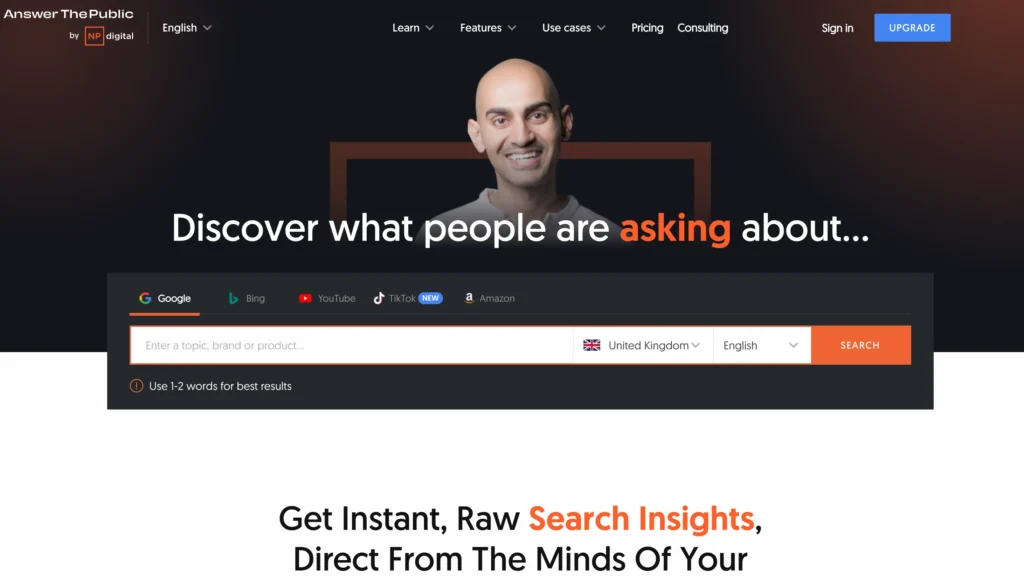
AnswerThePublic groups the questions and phrases people use around a topic. It is a goldmine for subheadings and FAQ sections, which also helps you win featured snippets and AI answers. After signing up you get 3 free searches a day. Paid Starter plans run about $10 to $20 a month, depending on region.
Best for: Bloggers who build content around questions.
Pros
- Turns one topic into dozens of question ideas
- Perfect for FAQ sections
- Low entry price
Cons
- Not a full volume and difficulty tool, so pair it with another
- Only 3 free searches a day
Website: https://answerthepublic.com/
9. Google Trends
Google Trends shows how interest in a topic moves over time and across regions. It uses a 0 to 100 relative scale, so it does not give search counts. That is exactly why it works so well next to a volume tool. Use it to spot seasonal spikes, compare two phrases, and catch rising topics before they get crowded.
Best for: Planning your content calendar and testing which of two phrases is growing faster.
Pros
- Free
- Shows seasonality and rising related searches
- Easy to compare phrases side by side
Cons
- No absolute search volume
- Not built for long keyword lists
Website: https://trends.google.com/

How to Find Low KD, High Volume Keywords Step by Step
Low difficulty and high volume rarely come together in one obvious phrase. You find them by narrowing a big list the right way. Here is a simple routine that works with almost any tool above.
- Write a seed list. List 5 to 10 broad topics your site covers.
- Run each seed in two tools. For example, KWFinder and Google Keyword Planner. Export the results.
- Filter by difficulty first. A common rule of thumb is to start under 30 on a new site and under 50 on an established one. Scales differ between tools, so treat these as guides.
- Set a volume floor. For a small site, 300 to 500 monthly searches is a practical starting point.
- Check the live results. Look for forum threads, thin pages and posts that still say 2024 or 2025. Those are openings. A free SEO Chrome extension can show page level details right on the results page.
- Match one keyword to one page. Group keywords by intent so two of your posts never fight for the same phrase.
- Review in Search Console. After 4 to 8 weeks, check which queries show up and update the post to match.
Before you commit to a keyword, look at how strong the sites on page one are. A quick check with a free domain authority checker tells you whether you are up against giants or smaller sites you can beat.
Common Mistakes to Avoid
- Chasing volume alone. A 20,000 search keyword you cannot rank for brings zero visitors. A 400 search keyword you can win brings real ones.
- Trusting one tool. Numbers differ from tool to tool. Check two and treat the result as a range.
- Ignoring search intent. If every result on page one is a tool list and you write a how to guide, you will not rank.
- Using old dates. Titles with last year’s date lose clicks. Update the year when you refresh a post.
- Researching once and stopping. Demand shifts. Revisit your list every quarter.
Expert Tips to Get More From Any Tool
- Use Search Console to find queries where you sit between positions 8 and 20. Improving those pages is faster than writing new ones.
- Pull question keywords from AnswerThePublic and answer each in two or three sentences. Direct answers suit featured snippets and AI summaries. Mark those answers up with one of the free schema markup generators so search engines can read them clearly.
- Check Google Trends before you plan seasonal posts, so you publish weeks before the spike.
- When you refresh an old post for a new keyword, run it through a broken link checker first. Links die over time, and a refresh is the perfect moment to fix them.
- Once a keyword page starts ranking, a free heatmap tool shows whether visitors actually read it or leave at the first screen.
| After keyword research: check your anchor text Keywords bring you the topics. Links help those pages rank. Once your post is live and you start earning backlinks, run your pages through DigiInte’s free Backlink Anchor Text Checker. It needs no login and shows how the anchor text pointing to a page is spread out, so you can spot too many exact match anchors before they become a problem. |
How to Choose the Right Tool for You
Match the tool to your stage. A new blog with no traffic can do almost everything with Keyword Planner, Google Trends and a free KWFinder account. A growing site gains a lot from Search Console plus one paid platform. Agencies usually settle on Semrush, Ahrefs or SE Ranking because they handle many clients and countries at once.
Whichever you pick, test your own keywords during a free plan or trial. Run the same five phrases in two tools and see which one gives answers that match what you see in Search Console.
Frequently Asked Questions
Final Thoughts: Choosing Your Keyword Research Tool for 2027
The best keyword research tool in 2027 is the one you will actually open every week. Start with Search Console and Keyword Planner, add a free account from KWFinder or Semrush, and test your own keywords before spending a rupee or a dollar.
Pick one keyword from this guide today, write the post this week, and track it in Search Console. If you want more tools to sharpen your SEO, browse the DigiInte blog for more free guides.

Behind every post at digiinte.com is a team of experienced SEO analysts and digital growth specialists. Our insights are backed by real data, industry research, and hands-on campaign experience — so you get advice that actually moves the needle.