
Last Updated on July 22, 2026 by Digiinte.com Team
You do not need a five hundred dollar a month SEO subscription to compete. You need the right ten minutes with the right free tool, applied consistently.
That is the part most best SEO tools lists skip. They hand you a wall of logos and call it a day. This guide is different. Every tool below comes with what it actually does, where its free tier stops, and which situation it is built for, so you are not guessing which one to open first. We are also covering something most 2026 lists still miss entirely, how free tools now factor into AI search visibility, not just traditional Google rankings.
- Key Takeaways
- Quick Reference: All 20 Tools at a Glance
- How to Use This List
- Keyword Research: Find What Your Audience Is Actually Typing
- Technical SEO: Make Sure Google Can Actually Crawl and Rank You
- On-Page Optimization: Make Every Page Work Harder
- Rank Tracking & Analytics: Know If It Is Working
- Backlink Analysis: Build and Monitor Off-Site Authority
- What's Changing in 2026: AI Search Visibility
- Frequently Asked Questions
- Conclusion
Whether you are running a one person blog, a local service business site, or an early stage SaaS product, this list covers everything from keyword research to technical audits to backlink tracking. Let us get into it.
Key Takeaways
- You can run a complete SEO workflow, keyword research, technical audits, on-page optimization, rank tracking, and backlink analysis, using only free tools, no paid subscription required.
- Google Search Console is the single most important tool on this list, free, first party Google data, covering keyword performance, indexing health, Core Web Vitals, and rank tracking all in one place.
- The 20 tools fall into 5 categories, keyword research, technical SEO, on-page optimization, rank tracking and analytics, and backlink analysis.
- Most free tiers cap usage, daily search limits, URL caps, or monthly query limits, so batch your research sessions instead of relying on one tool all day.
- Free tool data is often modeled or estimated rather than sourced directly from Google. Treat these as directional signals and cross-check anything important against Search Console.
- In 2026, visibility inside AI answer engines like ChatGPT and Perplexity is becoming part of the picture too, and a few free tools now help track this alongside traditional rankings.
- If you are starting from zero, prioritize five tools first, Search Console, Screaming Frog, Yoast or Rank Math, GA4, and Ahrefs’ free backlink checker.
Quick Reference: All 20 Tools at a Glance
Skim this table first, then jump to the full breakdown for whichever tool fits what you need done today.
| S.N | Tool | Category | Best For | Free Tier Limit |
| 1 | Google Keyword Planner | Keyword Research | Search volume and commercial intent | Broad volume ranges only |
| 2 | Google Trends | Keyword Research | Spotting rising and seasonal topics | No hard limit |
| 3 | Ubersuggest | Keyword Research | All in one keyword dashboard | Limited searches per day |
| 4 | AnswerThePublic | Keyword Research | Question based long-tail ideas | Small number of searches per day |
| 5 | Search Console (Performance) | Keyword Research | Queries already driving clicks | None, your own site data |
| 6 | Search Console (Coverage & CWV) | Technical SEO | Indexing errors and page experience | None, your own site data |
| 7 | Screaming Frog | Technical SEO | Full site crawl and audits | 500 URLs per crawl |
| 8 | PageSpeed Insights | Technical SEO | Speed and Core Web Vitals scoring | None |
| 9 | GTmetrix | Technical SEO | Visual waterfall load breakdown | Limited test frequency |
| 10 | Schema Markup Validator | Technical SEO | Validating structured data | None |
| 11 | Bing Webmaster Tools | Technical SEO | Bing index visibility and audits | None |
| 12 | Yoast SEO | On-Page | Real time WordPress SEO feedback | Core features free |
| 13 | Rank Math | On-Page | Advanced WordPress SEO features | Generous free tier |
| 14 | Surfer SEO (Free Audit) | On-Page | Content gap analysis vs competitors | One-time free audit |
| 15 | Mobile-Friendly Test | On-Page | Mobile rendering and usability | None |
| 16 | Google Analytics 4 | Rank Tracking & Analytics | On-site behavior and conversions | None |
| 17 | Search Console (Position Tracking) | Rank Tracking & Analytics | Historical ranking trends | 16 months of history |
| 18 | Free Rank Checkers | Rank Tracking & Analytics | Quick, one-off rank snapshots | A few lookups per day |
| 19 | Ahrefs Free Backlink Checker | Backlink Analysis | Quick backlink and DR snapshot | Top 100 backlinks shown |
| 20 | Moz Link Explorer | Backlink Analysis | Domain Authority and Spam Score | Limited queries per month |
How to Use This List
Free SEO tools are not a random grab bag. They cluster into five jobs.
- Understanding what people search for, keyword research
- Fixing what is broken on your site, technical audits
- Improving individual pages, on-page optimization
- Tracking whether it is working, rank tracking and analytics
- Building authority off-site, backlink analysis
The 20 tools below are organized by these categories, so you can jump straight to the job you need done today.
Keyword Research: Find What Your Audience Is Actually Typing
Keyword research is where every SEO campaign should start. Guessing what people search for is the single most common reason content underperforms.
1. Google Keyword Planner
Built into Google Ads, Keyword Planner gives you search volume ranges, competition levels, and bid estimates straight from Google’s own data, no third-party guessing in between. You do not need to spend a cent on ads to use it, a free Google Ads account with billing set up, even at zero active spend, is enough to unlock the tool.
What makes it valuable is the source, this is Google’s own data, not a scraped or modeled estimate like most third-party tools produce. Type in a seed keyword and it returns related terms along with monthly search volume ranges, a competition rating, and suggested bid ranges that hint at commercial intent. A keyword with a high suggested bid usually means advertisers are seeing real conversions from it, a strong signal it is worth targeting organically too.
The catch is that Google intentionally fuzzes exact volume into broad ranges unless you are running active campaigns, which limits precision. Use it as a validation layer, brainstorm ideas elsewhere, then run them through Keyword Planner to sanity check demand before you commit writing time to a topic.
2. Google Trends
Trends shows you direction, not volume, is interest in a topic rising, falling, or holding steady, and does it spike seasonally? That distinction matters more than raw search numbers, because a keyword’s trajectory tells you whether you are planting a flag early or arriving after the wave has already passed.
The interface lets you compare up to five search terms at once, filter by country, region, or city, and break results down by category. You can also filter by search type, Web, Image, News, Shopping, or YouTube, genuinely useful when deciding whether a topic deserves a blog post, a product page, or a video.
For content planning, the Related queries and Related topics panels are underused. They surface breakout terms before those terms show up with real volume in other keyword tools. For local service businesses, region level filtering helps decide which city or neighborhood pages deserve priority.
3. Ubersuggest
Neil Patel’s tool gives you keyword suggestions, estimated search volume, an SEO difficulty score, cost-per-click data, and content ideas in one dashboard, and unlike many freemium SEO tools, its free tier is genuinely usable rather than a crippled demo.
Enter a keyword and you get a full breakdown, monthly search volume, a difficulty score, paid difficulty, average CPC, and related keyword suggestions with the same metrics attached. Scroll down and you will find a Content Ideas section showing top performing published articles for that keyword, a fast way to gauge what good looks like before you start writing.
The trade-off is that its keyword difficulty and volume estimates are modeled, not sourced directly from Google, so treat the numbers as directional and cross-check anything borderline against Google Keyword Planner.
4. AnswerThePublic
This tool visualizes the actual questions, prepositions, comparisons, and related searches people type around a seed keyword, pulled from Google and Bing autocomplete data, arranged into a search cloud or list view organized by question type.
The real value here is speed. Type in one keyword and within seconds you have dozens of question based long-tail variations, exact phrasing real users search for. This is the fastest way to build out a genuinely useful FAQ section, which also sets you up for FAQ schema markup and featured snippet opportunities.
The free version limits you to a small number of searches per day, and no longer surfaces search volume on the free tier. The workaround is simple, batch your keyword research into a single weekly session and work from that list.
5. Google Search Console (Performance Report)
Search Console is not just a technical audit tool, its Performance report shows the exact queries already driving impressions and clicks to your site, broken down by query, page, country, device, and search appearance.
The most underused feature here is filtering by position. Sort your queries by average position between 8 and 20, and you will typically find keywords you are already ranking for on page 2 or 3 without realizing it. These almost ranking keywords are some of the highest leverage opportunities in SEO, a modest content expansion or a few internal links can push them onto page 1.
You can also compare date ranges to see whether a page’s traffic is trending up or down, filter by specific URL to audit one page’s full keyword footprint, and export everything for deeper analysis.
Technical SEO: Make Sure Google Can Actually Crawl and Rank You
Great content on a technically broken site rarely ranks. These tools find the structural issues holding you back.
6. Google Search Console (Coverage & Core Web Vitals)
Beyond keyword data, Search Console flags indexing errors, mobile usability issues, and Core Web Vitals problems, all metrics that factor into both ranking and user experience.
The Coverage report categorizes every URL Google knows about into buckets, Indexed, Not Indexed, and Excluded, each with a specific reason attached. Each reason points to a different fix. A page marked Discovered, currently not indexed often just needs stronger internal linking; a page marked Duplicate needs a canonical tag pointed at the right version.
The Core Web Vitals report groups your pages into Good, Needs Improvement, and Poor based on loading speed, responsiveness, and visual stability. If a page is not indexed at all, nothing else matters for that URL, no amount of keyword optimization helps a page Google refuses to show.
7. Screaming Frog SEO Spider (Free Version)
Screaming Frog crawls your site the way Googlebot does, systematically following every internal link and surfacing broken links, missing or duplicate title tags and meta descriptions, redirect chains, orphaned pages, and duplicate content in a single scan.
Once a crawl finishes, you get a spreadsheet style interface with tabs for every issue type. You can filter, sort, and export any of it. It also generates an XML sitemap directly from the crawl and can visualize your site’s internal link structure to show which pages are buried too many clicks deep from the homepage.
The free version caps at 500 URLs per crawl, plenty for small to mid size sites. For anyone managing a site with real page volume, this is arguably the single highest leverage free technical SEO tool available.
8. Google PageSpeed Insights
PageSpeed Insights scores your site speed and Core Web Vitals separately for mobile and desktop, using both lab data and, where available, real world field data collected from actual Chrome users who have visited your site.
Below the score, it lists specific, prioritized Opportunities and Diagnostics, each with an estimated time savings attached. This turns a vague make it faster goal into a concrete checklist a developer, or you with a plugin, can work through.
Since page experience and Core Web Vitals are confirmed ranking factors, this is not a check to run once and forget. Run it after every major site change, since a single heavy new element can undo months of speed optimization.
9. GTmetrix
GTmetrix complements PageSpeed Insights with a visual waterfall chart of your page’s entire load sequence, showing every single request your page makes and exactly how long each one took relative to the others.
Where PageSpeed Insights tells you what is slow, GTmetrix’s waterfall view shows you why in a way you can actually see, a large font file blocking the render, three separate analytics scripts loading before visible content, an oversized image. You can test from multiple server locations and simulated connection speeds, useful if a meaningful chunk of your audience is on mobile data.
10. Schema Markup Validator (validator.schema.org)
This tool checks whether your structured data is implemented correctly and free of syntax errors. Paste in a URL or raw code snippet and it parses the markup, flags errors and warnings, and shows a structured preview of what Google would extract from the page.
This matters because structured data powers rich results in search, star ratings, expandable FAQ dropdowns, recipe cards, all of which make a listing visually stand out. Rich snippets do not directly boost rankings, but they meaningfully improve click through rate. The catch is fragility, one misplaced comma can invalidate the entire markup block silently.
11. Bing Webmaster Tools
Often overlooked, Bing Webmaster Tools mirrors much of what Search Console does, crawl reports, indexing status, backlink data, and keyword insights, but for Bing’s index specifically, which still accounts for a meaningful slice of search traffic and also powers search inside Yahoo and portions of DuckDuckGo.
Beyond the basics, it includes a built-in SEO Analyzer that scans individual pages and flags on-page issues in a format that is arguably more beginner friendly than Search Console’s equivalent. It also offers bulk URL submission and a backlink report that sometimes surfaces links Search Console does not show.
On-Page Optimization: Make Every Page Work Harder
Once the technical foundation is solid, these tools help you optimize individual pages for both readers and search engines.
12. Yoast SEO (WordPress Plugin, Free Version)
Yoast’s free tier gives real time, traffic light style feedback on title tag length, meta description length, focus keyword placement, internal linking, and readability as you write, directly inside the WordPress editor.
The readability analysis checks sentence length, paragraph length, passive voice usage, and subheading distribution, nudging you toward genuinely more scannable writing. The SEO analysis checks whether your focus keyword appears in the title, URL, first paragraph, and meta description.
It will not write good content for you, but it reliably catches the mechanical mistakes, a missing meta description, an overlong title tag, a wall of text with no subheadings, that quietly undercut otherwise solid posts.
13. Rank Math (WordPress Plugin, Free Version)
Rank Math has become Yoast’s main rival, and its free version arguably does more out of the box, including built-in schema markup for 15 plus content types, a Google Search Console integration displayed directly inside your WordPress dashboard, 404 error monitoring, redirect management, and the ability to optimize for multiple focus keywords per post.
The Search Console integration is a genuine differentiator, you can see impressions, clicks, and average position for each post right where you are editing it. Its content analysis checklist runs 30 plus individual checks per keyword and shows a real time score out of 100.
14. Surfer SEO (Free Audit Tool)
Surfer’s free content audit compares your page against the top ranking competitors for a specific target keyword, analyzing word count, header structure, keyword density, and the semantically related terms and entities that top ranking pages include but yours might be missing.
Run an audit and you get a content score alongside a breakdown, how your word count compares to the average of the top 10 results, which important related terms appear in competitor content but not yours, and specific structural suggestions. This is essentially reverse engineering what Google is already rewarding for that query.
15. Google’s Mobile-Friendly Test
With mobile-first indexing now the standard, this simple tool confirms whether Google can properly render your page on a mobile device and flags any usability blockers standing in the way.
Paste in a URL and within seconds it renders a screenshot of how Googlebot sees your mobile page, alongside a pass or fail verdict and specific issues if any are found, text too small to read, clickable elements placed too close together, content wider than the screen.
Rank Tracking & Analytics: Know If It Is Working
You cannot improve what you do not measure. These tools tell you where you actually stand and how visitors behave once they land.
16. Google Analytics 4 (GA4)
GA4 tracks traffic sources, on-site user behavior, conversion paths, audience demographics, and engagement metrics across your entire site, using an event based data model.
Every interaction, a page view, a scroll, a click, a form submission, is logged as an event, giving you far more granular behavior data than the old pageview centric model offered. Pair it directly with Search Console, Search Console tells you how people find you, while GA4 tells you what they do once they arrive.
17. Google Search Console (Position Tracking)
Search Console’s average position data, broken down by individual query and page over time, is effectively a free, built-in rank tracker with historical trend lines going back up to 16 months.
Inside the Performance report, you can plot Average Position alongside clicks and impressions on the same graph, letting you visually correlate ranking movement with traffic changes. It will not track competitor positions the way a dedicated paid tracker will, but for monitoring your own movement over time, it is arguably more reliable than most paid tools.
18. Free Rank Checkers (SERPWatcher, SmallSEOTools)
Free rank checking tools let you plug in a specific keyword and domain to get an instant snapshot of your current ranking position, without needing to log into a full dashboard or wait for historical data to accumulate.
Daily free tier limits apply almost everywhere, so these are best used for occasional spot checks between your deeper Search Console reporting cycles, rather than as your primary tracking system.
Backlink Analysis: Build and Monitor Off-Site Authority
Backlinks remain one of the strongest ranking signals in Google’s algorithm. These tools help you understand your current link profile and evaluate potential link opportunities.
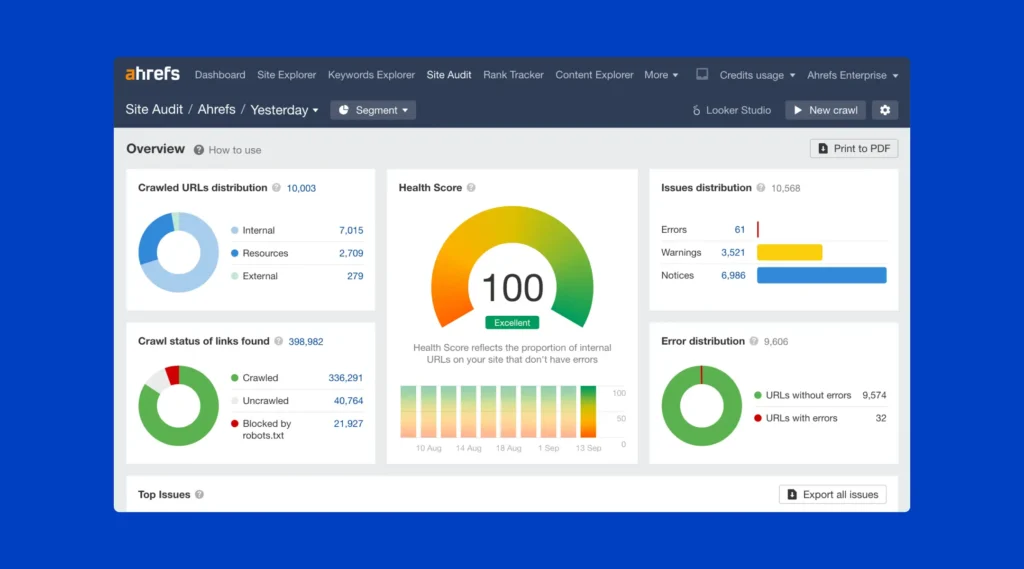
19. Ahrefs Free Backlink Checker
Ahrefs’ free tool shows your top 100 backlinks, total referring domains, and Domain Rating for any URL you enter, a deliberately stripped down version of their full paid platform, but still genuinely useful for a quick competitive snapshot.
The best use case is competitive reconnaissance, run a competitor’s top ranking page through the tool before you pitch your own content for outreach, so you know exactly which sites already link to similar content.
20. Moz Link Explorer (Free Tier)
Moz’s free tier provides Domain Authority, Page Authority, a sample of your backlink profile, and a Spam Score, plus a limited number of free queries per month.
Domain Authority is not a Google ranking factor, but it has become a widely adopted industry shorthand for comparing overall site strength at a glance. It is particularly useful when evaluating potential guest post or link exchange partners, a quick DA and Spam Score check tells you in seconds whether a site is worth pursuing a link from.
What’s Changing in 2026: AI Search Visibility
Traditional SEO tools were built to answer one question, where do I rank on Google. In 2026, that question has expanded. People increasingly ask ChatGPT, Perplexity, and other AI answer engines directly, and getting cited as a source inside those answers is becoming its own visibility metric, separate from your Google position.
Most of the free tools on this list still focus entirely on traditional search, and that is genuinely fine, the fundamentals underneath both systems overlap heavily. Strong technical health, clear structured data, and genuinely useful content that directly answers a question tend to perform well in both contexts. If you want to start paying attention to this trend without adding cost, keep an eye on newer free or freemium tools adding AI visibility tracking as a bonus feature, and treat it as a metric to watch, not yet a metric to chase at the expense of your fundamentals.
Frequently Asked Questions
Conclusion
You now have a complete, free SEO toolkit covering research, technical health, on-page optimization, tracking, and backlinks, everything a paid stack offers, minus the invoice.
Do not try to implement all 20 at once. Pick one tool per category this week, Search Console, Screaming Frog, Yoast or Rank Math, GA4, and the Ahrefs backlink checker are the strongest starting five, and build the habit of checking them on a regular schedule.

Behind every post at digiinte.com is a team of experienced SEO analysts and digital growth specialists. Our insights are backed by real data, industry research, and hands-on campaign experience — so you get advice that actually moves the needle.