

Last Updated on August 3, 2026 by Digiinte.com Team
The best keyword research tools for small business include Google Keyword Planner and Google Trends for free volume data, Ubersuggest, AnswerThePublic, and Keywords Everywhere for affordable keyword and question ideas, Moz Keyword Explorer for priority scoring, and Ahrefs, Semrush, and Mangools KWFinder for paid, in-depth competitive research.
- Key Takeaways
- How We Evaluated These Tools
- 1. Google Keyword Planner
- 2. Google Trends
- 3. Ubersuggest
- 4. AnswerThePublic
- 5. Ahrefs Keywords Explorer
- 6. Semrush Keyword Magic Tool
- 7. Mangools KWFinder
- 8. Moz Keyword Explorer
- 9. Keywords Everywhere
- Quick Comparison Table
- Free vs Paid: How to Decide
- Can AI Tools Replace Dedicated Keyword Research Tools?
- Frequently Asked Questions
- Conclusion
Every piece of content you write should start with one question, are people actually searching for this? Guessing gets you content nobody finds, while proper keyword research points you toward topics with real, measurable demand before you spend hours writing.
This guide covers the 9 best keyword research tools for small business, free and paid, evaluated by database size, how honest their free tier limits actually are, ease of use, and whether they show real search intent, not just a volume number. Each entry includes genuine pricing and honest pros and cons, so you can pick based on your actual budget and goals rather than a generic ranked list.
Key Takeaways
- Google Keyword Planner and Google Trends remain the two essential free tools, since both pull data directly from Google itself rather than a third-party estimate.
- Ubersuggest offers a genuinely usable free tier alongside affordable paid plans, a strong middle ground for small businesses.
- AnswerThePublic excels specifically at surfacing question-based, long-tail keywords, though its free tier caps at three searches per day.
- Keywords Everywhere brings keyword volume directly into your browser while searching Google, YouTube, or Amazon, on a low-cost, prepaid credit system.
- Moz Keyword Explorer adds a distinct Priority score that blends volume, difficulty, and click-through potential into one practical ranking signal.
- Ahrefs and Semrush are the two most comprehensive paid platforms, offering the largest keyword databases and deepest competitive analysis.
- Mangools KWFinder stands out for affordability relative to Ahrefs and Semrush, with a genuinely useful 10-day free trial.
- AI tools like ChatGPT or Gemini can help brainstorm keyword ideas quickly, but should always be cross-checked against a dedicated tool with real search volume data.
- Free tools cover most needs for a small blog or local business. Paid tools earn their price once you need competitor analysis, larger keyword databases, or ongoing rank tracking.
How We Evaluated These Tools
Rather than ranking by brand recognition alone, each tool below was assessed against the same criteria. Database size determines how many keyword ideas and how much search volume data a tool can actually surface. Free tier honesty matters just as much as the paid features, since a “free” tool that caps you at three searches a day behaves very differently in practice than one with a genuinely usable daily allowance. Ease of use affects how quickly a beginner can get from a seed keyword to a usable content plan. And search intent context, whether a tool tells you why people are searching a term, not just how often, separates a genuinely useful tool from a bare volume number.
1. Google Keyword Planner
Google Keyword Planner remains the single most important keyword tool available, largely because the data comes directly from Google’s own advertising platform rather than a third-party estimate scraped or modeled from other sources. Originally built for advertisers planning paid campaigns, it has quietly become an essential free resource for organic content strategy too, since the underlying search behavior it reveals is exactly the same regardless of whether someone eventually clicks a paid ad or an organic result. Because Google itself has no reason to inflate or distort this data for its own tool, it remains the closest thing to ground truth available to anyone doing keyword research without an enterprise budget.
What It Does: Enter a seed keyword or your website URL and it returns related keyword ideas alongside monthly search volume ranges, competition level, and suggested bid ranges that hint at commercial intent behind a term.
Key Features:
- Search volume data sourced directly from Google, not a third-party model
- Suggested bid data reveals which keywords have strong commercial intent
- Filtering by location, language, and search network
- Forecasting tools showing projected clicks and impressions for a keyword list
Pricing:
- Completely free, requiring only a Google Ads account, active ad spend is not required to access the tool
Pros:
- Free, first-party Google data rather than a third-party estimate
- Bid data offers a genuine signal of commercial value beyond volume alone
- No daily search limit unlike several competitors on this list
Cons:
- Exact search volume is shown only as a broad range unless you are running active ad campaigns
- Interface is built primarily for advertisers, not content-focused SEO workflows
- Fewer content-specific features like question keywords or SERP analysis
Why choose it? Since this is Google’s own data, it remains the most reliable baseline for validating whether a topic has genuine search demand before you commit time to writing about it, and it costs nothing to access.
Best for: Validating real search demand for a topic using Google’s own first-party data.
2. Google Trends
Google Trends shows a different kind of signal than raw volume, direction. Is interest in a topic rising, falling, or holding steady, and does it spike seasonally? Where most keyword tools give you a static snapshot, a single number representing average monthly searches, Trends instead plots that interest as a line moving through time, which matters enormously for content that either needs to catch a wave early or avoid publishing right as interest is fading. This time-based view is something no volume-only tool on this list replicates, making it a genuinely distinct addition to a keyword research workflow rather than a redundant alternative to the others.
What It Does: Compares search interest over time for up to five terms at once, broken down by region, category, and search type, including Web, Image, News, Shopping, and YouTube.
Key Features:
- Compare up to five keywords simultaneously to see relative interest
- Regional breakdown down to city level in many countries
- Related queries and related topics panels surface breakout terms early
- Historical data going back to 2004 for long-term trend analysis
Pricing:
- Completely free, no account required at all
Pros:
- Completely free with zero usage limits
- Excellent for catching rising topics before they show up with real volume elsewhere
- Regional filtering is genuinely useful for local businesses
Cons:
- Shows relative interest, not actual search volume numbers
- Requires pairing with another tool for real, actionable volume data
- Less useful on its own for finding brand new keyword ideas
Why choose it? Trends answers a different question than every other tool on this list, not how many people search this, but is this the right moment to publish about it. That distinction is genuinely valuable for planning content around seasonal topics or catching a rising trend early.
Best for: Spotting rising or seasonal topics and validating timing before you commit to a content plan.

3. Ubersuggest
Ubersuggest occupies a genuinely useful middle ground, a free tier that is actually usable for real research, paired with paid plans priced well below the major enterprise platforms. Built and popularized by Neil Patel’s marketing brand, it was designed specifically to lower the barrier for smaller businesses and individual bloggers who found tools like Ahrefs and Semrush priced far beyond what a single-person operation could justify. That positioning has stuck, and it remains one of the most frequently recommended entry points for anyone graduating beyond Google’s own free tools but not yet ready for an enterprise-level subscription.
What It Does: Enter a keyword or domain and it returns search volume, an SEO difficulty score, paid difficulty, cost-per-click data, and dozens of related keyword suggestions with the same metrics attached, along with a Content Ideas panel showing top-performing existing articles for that topic.
Key Features:
- Difficulty scoring alongside volume for quick opportunity assessment
- Content Ideas panel benchmarking against currently ranking articles
- Domain overview showing a competitor’s top pages and keywords
- Chrome extension for on-the-fly keyword data while browsing search results
Pricing:
- Free tier – three searches per day
- Individual plan – around $12/month (often discounted for the first month)
- Business and Enterprise plans – scale up for more searches and team seats
Pros:
- Genuinely usable free tier, not a crippled demo
- Paid tier priced significantly below Ahrefs or Semrush
- Content Ideas feature helps benchmark against what is already ranking
Cons:
- Difficulty and volume estimates are modeled, not sourced directly from Google
- Free tier’s three searches per day limits deep research sessions
- Keyword database is smaller than Ahrefs or Semrush’s
Why choose it? For a small business or solo blogger who wants real difficulty and competitive data without an enterprise price tag, Ubersuggest strikes a genuinely fair balance between capability and cost that few competitors match.
Best for: Small businesses and bloggers wanting real difficulty data without an enterprise budget.
4. AnswerThePublic
AnswerThePublic takes a completely different approach from the volume-focused tools above, it visualizes the actual questions people type around a topic, pulled from real autocomplete data. Rather than starting from a database of keywords and their statistics, it starts from the raw, messy reality of how people actually phrase their curiosity, the who, what, why, and how variations that rarely show up cleanly in a standard keyword list. This makes it less useful for judging whether a keyword is worth targeting on volume alone, but genuinely unmatched for understanding the shape of the questions your content actually needs to answer.
What It Does: Enter a seed keyword and it returns dozens of question-based, comparison, and preposition-based phrases, organized visually or as a list, covering the who, what, where, when, why, and how variations people actually search.
Key Features:
- Visualizes question-based long-tail keywords by category
- Covers comparisons and preposition-based phrases beyond just questions
- CSV export for building a content calendar from the results
- Simple, single-input interface requiring no learning curve
Pricing:
- Free tier – three searches per day, no search volume data included
- Individual plan – around $9 to $79/month depending on billing term
- Pro and Expert plans – add monitoring, alerts, and historical comparison
Pros:
- Fastest way to generate a genuinely comprehensive FAQ or blog outline
- Question format maps directly onto featured snippet opportunities
- Simple enough for a complete beginner to use immediately
Cons:
- No search volume data included even on the free tier
- Only three free searches per day, easy to exhaust in one research session
- Data volume is noticeably smaller than a dedicated question tool like Ahrefs’ question filter
Why choose it? When you need to build out a genuinely thorough FAQ section or understand the exact phrasing real people use to ask about a topic, nothing on this list surfaces that raw question data faster or more visually than AnswerThePublic.
Best for: Quickly generating question-based long-tail keywords for FAQs and blog outlines.

5. Ahrefs Keywords Explorer
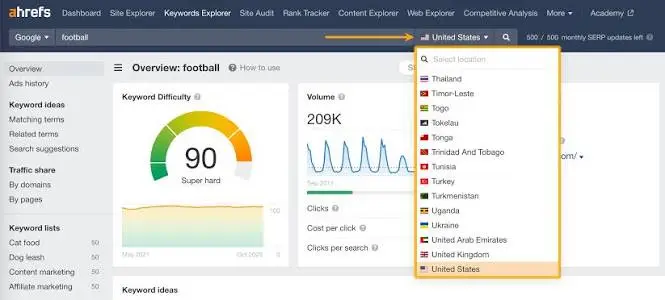
Ahrefs has built one of the largest keyword databases in the industry, backed by its own web crawler rather than relying entirely on clickstream or third-party data licensing. That crawler infrastructure was originally built for backlink analysis, and Ahrefs later extended the same underlying data collection toward keyword research, giving Keywords Explorer a genuinely independent data source rather than one licensed or modeled from someone else’s numbers. This independence is a large part of why Ahrefs’ data is frequently cited as a trusted benchmark across the SEO industry, even by competitors comparing their own tools against it.
What It Does: Returns search volume, keyword difficulty, click-through rate estimates, and a full list of related, question-based, and “also rank for” keyword ideas, alongside a detailed breakdown of every page currently ranking for that term.
Key Features:
- Massive keyword database across more than 170 countries
- Clicks metric showing how many searches actually result in a click, not just impressions
- Parent topic identification to avoid targeting overly narrow keyword variations
- Question filter surfacing tens of thousands of question-based variations for popular seed terms
Pricing:
- Lite plan – around $129/month
- Standard plan – around $249/month
- Advanced and Enterprise plans – scale up significantly for larger teams
Pros:
- One of the largest, most frequently updated keyword databases available
- Clicks data adds genuine nuance beyond raw search volume
- Extremely deep competitive and content gap analysis
Cons:
- Among the most expensive tools on this list, a real barrier for small businesses
- No meaningful free tier beyond very limited free tools on the main site
- Steeper learning curve given the sheer depth of available data
Why choose it? For anyone serious about SEO as an ongoing, significant part of their business, Ahrefs’ database depth and click-through data genuinely surface opportunities that smaller tools simply do not have the data to show.
Best for: Agencies and serious content teams who need the deepest possible keyword and competitive data.
6. Semrush Keyword Magic Tool
Semrush’s Keyword Magic Tool is built to take one broad seed keyword and explode it into potentially thousands of related ideas, organized into manageable subtopics automatically. This automatic clustering addresses a genuine pain point many marketers run into with other tools, receiving a massive flat list of keywords with no obvious structure and having to manually sort them into content categories by hand. Semrush handles that organizational step algorithmically, which becomes increasingly valuable the broader and more competitive your seed topic is, since a term like fitness or marketing can easily return tens of thousands of raw results without that structure imposed on top.
What It Does: Enter a seed keyword and target location, and it generates a categorized list of related keywords grouped by subtopic, complete with volume, difficulty, and search intent labeling for each term.
Key Features:
- Automatic subtopic grouping makes thousands of results manageable
- Search intent labeling, informational, navigational, commercial, or transactional
- Personalized recommendations when you connect your own domain
- Integration with Semrush’s broader SEO toolkit for content and rank tracking
Pricing:
- Free trial available
- Pro plan – around $139.95/month for the full SEO Toolkit
Pros:
- Automatic subtopic grouping saves significant manual organizing time
- Built-in search intent labeling speeds up content planning decisions
- Part of a broader toolkit covering rank tracking and site audits in one platform
Cons:
- Pricing is positioned at the same premium tier as Ahrefs
- Can feel overwhelming with the sheer volume of keyword suggestions generated
- Free trial is time-limited rather than an ongoing free tier
Why choose it? If you are staring at one broad topic idea and need it broken down into a genuinely organized content strategy rather than a flat list of thousands of keywords, the automatic subtopic clustering here does that organizing work for you.
Best for: Turning one broad topic into an organized, subtopic-grouped content strategy.

7. Mangools KWFinder
Mangools built KWFinder specifically around being the more affordable, approachable alternative to Ahrefs and Semrush, without stripping out the core data that actually matters. As a smaller, independently run company competing against much larger, venture-backed SEO platforms, Mangools has leaned into simplicity and price as its core differentiators rather than trying to match the sheer feature breadth of its bigger competitors. That focus shows up clearly in the product itself, a cleaner interface with fewer overwhelming menus, aimed squarely at users who found Ahrefs or Semrush’s learning curve more intimidating than useful.
What It Does: Enter a keyword and it returns search volume, keyword difficulty, and a list of related and question-based keyword suggestions, alongside a SERP overview showing the top-ranking pages and their key metrics for that term.
Key Features:
- Clean, beginner-friendly interface compared to denser competitor dashboards
- SERP analysis showing competing pages’ backlinks and social shares
- Local keyword research supporting city-level search volume data
- Part of the broader Mangools SEO suite including rank tracking and backlink tools
Pricing:
- 10-day free trial – full product access, no credit card required
- Basic plan – around $29.90/month
- Premium and Agency plans – scale up for more searches and team access
Pros:
- Genuinely more affordable than Ahrefs or Semrush for similar core data
- Interface is noticeably easier to learn for a first-time user
- Free trial gives full access rather than a stripped-down preview
Cons:
- Smaller overall keyword database than Ahrefs or Semrush
- Fewer advanced competitive analysis features for larger, established sites
- No permanent free tier once the trial period ends
Why choose it? For a small business or solo marketer who wants genuinely capable paid keyword data without committing to Ahrefs or Semrush’s enterprise pricing, KWFinder consistently gets recommended specifically for hitting that affordable middle ground well.
Best for: Small businesses wanting paid-tier keyword data without enterprise pricing.

8. Moz Keyword Explorer
Moz built its Keyword Explorer around a genuinely distinct metric most competitors do not offer in the same form, a single Priority score that blends search volume, difficulty, and organic click-through rate into one practical number, rather than making you weigh three separate metrics manually for every keyword.
What It Does: Enter a seed keyword and it returns search volume, a difficulty score, an organic CTR estimate, and the combined Priority score, alongside SERP analysis showing exactly which pages currently rank and their key metrics.
Key Features:
- Priority score combining volume, difficulty, and CTR into one practical ranking signal
- SERP analysis showing Domain Authority and Page Authority for ranking competitors
- Keyword lists feature for organizing research by content campaign or topic cluster
- Free MozBar browser extension pairs directly with the same underlying data
Pricing:
- Free tier – 10 queries per month with a free Moz account
- Standard plan – around $99/month
- Medium, Large, and Premium plans – scale up for more queries and team seats
Pros:
- Priority score genuinely simplifies decision-making compared to juggling three separate metrics
- Long-established, trusted metrics like Domain Authority are widely recognized industry shorthand
- Free tier, while limited, requires no credit card to start
Cons:
- Only 10 free queries per month, easy to exhaust quickly during active research
- Keyword database is smaller than Ahrefs or Semrush’s
- Pricing jumps significantly between the Standard and Medium tiers
Why choose it? If juggling separate volume, difficulty, and CTR numbers for every keyword feels like too much manual weighing, Moz’s single Priority score does that calculation for you, a genuinely practical shortcut for quickly triaging a long list of keyword ideas.
Best for: Quickly triaging a long keyword list using one combined priority metric instead of three separate numbers.
9. Keywords Everywhere
Keywords Everywhere takes a fundamentally different delivery approach than every other tool on this list, it lives inside your browser as an extension, overlaying keyword data directly onto Google, YouTube, Amazon, and several other sites as you browse them normally.
What It Does: Once installed, it displays search volume, cost-per-click, and competition data directly next to your search results on supported sites, plus a “People also search for” and related keywords panel, without needing to open a separate dashboard at all.
Key Features:
- Overlays keyword data directly on Google, YouTube, Bing, and Amazon search results
- Works across multiple platforms beyond just Google, useful for video or product-focused research
- Related keywords and “People also search for” data shown inline
- Historical trend data included alongside current volume for supported keywords
Pricing:
- Prepaid credit system – starting around $10 for 100,000 credits, credits do not expire
- No traditional monthly subscription required, you simply buy credits as needed
Pros:
- Genuinely convenient, no need to switch tabs or tools while researching
- Credit system means occasional users can pay very little overall
- Covers YouTube and Amazon search data most competitors on this list do not touch
Cons:
- Requires installing and granting permissions to a browser extension
- Credit-based pricing can feel less predictable than a flat monthly plan for heavy users
- Less suited to deep competitive or content gap analysis compared to a full platform
Why choose it? For anyone who does most of their keyword thinking directly inside Google search results or while planning YouTube content, having volume data appear right there without switching tools removes a genuinely repetitive extra step from the research process.
Best for: Getting keyword volume data directly inside Google, YouTube, or Amazon search results without leaving the browser.

Quick Comparison Table
| Tool | Data Source | Free Tier | Best For |
| Google Keyword Planner | First-party Google data | Fully free | Validating real search demand |
| Google Trends | First-party Google data | Fully free | Spotting rising or seasonal topics |
| Ubersuggest | Modeled estimates | 3 searches/day | Small businesses wanting real difficulty data |
| AnswerThePublic | Autocomplete data | 3 searches/day, no volume | Question-based long-tail keywords |
| Ahrefs Keywords Explorer | Proprietary crawler data | No | Agencies needing maximum database depth |
| Semrush Keyword Magic Tool | Proprietary database | Free trial only | Organizing one topic into a content strategy |
| Mangools KWFinder | Proprietary database | 10-day free trial | Affordable paid alternative for small business |
| Moz Keyword Explorer | Proprietary database | 10 queries/month | Combined priority scoring for triage |
| Keywords Everywhere | Proprietary database | No, prepaid credits | In-browser data on Google, YouTube, Amazon |
Free vs Paid: How to Decide
The honest answer depends on your actual goal, not a blanket rule. If you are validating demand for a handful of topics or running a small, occasional blog, Google Keyword Planner and Google Trends genuinely cover what you need at zero cost. Paid tools earn their price once you need to research at scale, track competitors’ keyword strategies, monitor your own rankings over time, or work with a keyword database large enough to support dozens of pieces of content across a full content calendar. A useful rule of thumb: if you are writing fewer than a handful of pieces of content a month, stick with free tools. Once keyword research becomes a weekly, ongoing part of your workflow, the time saved by a paid tool’s larger database and clustering features usually justifies the cost.
Can AI Tools Replace Dedicated Keyword Research Tools?
AI assistants like ChatGPT, Gemini, and Perplexity have become a genuinely useful starting point for brainstorming keyword ideas quickly, especially for exploring a new topic area or generating long-tail variations you might not think of manually. However, these tools do not have access to real, current search volume or difficulty data, their suggestions are based on language patterns, not actual search behavior. The most reliable approach treats AI as a brainstorming step, then cross-checks any promising ideas against a dedicated tool like Google Keyword Planner or Ubersuggest before committing real writing time to a topic. If you want a broader look at how AI tools fit into a content workflow beyond just keyword brainstorming, our guide on 12 free AI tools that actually save content writers time covers this in more detail.
Frequently Asked Questions
- Top 20 Free SEO Tools Every Website Owner Should Use
- 12 Free AI Tools That Actually Save Content Writers Time
- 8 On-Page SEO Mistakes New Bloggers Make (And How to Fix Them)
- 8 Local SEO Tips for Small Businesses
Conclusion
The best keyword research tool is not necessarily the most expensive one, it is the one that matches your actual research volume and budget. Google Keyword Planner and Google Trends cover genuine demand validation for free, Ubersuggest, AnswerThePublic, and Keywords Everywhere add difficulty scoring, question data, and in-browser convenience at an affordable price point, and Ahrefs, Semrush, Moz Keyword Explorer, and Mangools KWFinder serve teams that need deeper competitive research and ongoing tracking.
Start free, and only upgrade once you can clearly point to what a paid tool’s larger database or additional features would actually let you do that you cannot do now.
Ready to start? Open Google Keyword Planner today, plug in your top three content ideas, and confirm real search demand exists before you write a single word.

Behind every post at digiinte.com is a team of experienced SEO analysts and digital growth specialists. Our insights are backed by real data, industry research, and hands-on campaign experience — so you get advice that actually moves the needle.