
Last Updated on August 24, 2026 by Digiinte.com Team
If you run a small business website on WordPress, you have probably typed “free WordPress security plugins” into Google at least once, usually right after reading a scary headline about a hacked site or a client asking why their contact form suddenly stopped working.
Here is the honest truth. WordPress powers a huge share of the internet, and that popularity makes it a favorite target for bots that scan the web looking for weak passwords, outdated plugins, and unlocked doors. You do not need a big IT budget to close most of those doors. You need the right handful of free plugins, set up correctly.
This guide walks through 9 free WordPress security plugins that actually earn their spot on a small business site, what each one protects against, and how to put them together without slowing your site down or overwhelming yourself with settings you do not understand. If you are also exploring other plugin categories for your site, our roundup of WordPress popup plugins is worth a look once security is handled.
Key Takeaways
- Small business WordPress sites get targeted by automated bots, not just human hackers, so basic protection matters even if you think your site is too small to notice.
- Wordfence and Sucuri Security are the two most trusted free options for malware scanning and firewall protection.
- You do not need ten plugins running at once. Three or four working together, covering firewall, malware scanning, login protection, and backups, is usually enough for a small site.
- Two factor authentication is one of the cheapest, fastest ways to block the most common type of WordPress attack, the brute force login attempt.
- A backup plugin is not optional. If every other layer fails, a recent backup is what saves your site.
Why Small Business WordPress Sites Get Targeted
A lot of small business owners assume hackers only go after big, well known websites. That is not how it actually works. Most attacks on WordPress sites are automated. Bots crawl the internet nonstop, checking millions of sites for the same handful of weaknesses: default usernames like “admin,” weak passwords, outdated plugins with known vulnerabilities, and login pages with no protection against repeated attempts.
Your site does not need to be famous to get hit. It just needs to be running an old plugin version or using a login page that anyone can hammer with password guesses. A local bakery’s WordPress site and a Fortune 500 company’s WordPress site can both get scanned by the exact same bot within the same hour.
This is why free security plugins matter so much for small businesses specifically. You are not being paranoid by installing them. You are simply closing the doors that get checked automatically, every single day, whether you notice or not.
What to Look for in a Free WordPress Security Plugin
Before picking plugins, it helps to know what actually matters. Here is a simple checklist you can use to judge any security plugin, free or paid. Site health matters for SEO too, so once your security is sorted, our list of free SEO tools is a natural next step.
| Feature | Why It Matters | Should Be Free? |
|---|---|---|
| Malware scanning | Catches infected files before they spread or get flagged by Google | Yes, basic scanning should always be free |
| Firewall protection | Blocks malicious traffic before it reaches your site | Basic firewall rules, yes |
| Login attempt limiting | Stops bots from guessing your password thousands of times | Yes |
| Two factor authentication | Adds a second layer even if your password gets leaked | Yes |
| File change detection | Alerts you when core files get modified without your knowledge | Usually yes |
| Backups | Lets you restore your site if everything else fails | Basic scheduled backups, yes |
| Security notifications | Tells you when something suspicious happens, in real time | Yes |
If a plugin claims to be a full security solution but charges for basic scanning or login protection, that is a sign to keep looking. The plugins below all offer genuinely useful protection in their free tiers, not just a taste of what you get if you pay.
The 9 Best Free WordPress Security Plugins for Small Business Websites
1. Wordfence Security
Wordfence is the plugin most people searching for free WordPress security plugins install first, and it earns that reputation. The free version includes a firewall, a malware scanner, and login security tools, all bundled into one plugin instead of three separate ones.
What makes Wordfence useful for a small business is that it runs its scans automatically and emails you the moment it finds something wrong, so you do not have to remember to check a dashboard. It also blocks IP addresses that show clear signs of brute force login attempts, one of the most common attacks small sites face.
Standout features:
- Web application firewall that filters malicious requests before they reach your site’s code
- Daily malware and file change scanning, with the option to run manual scans anytime
- Real time IP blocking based on Wordfence’s own threat data, pulled from millions of protected sites
- Live traffic view showing exactly who is visiting your site and what they are doing, including blocked login attempts
Where it falls short:
- The firewall runs at the WordPress level rather than the DNS level, meaning traffic technically reaches your server before Wordfence can act on it
- Threat data updates are delayed by 30 days on the free version compared to the paid tier, so brand new attack patterns take longer to reach free users
- Can feel heavier on shared hosting, especially during a full site scan
Best for: small business owners who want one plugin that covers malware scanning, firewall protection, and login security together, without piecing together three separate tools.
2. Sucuri Security
Sucuri approaches security a bit differently than Wordfence. The free plugin focuses heavily on file integrity monitoring, watching your core WordPress files and alerting you the moment something changes that should not have changed.
This matters because malware often works quietly, without crashing your site or showing obvious symptoms. Sucuri’s file monitoring catches that kind of silent change early, before it turns into a bigger problem.
Standout features:
- File integrity monitoring that compares your current files against known clean versions and flags anything altered
- Remote malware scanning that checks your site the way an outside visitor or search engine would see it
- Security activity logging, tracking login attempts, file changes, and plugin or theme updates in one timeline
- Post hack security actions, including a guided checklist for resetting passwords and secret keys if you suspect a breach
Where it falls short:
- The free plugin does not include an active firewall. Sucuri’s actual firewall is a separate, paid, DNS level service
- Setup for the remote scanner and some notification features takes a bit more configuration than Wordfence’s more guided experience
- Best results come from pairing it with another tool, since file monitoring alone will not stop an attack in progress
Best for: business owners who want strong file change alerts and are comfortable running it alongside another plugin, like Wordfence, for active firewall protection.

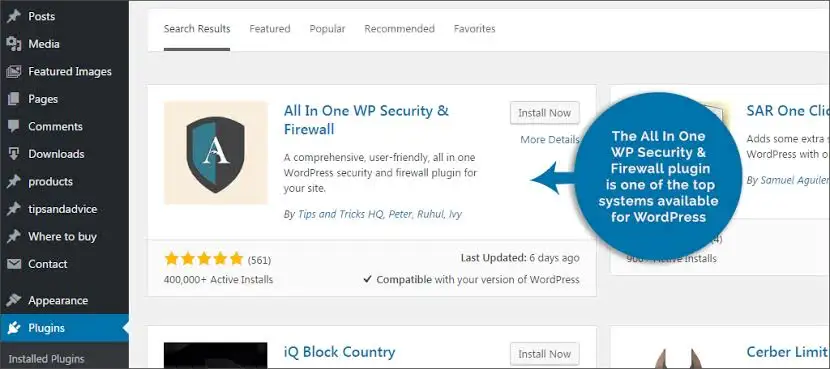
3. All In One WP Security and Firewall
This plugin has a reputation for being generous with its free tier, and it deserves that reputation. It covers user account security, login lockdown, database security, and basic firewall rules, without asking you to upgrade for the core features.
One thing that makes it a good pick for beginners is the built in security strength meter, which shows a visual score as you turn on different protections. That feedback is genuinely helpful if you are new to security settings and want to know you are making progress, not just clicking random toggles.
Standout features:
- Security strength meter that scores your current setup out of 100 and highlights what to fix next
- Login lockdown that temporarily bans an IP address after a set number of failed login attempts
- Database security tools, including the ability to change your WordPress table prefix in a couple of clicks
- Firewall rules that can block bad bots, image hotlinking, and suspicious query strings, all included free
Where it falls short:
- No built in malware scanning, so it will not tell you if your files are already infected
- The sheer number of settings can feel a bit dense the first time you open the dashboard, even with the scoring system guiding you
- Some advanced firewall rules require careful testing, since overly strict settings can occasionally lock out legitimate traffic
Best for: beginners who want an easy to understand dashboard with a clear sense of progress, and who plan to pair it with a separate malware scanner.
4. Solid Security (formerly iThemes Security)
Solid Security is built around the idea that most people do not know which security settings actually matter. Instead of dumping forty toggles on you at once, it walks you through a setup wizard that recommends settings based on your specific site.
The free version includes brute force protection, file change detection, and the ability to force strong passwords for every user account, which matters more than people expect once more than one person logs into your dashboard.
Standout features:
- Guided setup wizard that recommends security settings based on your answers, instead of leaving you to figure it out alone
- Strong password enforcement across every user account, not just the site administrator
- Away mode, which disables the login page entirely during hours you specify, useful if your team only works set hours
- 404 error detection, flagging visitors who repeatedly hit broken URLs, a common sign of someone scanning your site for weaknesses
Where it falls short:
- Some genuinely useful features, like two factor authentication in certain configurations, sit behind the paid Solid Security Pro tier
- The plugin can generate a lot of database activity while logging events, which may need occasional cleanup on lower tier hosting
- Newer users sometimes find the terminology used in the wizard still requires a bit of a learning curve, even with the guidance
Best for: small business owners who want guided setup instead of a long list of settings to figure out alone, especially those managing more than one WordPress user account.

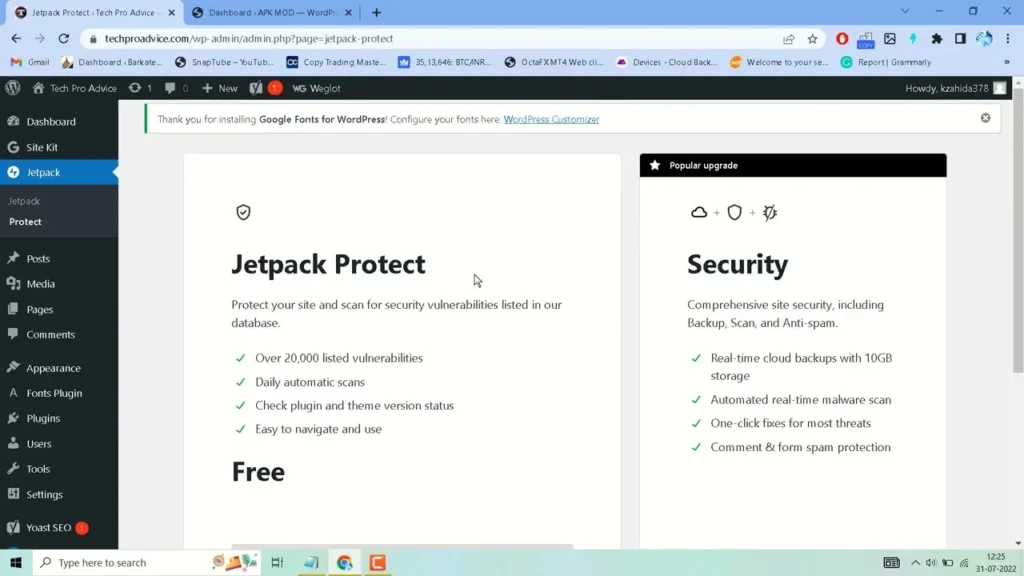
5. Jetpack Protect
Jetpack Protect is a free, standalone security module pulled out of the larger Jetpack plugin, so you get scanning and firewall features without needing the rest of Jetpack’s marketing and analytics tools.
It scans your plugins and themes against a known database of vulnerabilities and tells you immediately if something you have installed has a known security hole, even before it gets actively exploited. This matters since outdated plugins are one of the biggest causes of WordPress hacks.
Standout features:
- Vulnerability database scanning that checks every installed plugin and theme against a constantly updated list of known security issues
- Daily automated scans with clear, plain language explanations of what was found and why it matters
- Built by Automattic, the company behind WordPress.com, so it tends to stay closely aligned with new vulnerability data as it becomes available
- Lightweight footprint compared to full security suites, since it focuses specifically on vulnerability detection rather than trying to do everything
Where it falls short:
- No firewall included, so it detects risks but does not actively block malicious traffic
- Requires a free WordPress.com account to connect, which adds one extra setup step compared to fully standalone plugins
- Works best as an early warning layer rather than a complete security solution on its own
Best for: sites running a lot of third party plugins and themes that want an early warning system for known vulnerabilities before they become active problems.
6. WP Cerber Security
WP Cerber is less well known than Wordfence or Sucuri, but it has a loyal following among users who want strong login protection without extra bloat. It focuses on stopping unauthorized login attempts, spam registrations, and comment spam.
The free version includes a solid firewall, malware scanning, and detailed activity logs showing exactly who logged in, when, and from where. For a small site with a few contributors, that visibility helps if you ever need to figure out what happened after something goes wrong.
Standout features:
- Adaptive login security that automatically tightens restrictions when it detects a spike in suspicious login attempts
- Detailed activity logs showing user logins, failed attempts, and IP addresses in a clear, searchable timeline
- Built in spam protection for comments and registration forms, reducing the need for a separate anti spam plugin
- Citadel mode, which locks out an entire IP range after repeated failed attempts from the same source
Where it falls short:
- Smaller community and fewer tutorials online compared to bigger names like Wordfence, so troubleshooting can take more digging
- The interface, while functional, feels less polished than some of the more mainstream options on this list
- Some advanced reporting and geo blocking features are limited to the paid Pro version
Best for: sites that want strong login and spam protection without the heavier feature set, and dashboard clutter, of a full all in one suite.

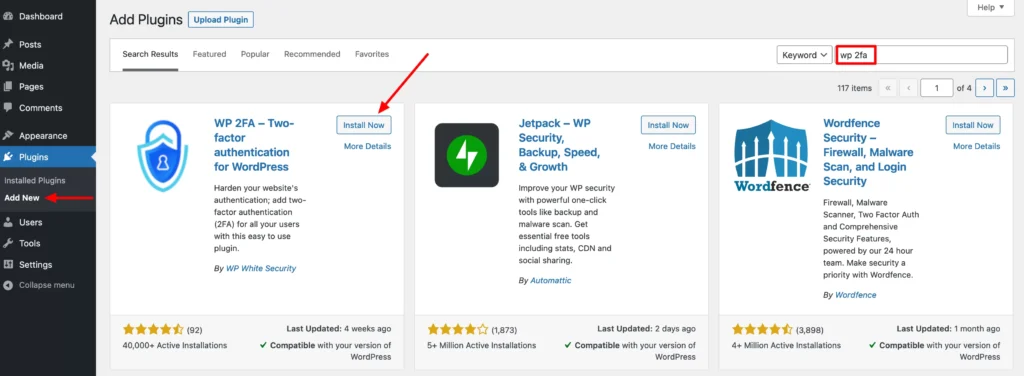
7. WP 2FA (Two Factor Authentication)
Passwords alone are not enough anymore, even for a small local business site. WP 2FA adds a second verification step to your login process, usually a code sent to your phone or generated through an authenticator app.
Even if a hacker somehow gets your password, two factor authentication stops them from getting into your dashboard without that second code. This is exactly the kind of protection people searching for free WordPress security plugins should prioritize first, since it blocks one of the most common successful attack methods, the stolen or guessed password.
Standout features:
- Support for authenticator apps like Google Authenticator and Authy, in addition to email based codes
- Policy driven enforcement, letting you require two factor authentication for specific user roles, like administrators and editors, while leaving lower risk roles optional
- Backup codes generated during setup, so you are not locked out if you lose access to your phone
- Grace period settings, giving existing users a set number of days to set up two factor authentication before it becomes mandatory
Where it falls short:
- Requires a small amount of hand holding to get non technical staff comfortable with authenticator apps the first time
- SMS based verification is not included free and generally requires a separate paid service if you want that specific option
- Does nothing to stop other attack types, like malware or firewall level threats, so it needs to be paired with a broader security plugin
Best for: literally every WordPress site with an admin login, no exceptions, since it closes one of the most exploited gaps in WordPress security.
8. Limit Login Attempts Reloaded
This plugin does exactly one thing, and it does it well. It limits how many times someone can try to log into your site before getting temporarily locked out, which directly blocks brute force attacks, where a bot tries thousands of password combinations in a short period.
Without this kind of protection, your login page is essentially an open door anyone can keep knocking on. With it, a bot gets locked out after a handful of failed attempts and has to wait before trying again, making large scale password guessing impractical.
Standout features:
- Configurable lockout thresholds, so you decide exactly how many failed attempts trigger a temporary ban
- Increasing lockout durations, meaning repeat offenders get locked out for longer each time they keep trying
- Email notifications when a lockout occurs, so you know if someone is actively attempting to break in
- Cloud based shared blocklist option, using data from other sites running the plugin to preemptively block known bad IP addresses
Where it falls short:
- Does not scan for malware or monitor file changes, since its entire focus is login attempt limiting
- Shared hosting environments with many users behind the same IP address occasionally trigger accidental lockouts for legitimate users
- Offers little value on its own without pairing it with a broader security or backup plugin
Best for: adding a fast, no fuss layer of login protection alongside whatever other security plugin you are using, since setup takes only a couple of minutes.

9. UpdraftPlus
Backups are not glamorous, but they are the one thing that saves you when every other layer of protection fails. UpdraftPlus is the most widely used free backup plugin for WordPress, letting you schedule automatic backups of your files and database to cloud storage like Google Drive or Dropbox.
If your site gets compromised, a plugin update breaks something, or you simply make a mistake while editing, a recent backup means you can restore everything in minutes instead of starting over or paying someone to rebuild it.
Standout features:
- Scheduled automatic backups of both files and database, sent directly to cloud storage instead of sitting on the same server as your site
- One click restore process, letting you roll back to a previous backup without needing a developer or hosting support ticket
- Support for major cloud destinations, including Google Drive, Dropbox, Amazon S3, and OneDrive, all available in the free version
- Backup file encryption options for sensitive database content, adding an extra layer of protection to your stored backups
Where it falls short:
- The free version limits you to manual restore steps for full migrations, with the more automated migration tools reserved for the paid version
- Backup frequency options in the free tier are more limited than paid alternatives built for very active, frequently updated sites
- Large sites with a lot of media can produce sizable backup files, which may bump against free cloud storage limits over time
Best for: every single WordPress site, treated as a non negotiable part of your security setup rather than an optional extra. For a closer look at how this plugin compares to other backup options, our guide to the best backup plugins for WordPress beginners breaks down UpdraftPlus, Duplicator, and a few other choices side by side.

Quick Comparison Table
| Plugin | Main Strength | Includes Firewall | Includes Malware Scan | Best For |
|---|---|---|---|---|
| Wordfence Security | All in one protection | Yes | Yes | Overall best starting point |
| Sucuri Security | File change monitoring | No (paid add on) | Yes | Detecting silent malware changes |
| All In One WP Security | Beginner friendly dashboard | Basic | No | First time users |
| Solid Security | Guided setup wizard | Basic | Yes | Step by step configuration |
| Jetpack Protect | Vulnerability database scanning | No | Yes | Sites with many plugins/themes |
| WP Cerber Security | Login and spam protection | Yes | Yes | Lightweight, detailed activity logs |
| WP 2FA | Two factor authentication | No | No | Blocking stolen password logins |
| Limit Login Attempts Reloaded | Brute force blocking | No | No | Fast, simple login protection |
| UpdraftPlus | Automatic backups | No | No | Disaster recovery |
How to Secure Your WordPress Site for Free, Step by Step
If you are starting from zero, here is a practical order to follow when setting up free WordPress security plugins, rather than installing everything at once and getting overwhelmed.
- Install a backup plugin first. Before you change any security settings, set up UpdraftPlus and run one full backup. This way, if anything goes wrong while you are setting up security, you can undo it.
- Add a core security plugin. Choose either Wordfence or Sucuri and let it run its first full scan. Fix anything it flags before moving on.
- Turn on two factor authentication. Install WP 2FA and set it up for every admin and editor account on your site, not just your own.
- Limit login attempts. Add Limit Login Attempts Reloaded so bots cannot keep guessing passwords indefinitely.
- Update everything. Go through your plugins, themes, and WordPress core itself, and update anything that is behind. Outdated software is still the single biggest cause of WordPress hacks.
- Remove what you do not use. Delete inactive plugins and themes entirely instead of just deactivating them. Unused code sitting on your server is still a potential entry point.
- Set a recurring reminder. Once a month, log in and check your security plugin’s dashboard, update anything that needs it, and confirm your last backup actually ran successfully.
None of these steps require paying for anything or hiring outside help. Most small business owners can work through this list in a single afternoon.
Best Free Plugin for Beginners vs Best for Growing Businesses
Not every small business has the same needs, so here is a quick way to decide where to start.
If you are a true beginner who has never touched a security setting before, start with All In One WP Security and Firewall or Solid Security. Both are built to explain what they are doing as you go, rather than assuming you already understand the terminology.
If your business is growing, you have multiple staff members logging into WordPress, or you are handling customer data through forms or a store, lean toward Wordfence paired with WP 2FA and UpdraftPlus. That combination covers scanning, firewall protection, login security, and backups, which is the realistic minimum for a site doing real business online.
Frequently Asked Questions
Conclusion
Securing a small business WordPress site does not require a big budget or a background in cybersecurity. It requires picking a handful of the right free WordPress security plugins, from this list of 9, and actually setting them up instead of letting them sit half configured in your plugin list. Start with a backup plugin, add one solid all in one security tool like Wordfence, turn on two factor authentication, and limit login attempts. That combination alone puts you ahead of a large share of small business sites still running with no protection at all.
Do not wait for a hacked site or a scary email from your hosting provider to take this seriously. Set aside one afternoon this week, work through the steps in this guide, and give your website the same protection you would want for your physical storefront. Once your site is secure, take a look at our guide to digital marketing tools for small business to keep building on that solid foundation. If you run into a setting you are not sure about, or your site is already showing signs of an infection, reach out to your hosting provider’s support team or a WordPress security specialist before making changes you are unsure of.
