
Last Updated on August 28, 2026 by Digiinte.com Team
Key Takeaways
The best WordPress calendar plugins of 2026 are Sugar Calendar, The Events Calendar, BookingPress, Simple Calendar, and My Calendar.
- Sugar Calendar is best for straightforward event listings with minimal setup.
- The Events Calendar is best for larger sites running frequent, recurring, or ticketed events.
- BookingPress is best for service businesses that need appointment scheduling rather than event listings.
- Simple Calendar is best for sites that already manage everything in Google Calendar.
- Performance impact and Core Web Vitals deserve as much attention as features when choosing a calendar plugin.
- Key Takeaways
- What Is a WordPress Calendar Plugin?
- Why the Right Calendar Plugin Matters
- How Calendar Plugins Impact Site Performance
- Comparison Table: Best WordPress Calendar Plugins (2026)
- 1. Sugar Calendar
- 2. The Events Calendar
- 3. BookingPress
- 4. Simple Calendar
- 5. My Calendar
- How to Choose the Right Calendar Plugin
- Frequently Asked Questions
What Is a WordPress Calendar Plugin?
A WordPress calendar plugin lets you display, manage, and organize events, appointments, or bookings directly on your website. Depending on the plugin, this can range from a simple visual list of upcoming dates to a full booking system with payment processing, recurring events, and calendar sync. The right choice depends heavily on whether you are listing events, taking appointments, or simply displaying a schedule.
Why the Right Calendar Plugin Matters
A calendar is often one of the first things a visitor checks when deciding whether to attend an event, book an appointment, or trust that a business is active and organized. A cluttered, slow, or confusing calendar can quietly cost you bookings and credibility, while a clean, fast one builds trust immediately. Beyond the visitor experience, calendar plugins vary significantly in how much JavaScript and CSS they load, which directly affects page speed and Core Web Vitals.
How Calendar Plugins Impact Site Performance
Calendar and booking plugins are notorious for adding more script weight than most other plugin categories, since they often need to render interactive date pickers, AJAX based booking flows, and dynamic event data. This can affect:
- Largest Contentful Paint (LCP), if the calendar loads heavy scripts before the rest of the page content renders
- Cumulative Layout Shift (CLS), if the calendar grid or booking widget loads after the surrounding layout has already settled
- Interaction to Next Paint (INP), if clicking dates or navigating months feels sluggish due to excessive JavaScript
The plugins that handle this best either load assets asynchronously, only load scripts on pages where the calendar actually appears, or offload heavier processing to a connected cloud service rather than running everything locally.
Comparison Table: Best WordPress Calendar Plugins (2026)
| Plugin | Best For | Standout Feature | Price |
| Sugar Calendar | Simple event listings | Clean, lightweight front end | Free plus Pro |
| The Events Calendar | High volume or recurring events | Deep event and ticketing ecosystem | Free plus Pro |
| BookingPress | Appointment based businesses | Full booking and payment flow | Free plus Pro |
| Simple Calendar | Google Calendar dependent sites | One way Google Calendar sync | Free plus Pro |
| My Calendar | Accessibility focused sites | Strong built in accessibility support | Free plus Pro |
1. Sugar Calendar
Sugar Calendar is built specifically for straightforward event display without the complexity of a full booking system. It focuses on doing one thing well: showing events clearly, quickly, and without unnecessary bloat.
Key Features
- Clean, list or grid based calendar display with minimal front end script weight
- Simple event creation directly inside the standard WordPress editor
- Recurring event support for weekly, monthly, or custom schedules
- Optional add ons for ticketing and event registration without forcing every site to load that extra weight
Best Use Case Blogs, small organizations, and local businesses that need a clean, fast way to list upcoming events without appointment booking.
Performance Perspective Since Sugar Calendar avoids the heavier booking and payment logic found in appointment focused plugins, it tends to stay lighter on page load, which helps protect LCP scores on event pages.

2. The Events Calendar
The Events Calendar is one of the most established event management plugins in the WordPress ecosystem, built to handle everything from a single meetup to a full multi track conference schedule.
Key Features
- Multiple calendar views, including list, month, and map based layouts
- Recurring event support with detailed exception handling for skipped or rescheduled dates
- Deep integration with a ticketing add on for paid or RSVP based events
- Category and tag based filtering, useful for sites running many simultaneous event types
Best Use Case Organizations, venues, or content heavy sites running frequent or recurring events that need more structure than a simple list.
Performance Perspective The Events Calendar’s feature depth comes with more JavaScript and CSS than lighter alternatives. Caching, script deferral, and loading it only on pages that actually need it are worth setting up carefully to protect Core Web Vitals.

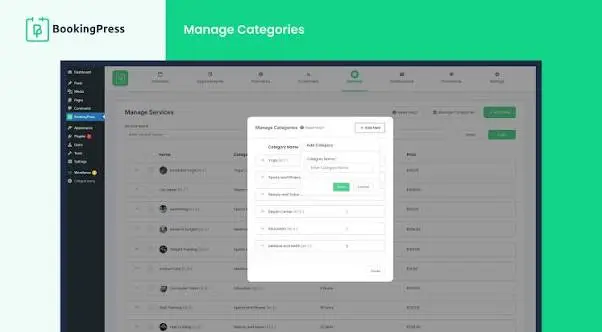
3. BookingPress
BookingPress shifts the focus from event listings to appointment scheduling, making it a better fit for service based businesses rather than organizations hosting public events.
Key Features
- Unlimited appointment bookings, even on the free version
- Support for multiple services, staff members, and categories
- Customizable booking forms to collect the exact information each business needs
- Built in calendar view showing all upcoming appointments at a glance
Best Use Case Salons, clinics, consultants, and any service business that needs clients to book time slots rather than simply view a list of events.
Performance Perspective Booking flows inherently require more interactive JavaScript than a static event list, so BookingPress benefits significantly from being limited to only the specific booking page rather than loading site wide.
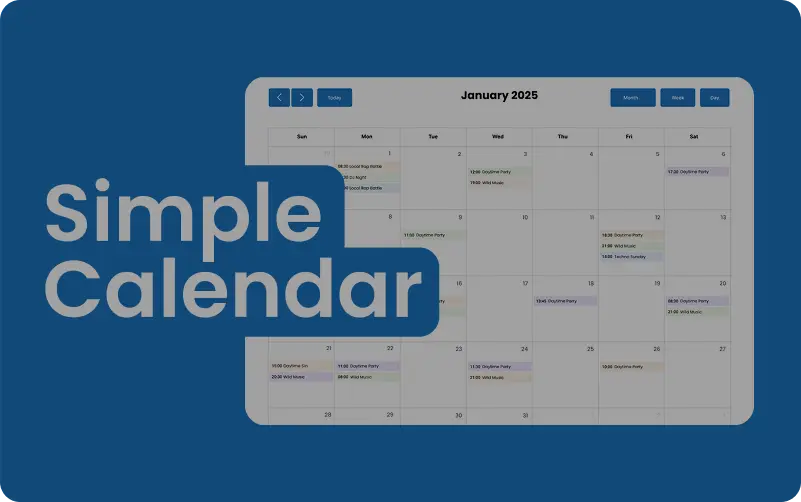
4. Simple Calendar
Simple Calendar takes a different approach entirely by connecting directly to an existing Google Calendar account, rather than asking you to manage events separately inside WordPress.
Key Features
- One way sync that pulls events directly from a connected Google Calendar
- Multiple embeddable calendar views, including month, week, and agenda formats
- No need to manually duplicate events already being managed in Google Calendar
- Straightforward setup with minimal configuration required
Best Use Case Businesses or teams that already rely on Google Calendar for internal scheduling and want that same data reflected on their website without duplicate data entry.
Performance Perspective Since event data is pulled from Google rather than processed locally, Simple Calendar tends to keep local server load lower, though the initial API call can add a small delay if not cached properly.
5. My Calendar
My Calendar stands out specifically for its strong focus on accessibility, an area many competing calendar plugins treat as an afterthought.
Key Features
- Built with WCAG accessibility guidelines in mind, including full keyboard navigation
- Support for multiple, separately manageable calendars on a single site
- Detailed recurring event options with location and category management
- Screen reader friendly markup throughout the calendar display
Best Use Case Government sites, educational institutions, and any organization where accessibility compliance is a genuine requirement rather than a nice to have.
Performance Perspective My Calendar’s accessibility focused markup is generally lightweight, though sites running multiple calendars simultaneously should still monitor page weight on calendar heavy pages.
How to Choose the Right Calendar Plugin
The right choice depends less on which plugin has the most features and more on which one matches what you are actually trying to do.
- If you need simple, low maintenance event listings, choose Sugar Calendar.
- If you are running frequent, recurring, or ticketed events at scale, choose The Events Calendar.
- If you are booking appointments rather than listing public events, choose BookingPress.
- If your team already manages scheduling entirely inside Google Calendar, choose Simple Calendar.
- If accessibility compliance is a hard requirement for your organization, choose My Calendar.
Whichever option you choose, test it with a tool like Google PageSpeed Insights after activation to confirm it is not introducing unnecessary layout shift or slowing down page load on the pages where it appears.
Frequently Asked Questions
Conclusion
The best WordPress calendar plugin depends entirely on what you are trying to display or manage, whether that is a simple event list, a full booking system, or a Google Calendar mirror. Match the plugin to your actual use case first, then confirm it performs well using a real performance test rather than assuming every calendar plugin behaves the same way on your specific site.

Behind every post at digiinte.com is a team of experienced SEO analysts and digital growth specialists. Our insights are backed by real data, industry research, and hands-on campaign experience — so you get advice that actually moves the needle.