
Last Updated on August 1, 2026 by Digiinte.com Team
A broken link is a small thing that quietly does real damage. Visitors hit a dead end and leave, search engines waste crawl budget on pages that no longer exist, and a growing pile of 404 errors signals a site that is not being maintained. The tricky part is that broken links do not announce themselves, pages get deleted, URLs change, and external sites you once linked to disappear, all without any warning to you.
- Key Takeaways
- Quick Answer
- Why Broken Links Matter More Than They Seem
- 1. Google Search Console
- 2. Screaming Frog
- 3. Broken Link Checker (WordPress Plugin)
- 4. Dead Link Checker
- 5. Sitechecker
- 6. Ahrefs Site Audit
- Quick Comparison Table
- How to Fix Broken Links Once You Find Them
- Frequently Asked Questions
- Conclusion
This guide covers the 6 best tools for monitoring 404 errors and broken links, what each one actually does, its real pricing, and honest pros and cons, plus exactly how to fix what they find once you have a list in hand.
Key Takeaways
- Google Search Console is the essential free starting point, since it shows exactly which of your pages Google has already found returning a 404 error.
- Screaming Frog remains the most thorough on-demand crawler for a deep, one-time audit of your entire site’s links.
- Broken Link Checker is the most practical choice specifically for WordPress sites wanting ongoing, automatic monitoring without leaving the dashboard.
- Dead Link Checker offers a genuinely free, no-signup way to scan a site quickly for a one-off check.
- Sitechecker and similar monitoring dashboards add scheduled scans and instant alerts, useful for sites that cannot afford to let a broken link sit unnoticed.
- Ahrefs Site Audit folds broken link detection into a broader technical SEO audit, useful if you want one platform covering multiple issue types.
- Finding broken links is only half the job. Fixing them properly with redirects or updated links matters just as much as detection.
Quick Answer
For most sites, start with Google Search Console, it is free and already shows you real 404 errors Google has encountered. Add Screaming Frog for periodic deep crawls, and if you run WordPress specifically, Broken Link Checker gives you ongoing monitoring without needing a separate dashboard at all.
Why Broken Links Matter More Than They Seem
A single broken link rarely tanks a site’s rankings on its own, but the pattern it represents does matter. Search engines use crawl efficiency as a quality signal, a site riddled with dead ends forces crawlers to waste effort on pages that lead nowhere, which can slow how quickly new, valid content gets discovered and indexed. For visitors, hitting a 404 error interrupts their path partway through whatever they came to do, and a site that feels poorly maintained loses trust quickly, especially if broken links keep showing up in acquisition channels like organic search or paid ads pointing to outdated URLs. Our guide on 8 signs your website has a technical SEO problem covers this exact issue as one of the clearest, most direct warning signs your site is due for a technical cleanup.
1. Google Search Console
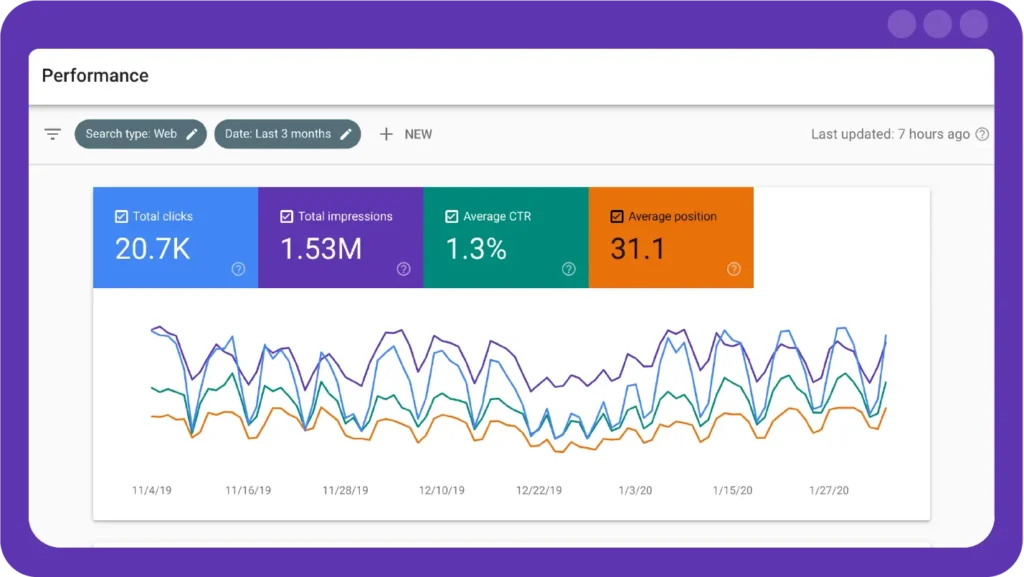
Search Console is the one tool on this list every site owner already has access to, and it should be the first place you check before reaching for anything else. Unlike every other tool on this list, Search Console does not crawl your site itself in the traditional sense, it reflects Google’s own actual crawling activity, meaning the 404 errors it surfaces are ones a real search engine bot has genuinely encountered while trying to index your content. This makes its data uniquely relevant, since a broken link Google itself has stumbled on is directly affecting how your site gets crawled and indexed, not just a theoretical issue sitting somewhere on your site.
What It Does: The Coverage report inside Search Console lists every URL Google has crawled and categorizes them, including a specific “Not found (404)” category showing exactly which pages Google’s crawler has encountered as broken, along with which other pages link to them internally.
Key Features:
- Directly sourced from Google’s own crawl data, not a third-party estimate
- Shows which internal pages link to each broken URL, making the fix easier to trace
- Completely free with no signup beyond a standard Google account
- Historical trend data showing whether 404 errors are increasing or decreasing over time
Pricing:
- Completely free, no paid tier exists
Pros:
- Free, direct data from Google itself rather than a third-party crawl estimate
- Shows internal linking context, not just the broken URL in isolation
- No setup required beyond verifying your site
Cons:
- Only shows 404s Google has actually crawled, not necessarily every broken link on your site
- Does not check external links pointing away from your site
- Update frequency depends on Google’s own crawl schedule, not real time
Why choose it? Since this data comes directly from Google’s own crawler, it tells you exactly which broken pages are affecting your actual search presence, not just a theoretical crawl. It is also already sitting there waiting to be checked, most site owners already have it verified from earlier SEO work.
Best for: Every website owner, as a free, non-negotiable first check before adding any other tool.
2. Screaming Frog
Screaming Frog has earned its reputation as the go-to desktop crawler for a genuinely thorough, one-time deep audit of a site’s entire link structure. Built by a UK based SEO consultancy that still actively maintains and updates it, the tool has become something of an industry standard specifically because it mimics Googlebot’s own crawling behavior closely enough that the issues it surfaces tend to closely match what a search engine would actually encounter. Unlike browser based checkers limited to a handful of pages, it is built to handle sites with thousands of URLs, following every discoverable link systematically rather than sampling a subset.
What It Does: Crawls your website the way Googlebot does, following every internal and external link, then presents a full spreadsheet-style report categorizing every link by status code, including 404s, redirects, and server errors, along with exactly which page each broken link was found on.
Key Features:
- Crawls both internal and external links across the entire site
- Exports full broken link reports for bulk fixing
- Shows anchor text and source page for every broken link found
- Visualizes site structure to spot orphaned or deeply buried pages
Pricing:
- Free version – crawls up to 500 URLs
- Paid license – around $259/year, removes the URL crawl limit and unlocks additional features
Pros:
- Extremely thorough, catches both internal and external broken links in one crawl
- Free tier is genuinely usable for small to mid-sized sites
- Detailed export data makes bulk fixing significantly faster
Cons:
- Requires a desktop download rather than working purely in-browser
- Free tier’s 500 URL cap limits usefulness for larger sites
- Not built for ongoing monitoring, it is a point-in-time crawl tool rather than a continuous alert system
Why choose it? When you need a comprehensive, one-time audit of your entire site’s link health, ahead of a migration, a redesign, or a periodic cleanup, nothing on this list matches the sheer thoroughness of a full Screaming Frog crawl.
Best for: A deep, thorough one-time audit of an entire site’s internal and external links.
3. Broken Link Checker (WordPress Plugin)
For WordPress sites specifically, Broken Link Checker solves this problem without ever needing to leave your dashboard or run a separate tool. Rather than requiring you to remember to periodically export a report from an outside service, it embeds the entire monitoring process directly into the platform you already use daily to manage content, checking links quietly in the background on a recurring schedule and simply waiting until you happen to log in to show you what it found. This passive, always-on approach suits site owners who would otherwise never think to run a manual check until something visibly breaks.
What It Does: Runs in the background, periodically checking all links across your posts, pages, and comments, and flags broken ones directly inside your WordPress admin area, with the option to edit or unlink them right from that same screen.
Key Features:
- Automatic, ongoing background monitoring without manual scans
- Checks links in posts, pages, comments, and even the blogroll
- Flags broken links directly inside the WordPress dashboard for quick fixes
- Options to exclude specific link types or domains from checks
Pricing:
- Completely free, available directly from the WordPress plugin directory
Pros:
- Fully automated once installed, no manual scanning required
- Fixes can be made directly inside WordPress without switching tools
- Zero cost with no premium upsell
Cons:
- Can add some server load on larger sites during scheduled scans
- Limited to content within WordPress itself, does not check external site-wide technical issues
- Less detailed reporting compared to a dedicated crawler like Screaming Frog
Why choose it? If your entire site runs on WordPress, this plugin removes the need to remember to run periodic checks at all, it simply flags problems as they appear, directly where you already manage your content.
Best for: WordPress site owners who want automatic, ongoing monitoring without a separate dashboard or tool.
4. Dead Link Checker
Dead Link Checker has stayed popular for one simple reason, it delivers a genuinely free, no-signup way to scan an entire site quickly. In a landscape where most competing tools gate their real functionality behind an account creation step or a credit card for a trial, this remains one of the few that lets you paste in a URL and get a real, usable report within minutes, no email required, no upsell screen before you see your results. That low-friction approach has made it a frequent recommendation specifically for anyone who just needs an answer once, not an ongoing relationship with a monitoring platform.
What It Does: Crawls a website you enter and returns a full report of broken links found across the site, without requiring an account, a paid plan, or any software installation.
Key Features:
- No signup or account required to run a scan
- Scans an entire domain rather than just a single page
- Clear, straightforward report format
- Available as a free browser extension for quick single-page checks
Pricing:
- Completely free for standard site scans
Pros:
- Genuinely free with no account creation barrier
- Fast setup, just enter a URL and scan
- Useful browser extension for quick, single-page checks
Cons:
- Less detailed than a dedicated crawler like Screaming Frog
- No ongoing monitoring, each scan is a one-off manual check
- Limited additional SEO context compared to more comprehensive platforms
Why choose it? For a quick, no-commitment check, verifying a client’s site before a pitch, or a fast sanity check after a content update, this remains one of the fastest ways to get a broken link report without any setup at all.
Best for: Quick, free, one-off broken link scans without creating an account.

5. Sitechecker
Sitechecker represents the ongoing-monitoring category well, built around scheduled crawls and instant alerts rather than a single manual scan. Its core value proposition rests on a simple shift in timing, instead of you remembering to go check for problems, the tool checks continuously and comes to you the moment something changes. For a business where search visibility translates directly into leads or sales, that shift from reactive to proactive monitoring can be the difference between catching a broken checkout link within hours versus discovering it weeks later after it has already cost real conversions.
What It Does: Automatically crawls your site on a schedule you set, daily, weekly, or monthly, and sends alerts through email or Slack the moment a new 404 error is detected, alongside a broader dashboard covering other SEO health metrics.
Key Features:
- Scheduled, automatic crawling on a custom frequency
- Real-time alerts via email or Slack when new 404 errors appear
- Unified dashboard combining broken link monitoring with broader SEO metrics
- Checks both internal and external links continuously
Pricing:
- Free trial – 14 days, no credit card required
- Paid plans – tiered subscriptions scaling by site size and crawl frequency needed
Pros:
- Genuinely proactive, alerts you the moment a new issue appears rather than waiting for your next manual check
- Combines broken link monitoring with a broader SEO toolset in one dashboard
- Slack integration fits naturally into an existing team workflow
Cons:
- No permanent free tier, only a time-limited trial
- Ongoing subscription cost compared to fully free alternatives
- Overkill for a very small, rarely updated personal site
Why choose it? For a business site where a broken link left unnoticed for weeks could mean lost leads or a poor first impression, the instant alert system justifies the subscription cost by catching problems the same day they appear rather than during your next scheduled manual check.
Best for: Businesses that want proactive alerts rather than relying on remembering to check manually.

6. Ahrefs Site Audit
Ahrefs Site Audit folds broken link detection into a much broader technical SEO audit, useful if you would rather monitor multiple issue types from a single platform. Rather than existing as a standalone product built around one specific problem, it operates as one module within a much larger SEO suite already covering keyword research, backlink analysis, and rank tracking, meaning broken link data sits alongside dozens of other technical signals in the same dashboard you might already be checking daily for unrelated reasons. For teams already paying for that broader platform, this bundling effectively makes broken link monitoring a byproduct of work they were already doing rather than an entirely separate task.
What It Does: Crawls your site on a schedule and flags broken internal and external links as part of a comprehensive technical health report, alongside dozens of other checks like duplicate content, missing meta tags, and Core Web Vitals issues.
Key Features:
- Broken link detection bundled with a full technical SEO audit
- Scheduled recurring crawls with historical health score tracking
- Detailed issue prioritization based on severity
- Integration with Ahrefs’ broader keyword and backlink data
Pricing:
- Requires an active Ahrefs subscription, with site audit crawl limits scaling by plan tier
Pros:
- Combines broken link monitoring with a comprehensive range of other technical checks
- Strong prioritization helps focus on the most impactful issues first
- Historical health score tracking shows whether your site is improving over time
Cons:
- Requires a paid Ahrefs subscription, no standalone free option for this specific feature
- More than most site owners need if broken links are the only concern
- Overlaps significantly with dedicated tools if you are not already using Ahrefs for other SEO work
Why choose it? If you are already invested in Ahrefs for keyword research or backlink analysis, having broken link monitoring bundled into the same platform avoids paying for and learning a separate dedicated tool just for this one issue.
Best for: Existing Ahrefs users who want broken link monitoring folded into a broader technical SEO audit.

Quick Comparison Table
| Tool | Monitoring Type | Free Tier | Best For |
| Google Search Console | Passive, Google’s own crawl data | Fully free | Every site owner, as a baseline check |
| Screaming Frog | On-demand deep crawl | Yes, up to 500 URLs | Thorough one-time site audits |
| Broken Link Checker | Automatic, ongoing (WordPress) | Fully free | WordPress sites wanting hands-off monitoring |
| Dead Link Checker | Manual, one-off scan | Fully free | Quick, no-signup checks |
| Sitechecker | Scheduled, with real-time alerts | 14-day trial only | Businesses wanting proactive alerts |
| Ahrefs Site Audit | Scheduled, bundled with full audit | No, subscription required | Existing Ahrefs users |
How to Fix Broken Links Once You Find Them
Detection is only the first step. Here is how to actually resolve what these tools flag.
- Confirm the link is genuinely broken. Occasionally a page is temporarily down rather than permanently gone, recheck before making changes.
- Set up a 301 redirect for deleted or moved pages. If the content moved to a new URL, redirect the old one so both visitors and search engines land on the correct page.
- Update the link if it points to an external site that changed its URL. Sometimes the destination page still exists at a new address, a quick search often finds it.
- Remove the link entirely if no replacement exists. For outdated external references with no equivalent page anymore, simply removing the link is cleaner than redirecting to an unrelated page.
- Customize your 404 page. For any errors you cannot immediately fix, a helpful 404 page with a search bar and links to popular pages keeps visitors from leaving entirely.
- Re-crawl to confirm the fix worked. Run your chosen tool again after making changes to verify the broken link no longer appears.
Frequently Asked Questions
- 8 Signs Your Website Has a Technical SEO Problem
- Top 20 Free SEO Tools Every Website Owner Should Use
- 10 Best Chrome Extensions for SEO Professionals
- 6 Best Website Speed Testing Tools and How to Fix Slow Load Times
Conclusion
Monitoring 404 errors and broken links does not require an elaborate setup. Start with Google Search Console since it is free and already shows real data from Google’s own crawler, add Screaming Frog for periodic deep audits, and if you run WordPress, let Broken Link Checker handle ongoing monitoring automatically in the background. For businesses that cannot afford to let a broken link sit unnoticed, Sitechecker or Ahrefs Site Audit add proactive alerts worth their subscription cost.
Finding broken links is only half the job, fixing them properly with redirects, updated links, or clean removal matters just as much as catching them in the first place.
Ready to check your site? Open Google Search Console right now, pull up your Coverage report, and see how many 404 errors are already sitting there waiting to be fixed.

Behind every post at digiinte.com is a team of experienced SEO analysts and digital growth specialists. Our insights are backed by real data, industry research, and hands-on campaign experience — so you get advice that actually moves the needle.