
Last Updated on July 31, 2026 by Digiinte.com Team
A slow WordPress site is often not a content problem or even a hosting problem, it is a caching problem. Every time a visitor loads your page, WordPress normally rebuilds it from scratch, running database queries and PHP scripts all over again. A caching plugin stores a ready-made version of that page instead, so the next visitor gets it instantly rather than waiting for WordPress to rebuild it.
Here are the 5 best caching plugins for WordPress in 2026, compared by what they actually do to your server response time, how they fit different hosting setups including shared hosting, and their genuine pricing, so you can pick based on your actual site rather than a generic ranking.
Key Takeaways
- WP Rocket remains the easiest premium option for beginners, working well out of the box without heavy configuration.
- LiteSpeed Cache is the clear choice if your host runs a LiteSpeed server, since it integrates at the server level rather than just through WordPress.
- WP Super Cache is a solid, genuinely free starting point for shared hosting where server resources are limited.
- W3 Total Cache offers the deepest configuration options but comes with a steeper learning curve and more room for misconfiguration.
- FlyingPress focuses specifically on Core Web Vitals improvements, useful if your speed test results flag LCP or render-blocking issues.
- Only ever run one caching plugin at a time. Running two simultaneously is one of the most common causes of a broken or conflicting WordPress site.
If you want the simplest setup with strong results, WP Rocket is the safest premium pick. If your hosting runs LiteSpeed specifically, LiteSpeed Cache outperforms nearly everything else for free. If you are on a tight budget and shared hosting, WP Super Cache is a dependable, genuinely free starting point.
How Caching Actually Improves Your Site
Understanding what a caching plugin changes under the hood makes it much easier to judge whether one is actually working. Every WordPress page load normally involves the server querying the database, running PHP, and assembling HTML from scratch, a process that takes real time, especially on shared hosting where server resources are split across many other sites. A caching plugin intercepts this process, saving a static, ready-to-serve version of the page after the first visit, so every subsequent visitor gets that saved version instantly instead of triggering the full rebuild.
This directly improves Time to First Byte, how quickly your server starts responding at all, which we covered in detail in our guide on website speed testing tools and how to fix slow load times. A slow TTFB is one of the most common issues speed tests flag, and caching is usually the single highest impact fix available for it.
1. WP Rocket
WP Rocket has built its reputation specifically around removing the technical intimidation factor from caching, activating with genuinely strong default settings rather than requiring you to understand every technical option before your site is properly optimized. It has become one of the most recommended premium caching plugins in the WordPress space largely because of this beginner-safe approach, paired with genuinely capable performance under the hood.
What It Does: Handles page caching, browser caching, and mobile-specific caching out of the box, alongside file optimization features like CSS and JavaScript minification, lazy loading, and database cleanup, all through a clean, approachable settings interface.
Key Features:
- Effective default settings that work well without manual configuration
- Automatic exclusion of sensitive pages like cart and checkout for WooCommerce compatibility
- Built-in CDN integration support
- Database optimization and cache preloading
Pricing:
- Single plan – around $59/year, 1 website
- Plus plan – around $119/year, 3 websites
- Infinite plan – around $299/year, unlimited websites
- No free version, but a 14-day money-back guarantee is offered
Pros:
- Genuinely easy to set up correctly on the first try
- Strong WooCommerce compatibility handled automatically
- Reliable results without needing deep technical knowledge
Cons:
- No free tier at all, unlike most competitors on this list
- Less granular control for advanced users who want to fine-tune every setting
- Ongoing subscription cost compared to some fully free alternatives
Why choose it? If you want strong results without spending hours learning caching terminology, WP Rocket’s sensible defaults consistently deliver good outcomes with minimal setup time, which is exactly why it remains one of the most recommended options for site owners who would rather spend their time on content than server configuration.
Best for: Beginners and business owners who want reliable results without a steep learning curve.

2. LiteSpeed Cache
LiteSpeed Cache occupies a unique position on this list, it is built specifically to take advantage of LiteSpeed web servers at a level no purely PHP-based plugin can match, since it integrates directly with the server software itself rather than working entirely through WordPress.
What It Does: Performs server-level caching directly through LiteSpeed’s own architecture when available, alongside image optimization, CSS and JavaScript optimization, and integration with QUIC.cloud, a CDN built specifically to pair with LiteSpeed environments.
Key Features:
- Server-side caching that operates below the PHP layer for genuinely faster response times
- Built-in image optimization and lazy loading
- Free integration with the QUIC.cloud CDN
- Guest mode optimizations that improve first-time visitor load speed
Pricing:
- Free plugin – full core caching and optimization features
- QUIC.cloud add-on services – optional paid tiers for additional CDN bandwidth and image optimization credits
Pros:
- Genuinely free with no artificial feature limitations for core caching
- Server-level caching outperforms PHP-based alternatives on compatible hosting
- Strong image and Core Web Vitals focused optimization included
Cons:
- Its biggest performance advantage only applies if your host actually runs LiteSpeed
- Interface includes a large number of settings that can feel overwhelming initially
- Less beneficial on standard Apache or Nginx hosting compared to its LiteSpeed-specific advantages
Why choose it? Many budget and mid-tier hosting providers now run LiteSpeed specifically because of how well it pairs with this plugin. If your host confirms LiteSpeed support, this combination frequently outperforms paid alternatives entirely for free, making it worth checking your hosting control panel before choosing a different plugin.
Best for: Any site hosted on a LiteSpeed server, where it delivers premium-level performance for free.
3. WP Super Cache
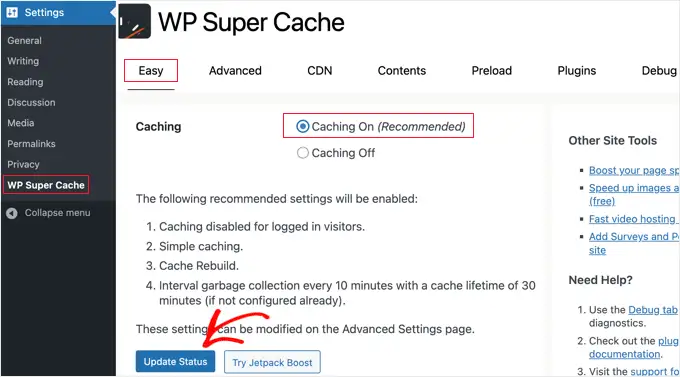
WP Super Cache has remained a dependable, no-frills choice for years, maintained by Automattic, the company behind WordPress.com, which gives it a level of long-term reliability and compatibility testing many newer plugins lack.
What It Does: Generates static HTML files from your dynamic WordPress pages and serves those files directly, bypassing much of the heavier PHP processing that would otherwise run on every page load.
Key Features:
- Three caching modes, simple, expert, and WP-Cache, letting you match complexity to your comfort level
- CDN support for serving cached files from a content delivery network
- Scheduled cache preloading to keep pages ready before visitors arrive
- Genuinely lightweight resource usage suited to limited shared hosting environments
Pricing:
- Fully free, with no premium tier or paid upsell at all
Pros:
- Completely free with no feature restrictions
- Lightweight enough to run well even on limited shared hosting resources
- Long track record of stability and broad hosting compatibility
Cons:
- Fewer built-in optimization features compared to WP Rocket or FlyingPress
- Interface feels dated compared to more modern competitors
- Requires a bit more manual configuration to get the most out of its expert mode
Why choose it? For a shared hosting environment where server resources are genuinely limited, a lightweight, no-cost plugin that does the core job reliably often beats a heavier, feature-dense alternative that consumes more of an already constrained resource pool.
Best for: Budget-conscious sites on shared hosting that need reliable, free caching without extra complexity.
4. W3 Total Cache
W3 Total Cache has long been known as the most configurable caching plugin available, offering granular control over nearly every caching layer a WordPress site can use, at the cost of a genuinely steeper learning curve.
What It Does: Supports page caching, browser caching, database and object caching, and minification, with deep configuration options for each layer, along with integration for external object caching systems like Redis and Memcached where your hosting supports them.
Key Features:
- Support for advanced object caching through Redis or Memcached
- Granular control over nearly every caching parameter
- CDN integration across multiple providers
- Compatibility with multisite WordPress installations
Pricing:
- Free plugin – covers the core caching features
- Pro version – paid tier adding fragment caching, additional CDN integrations, and monitoring features
Pros:
- Extremely thorough configuration options for advanced users
- Free tier covers genuinely powerful core caching features
- Strong support for advanced setups like multisite and object caching
Cons:
- Genuinely steep learning curve, misconfiguration is a common complaint
- Interface feels complex and dated compared to newer competitors
- Higher risk of site issues if settings are not configured carefully
Why choose it? For a technically comfortable site owner or developer who wants maximum control over every caching layer, including object caching most simpler plugins do not offer at all, the depth here is hard to match, provided you are willing to invest the time to configure it properly.
Best for: Technically experienced users and developers who want maximum configuration control.
5. FlyingPress
FlyingPress takes a deliberately modern, Core Web Vitals focused approach, built around the specific metrics Google actually measures for page experience rather than general page speed alone.
What It Does: Combines page caching with a focused set of Core Web Vitals optimizations, including LCP image preloading, self-hosting Google Fonts locally, and lazy rendering of below-the-fold HTML elements, paired with the FlyingCDN service built on Cloudflare’s enterprise network.
Key Features:
- LCP image preloading specifically targeting Largest Contentful Paint scores
- Local font hosting to reduce third-party font loading delays
- Lazy loading for background images and HTML elements, not just standard images
- Integration with FlyingCDN, built on Cloudflare’s enterprise infrastructure
Pricing:
- Single site plan – priced annually, typically positioned similarly to WP Rocket’s entry tier
- Multi-site plans – scale up in price for agencies and multi-site portfolios
- No free version, though a trial period is generally available
Pros:
- Directly targets the specific metrics Google’s Core Web Vitals actually measure
- Modern, actively maintained feature set addressing newer performance techniques
- Strong CDN integration built on established Cloudflare infrastructure
Cons:
- No free tier, similar to WP Rocket
- Smaller, newer user base means less community troubleshooting content exists
- Some advanced features assume a baseline comfort with performance terminology
Why choose it? If a speed test has specifically flagged Core Web Vitals issues, a poor LCP score or render-blocking resources, FlyingPress’s feature set is built directly around fixing exactly those flagged issues, rather than general-purpose caching that may not address them as precisely.
Best for: Site owners specifically chasing better Core Web Vitals scores after running a speed test.

Quick Comparison Table
| Plugin | Best Server Type | Free Version | Best For |
| WP Rocket | Any (Apache, Nginx, LiteSpeed) | No | Beginners wanting easy setup |
| LiteSpeed Cache | LiteSpeed specifically | Yes, full core features | Sites hosted on LiteSpeed servers |
| WP Super Cache | Any, especially shared hosting | Yes, fully free | Budget shared hosting |
| W3 Total Cache | Any, best with Redis/Memcached access | Yes, core features | Advanced users wanting full control |
| FlyingPress | Any (Apache, Nginx, LiteSpeed) | No | Core Web Vitals focused optimization |
Golden Rules Before You Install Any Caching Plugin
A few simple habits prevent the vast majority of caching-related problems.
- Back up your site first. Caching plugins modify how your site serves pages, and a backup gives you a safe fallback if something breaks during setup.
- Only run one caching plugin at a time. Running two simultaneously is one of the most common causes of conflicts, broken layouts, or a fully crashed site.
- Clear your cache after every change. If you update a page, theme, or plugin and do not see the change live, you are almost certainly viewing an old cached version.
- Exclude sensitive pages from caching. Cart, checkout, and account pages should never be served from a static cache, most modern plugins handle this automatically, but it is worth confirming.
- Re-test your speed after setup. Confirm the plugin is actually improving your load time using a dedicated speed test rather than assuming it is working.
Frequently Asked Questions
- 6 Best Website Speed Testing Tools and How to Fix Slow Load Times
- 8 Signs Your Website Has a Technical SEO Problem
- 7 Best Page Builders for WordPress in 2026
- 9 Best WordPress Security Plugins to Protect Your Site
- 7 Best Backup Plugins for WordPress Beginners in 2026
Conclusion
Choosing the right caching plugin comes down to matching it to your actual hosting environment and comfort level, not just picking whichever name is most familiar. WP Rocket suits beginners wanting strong results with minimal setup, LiteSpeed Cache is unbeatable value if your host supports it, WP Super Cache remains a reliable free option for shared hosting, W3 Total Cache serves advanced users wanting full control, and FlyingPress targets Core Web Vitals scores directly.
Whichever you choose, follow the golden rules, back up first, run only one caching plugin, and clear your cache after changes, and then re-test your site’s speed to confirm it actually worked.
Ready to speed up your site? Check whether your host runs LiteSpeed first, then install the matching plugin from this list today and run a fresh speed test to see the real difference.

Behind every post at digiinte.com is a team of experienced SEO analysts and digital growth specialists. Our insights are backed by real data, industry research, and hands-on campaign experience — so you get advice that actually moves the needle.