
Last Updated on April 17, 2026 by Digiinte.com Team
Most website owners obsess over keywords, backlinks, and meta descriptions when building an SEO strategy. Yet one small detail quietly sitting in every page address gets overlooked almost every time: the URL slug. It takes five seconds to write. It is visible in every search result. And it directly influences whether users click your link or scroll right past it.
Understanding how URL slugs work and how to optimize them is one of the fastest, lowest-effort wins available in technical SEO. This guide breaks down everything you need to know, from the basic definition to real best practices that apply to every website in 2026.
Key Takeaways
- A URL slug is the part of a web address that comes after the domain name and identifies a specific page
- Pages with short, concise slugs rank slightly higher across an analysis of 11.8 million search results
- Google’s John Mueller confirmed that words in a URL are a ranking factor, though a very lightweight one
- A clean, descriptive slug improves click-through rates by making your link more trustworthy in search results
- Slugs should use hyphens, lowercase letters, and the primary keyword only, with no stop words or special characters
- Changing existing slugs requires setting up 301 redirects to avoid losing traffic and rankings
What Is a URL Slug?
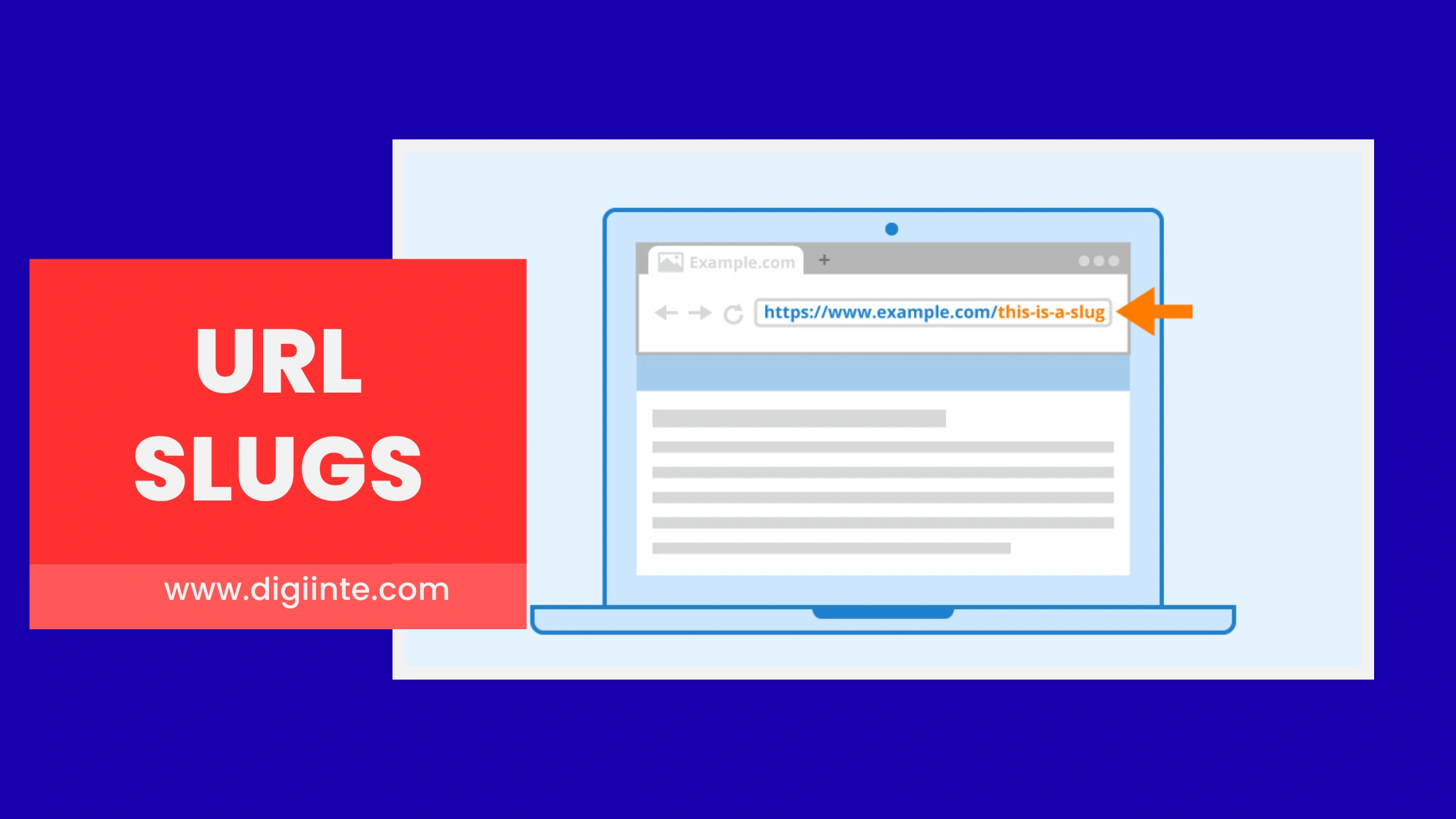
A URL slug is the portion of a webpage address that appears after the domain name and identifies a specific page. In the address example.com/seo-tips-for-beginners, the slug is seo-tips-for-beginners. It serves as a readable, human-friendly label for the page and tells both users and search engines exactly what content lives at that address. A good slug is short, lowercase, uses hyphens between words, and reflects the page’s primary topic or keyword.
Why URL Slugs Matter for SEO
URL slugs sit at the intersection of user experience and search engine signals. They are one of the first things a user reads when scanning a search results page, and they contribute to how search engines initially interpret page content before a full crawl is complete.
According to Google’s own Search Advocate John Mueller, words in a URL slug function as a very lightweight ranking factor. His exact framing: they matter most when Google has not yet crawled the page, using the slug as an early content signal. Once a page is indexed, the weight shifts to content quality. However, dismissing slugs entirely because of this misses the larger point: slugs do not just influence algorithms, they influence human behavior.
Research across 11.8 million search results pages shows that pages with short, focused slugs tend to rank higher than pages with long, cluttered addresses. And with AI-powered search platforms like ChatGPT, Perplexity, and Google’s AI Mode increasingly recommending content, having keyword-rich, readable slugs helps these systems understand and categorize pages accurately, improving the chance of being surfaced in AI-generated answers.
Four specific ways URL slugs affect SEO performance:
- Search engine understanding: A descriptive slug sends an early topical signal about the page content, helping Google and other crawlers categorize it correctly before indexing
- Click-through rate: When users see a clean, readable URL in search results, they are more likely to click it. A vague or auto-generated slug like example.com/page?id=8823 erodes trust immediately
- Duplicate content prevention: Unique, intentional slugs prevent multiple pages from competing against each other for the same search terms
- Shareability: A readable slug looks better when shared on social media, in emails, and in messaging apps, leading to more organic link sharing
Good Slugs Versus Bad Slugs: Real Examples
The difference between an effective slug and a damaging one is easy to see side by side. Here are common comparisons:
| Good Slug | Bad Slug |
| /seo-url-slug-guide | /post-2024-01-07-seo?id=312 |
| /best-dog-beds-large-dogs | /the-best-dog-beds-for-large-dogs-in-2025-and-beyond |
| /email-marketing-tips | /Email_Marketing_TIPS_v2 |
| /memory-foam-dog-bed | /category/products/beds/dog/memoryfoam123 |
The good slugs are short, lowercase, use hyphens, and match a clear keyword. The bad slugs contain dates, underscores, uppercase letters, ID numbers, and excessive words that confuse both users and crawlers.
How to Create SEO-Friendly URL Slugs
Creating a strong slug takes less than a minute if you follow a clear process. Here is how to do it right every time.
Step 1: Identify the Primary Keyword
Start with the main keyword the page is targeting. This is usually the central topic, such as orthopedic dog beds or email marketing tips. The slug should reflect this keyword naturally, not a stuffed version of it. One keyword per slug is the rule. Secondary keywords belong in the content, headings, and meta description, not the URL.
Step 2: Strip Stop Words
Common words like “the,” “and,” “of,” “a,” and “for” add length without adding meaning. Remove them entirely. A slug targeting “the best tips for email marketing” becomes /email-marketing-tips. Shorter, focused, and just as clear.
Step 3: Use Hyphens, Not Underscores
Google’s own guidelines recommend hyphens as word separators in URLs. Underscores cause crawlers to read two words as one unit, which hurts readability and indexing accuracy. Always use hyphens. Never use spaces, underscores, or special characters.
Step 4: Keep It Lowercase
Some servers treat uppercase and lowercase URLs as separate pages entirely, which creates duplicate content problems. The address example.com/SEO-Tips and example.com/seo-tips may be interpreted as two different pages, splitting ranking signals and diluting page authority. Always write slugs in lowercase.
Step 5: Aim for 3 to 5 Words
SEO best practices consistently point to slugs between 3 and 5 meaningful words as the sweet spot. Beyond that, the URL risks truncation in search results, reducing its visual appeal and the user’s ability to understand what they are clicking on. Keep it tight and descriptive.
Step 6: Make It Evergreen
Avoid including years, dates, or version numbers in slugs whenever possible. A page titled “Best SEO Tools 2025” with a slug of /best-seo-tools-2025 looks outdated in 2026 and forces you to either change the URL or leave stale content on display. Use /best-seo-tools and update the content inside the page instead.

Common URL Slug Mistakes to Avoid
Even experienced site owners make these errors. Recognizing them early saves significant cleanup work later.
- Using auto-generated slugs: Content management systems often generate slugs from the full page title, including stop words and unnecessary text. Always review and edit before publishing
- Keyword stuffing the slug: Forcing multiple keywords into a single slug looks spammy and provides no meaningful ranking benefit. Focus on one clear keyword
- Using special characters: Symbols like and, percent, dollar, or ampersand break URLs or cause encoding errors that confuse crawlers
- Changing slugs on live pages without redirects: Updating a slug without setting up a 301 redirect from the old URL causes broken links, 404 errors, and the loss of any backlinks pointing to the original address
- Including category or date folders unnecessarily: Deep URL structures like /blog/2025/january/category/post-name are harder to crawl and make slugs unnecessarily long
How to Handle Existing Slugs Safely
If your site already has poorly structured slugs, the fix is straightforward but must be done carefully. Changing a slug changes the page address, which means every link pointing to the old URL immediately breaks unless redirected.
Here is the process for updating existing slugs without damaging rankings:
- Identify which pages have weak slugs using a site audit tool
- Prioritize pages with high traffic or strong backlink profiles, as these carry the most risk if disrupted
- Create the new, optimized slug following the best practices above
- Set up a 301 permanent redirect from the old URL to the new one before making the change live
- Update any internal links on your site that reference the old URL
- Submit the updated URL to Google Search Console to accelerate reindexing
A 301 redirect tells search engines that the page has moved permanently and passes the ranking signals from the old address to the new one. Skipping this step is the single most common cause of traffic loss after slug updates.
URL Slugs in the Age of AI Search
The rise of AI-powered search platforms adds a new dimension to why slug quality matters. Platforms like Perplexity, ChatGPT Search, and Google’s AI Overview mode pull content recommendations from indexed pages. These systems rely on structured, readable signals to understand and categorize content accurately before surfacing it in generated answers.
A keyword-rich, clearly structured slug gives AI retrieval systems an immediate content signal: what this page is about, how it fits into a topic, and whether it matches a user’s query intent. A vague or auto-generated slug provides none of those signals, making the page a less competitive candidate for AI-driven recommendations.
As AI search continues to grow, the combination of clean URL slugs, structured content, and descriptive headings becomes an increasingly important part of visibility strategy, not just for Google’s traditional blue-link results but for the next generation of how people find information online.
FAQ
Conclusion
URL slugs for SEO may not move the needle as dramatically as content quality or backlink authority, but they are one of the most efficient optimizations available. A well-crafted slug takes moments to write, costs nothing to implement, and pays dividends in readability, click-through rates, and search engine clarity for the life of the page.
The core principles are simple: keep slugs short, use your primary keyword, write in lowercase, separate words with hyphens, remove stop words, and make them evergreen. Apply those six rules consistently across your site and you create a clean URL structure that serves both users and search engines well.
If your existing pages have messy slugs, prioritize the high-traffic ones, update carefully with 301 redirects in place, and work through the rest systematically. Every clean slug you publish is a small but permanent improvement to your site’s SEO foundation.
