

Last Updated on October 16, 2026 by Digiinte.com Team
Google says 15 percent of the searches it sees each day are brand new. Nobody has typed them before. That one fact is why keyword research never really ends, and why the tool you pick matters.
The best keyword research tools for SEO do three jobs. They show what people search for, roughly how many people search it, and how hard it is to reach page one. Some tools do this for free. Others cost more than your phone and internet bills combined.
- Key Takeaways
- What Are Keyword Research Tools for SEO?
- Why Does Keyword Research Still Matter?
- How Do You Choose the Right Keyword Research Tool?
- SEO Keyword Research Tools Comparison at a Glance
- The 9 Best Keyword Research Tools for SEO
- Which Are the Best Keyword Research Tools for Beginners?
- Which Are the Best Low Competition Keyword Research Tools?
- How Do You Use These Tools Together?
- What Mistakes Should You Avoid With Keyword Tools?
- Frequently Asked Questions
- Final Thoughts on the Best Keyword Research Tools for SEO
This guide compares nine tools you can start using today, from Google’s own free options to full paid suites. You will see real pricing, honest limits, and plain advice on which one suits a beginner, a small site, or a team that needs low competition keywords fast.
Key Takeaways
- Start free. Google Keyword Planner and Google Search Console cost nothing and use data straight from Google.
- Beginners: KWFinder and Ubersuggest explain difficulty in a way new SEOs can read at a glance.
- Low competition: LowFruits checks who actually ranks, not just a difficulty score.
- Big databases: Semrush and Ahrefs lead on size, but both cost over $100 a month.
- No tool is exact. Use volume numbers to compare ideas, then confirm with the live search results.
What Are Keyword Research Tools for SEO?
Keyword research tools for SEO are software products that show which words and questions people type into search engines. They report estimated monthly searches, a difficulty score for ranking, related ideas, and often the pages that already rank. You use them to pick topics with real demand before you write a page.
Here is the catch. The numbers are estimates. Ahrefs once compared its own volume figures with Google Search Console impressions across 72,635 keywords and found them roughly right about 60 percent of the time. That is a vendor grading itself, so read it with care. The lesson still holds for every tool on this list.
Why Does Keyword Research Still Matter?
A well written page that nobody searches for earns nothing. Keyword research stops that waste. It shows demand, reveals the wording people really use, and tells you what kind of page Google prefers for each phrase. Questions matter too. Backlinko found that 14.1 percent of searches are phrased as questions, which is why intent and question tools deserve space in your toolkit.
How Do You Choose the Right Keyword Research Tool?
Pick by the job you need done, not by brand name. Five questions sort most people quickly.
- Budget. Free tools are enough for a first blog. Paid tools start near $30 and climb past $130 a month.
- Volume detail. Are ranges fine, or do you need exact numbers? Google Keyword Planner shows ranges unless you spend on ads.
- Difficulty. Do you want a score, or a look at the pages that actually rank?
- Workload. Free plans often cap you at three searches a day. Weekly research hits that wall fast.
- Country. Volume changes by country and language. Check that the tool covers your market, whether that is the USA or several countries at once.
If you also want to track visibility inside AI search answers, our list of the best AI SEO tools covers that side.
SEO Keyword Research Tools Comparison at a Glance
| Semrush | Big database and topic grouping | Free trial | $139.95 a month |
| Ahrefs | Click data and rival research | Keyword Generator, Webmaster Tools | Around $129 a month |
| Google Keyword Planner | Google volume ranges | Free with Google Ads account | Free |
| Google Search Console | Queries your site already earns | Free | Free |
| KWFinder | Beginners and long phrases | Short free trial | Near $30 a month, yearly billing |
| LowFruits | Low competition keywords | 10 free credits | $25 for 2,000 credits |
| AlsoAsked | Questions and intent | 3 searches a day | $12 a month, yearly billing |
| SE Ranking | Research plus tracking in many countries | No permanent free plan | $129 a month ($103.20 yearly) |
| Ubersuggest | Simple dashboard, lifetime option | Limited daily searches | $29 a month or $290 lifetime |
The 9 Best Keyword Research Tools for SEO
We picked these nine with four checks: where the data comes from, how usable the free option is, how easy the screen is for a new SEO to read, and how many countries it covers. Each entry lists what the tool does well, what it costs, and where it falls short.
1. Semrush Keyword Magic Tool
Semrush is the tool many agencies open first. Its Keyword Magic Tool turns one seed phrase into thousands of ideas and sorts them into subtopics, so you never stare at one flat list. Each row shows volume, difficulty, cost per click, and search intent. Published reviews put the database above 25 billion keywords. The Keyword Gap tool is the quiet star: add your site and two rivals, and it lists terms they rank for that you do not.
- Best for: agencies and growing sites that plan content in clusters.
- Starts at: $139.95 a month for Pro, with a free trial.
- Watch out: extra users add cost, and Pro tracks only 500 keywords.
2. Ahrefs Keywords Explorer
Ahrefs is known for backlinks, yet its Keywords Explorer is just as strong. It reports a clicks figure, because many searches never end in a click. It also names a parent topic, which tells you whether a small phrase deserves its own page or belongs inside a bigger one. One recent comparison puts its database near 28 billion keywords.
- Best for: serious content teams that care about real click potential.
- Free option: the Keyword Generator shows volume and difficulty for a sample of ideas, and Webmaster Tools covers sites you own.
- Starts at: around $129 a month on Lite.
- Watch out: reviews in 2026 say paid plans have no free trial, and the learning curve is steeper.
3. Google Keyword Planner
Keyword Planner sits inside Google Ads and was built for advertisers. SEOs use it because the volume data comes from Google itself. You need a Google Ads account, but you can create one without running a campaign, and the tool is free. There are two traps. Accounts with little ad spend see ranges such as 1K to 10K instead of exact numbers. And the competition column describes advertiser competition, not how hard it is to rank organically.
- Best for: checking whether a topic has real demand.
- Cost: free.
- Watch out: broad ranges, and a competition score that is about ads.

4. Google Search Console
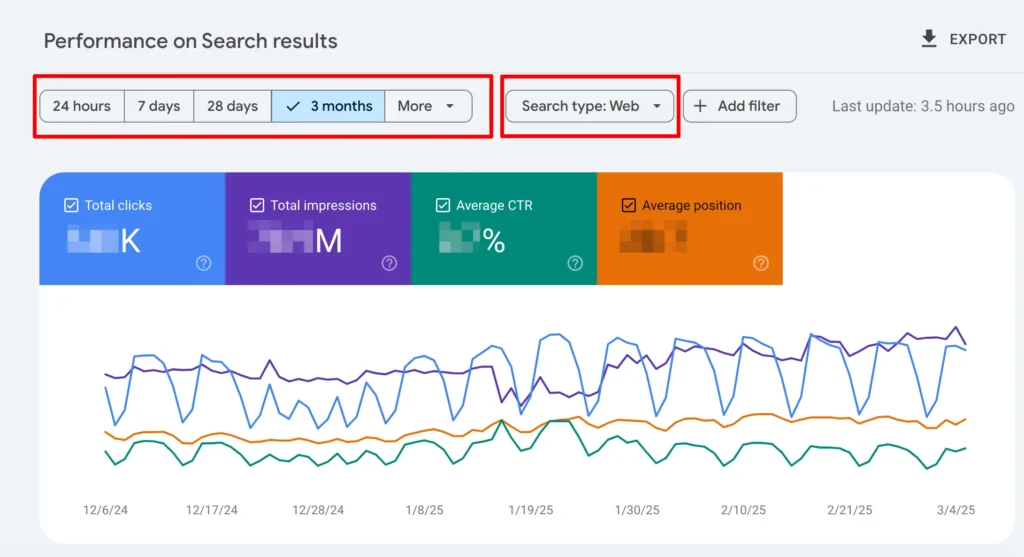
Every other tool here guesses. Search Console reports. It shows the real queries that earned impressions and clicks for your own site, plus your average position for each, with about 16 months of history. Look for queries where you sit between positions 8 and 20. Those pages are close to page one, and a better title, a new section, or an extra internal link can push them over. It can also catch odd new phrases that paid tools rarely list.
- Best for: improving pages you already have.
- Cost: free.
- Watch out: it only shows sites you own, and a brand new site has little data.
5. KWFinder by Mangools
KWFinder is the friendliest paid option for new SEOs. Type a keyword, choose a country and language, and a color coded difficulty gauge appears beside the list. It was built to surface longer, easier phrases. Difficulty scores are estimates in every tool, so open the top ten results yourself before you commit.
- Best for: beginners and solo bloggers.
- Starts at: near $30 a month on yearly billing, with a short free trial.
- Watch out: daily lookup limits on lower plans can feel tight.
6. LowFruits
Most tools give you a difficulty number and stop. LowFruits reads the actual search results and flags weak spots, meaning pages from low authority sites that a newer site could beat. That is a different kind of proof, and for finding low competition keywords it is the most direct method on this list. You can pay as you go. A $25 pack includes 2,000 credits, and new users get 10 free credits to try it.
- Best for: new sites hunting easy wins.
- Starts at: $25 for 2,000 credits.
- Watch out: big keyword lists use credits quickly, and pay as you go credits expire after a year.

7. AlsoAsked
AlsoAsked pulls live People Also Ask data from Google and draws it as a map. You see which questions sit near each other and which ones follow. That map shows intent, which makes it ideal for outlines and FAQ sections. It will not show volume or difficulty, so treat it as a partner tool, not a main one.
- Best for: question and intent research.
- Starts at: free for 3 searches a day, then $12 a month on yearly billing.
- Watch out: no search volume and no difficulty score.
8. SE Ranking
SE Ranking is a full SEO platform that sits in the same price range as Semrush and Ahrefs. A TechRadar review lists more than 5 billion keywords across 188 countries, which helps if you target several markets and not only the USA. The Core plan includes unlimited keyword research along with rank tracking and site audits.
- Best for: teams that want research, tracking, and audits in one place.
- Starts at: $129 a month, or $103.20 on yearly billing.
- Watch out: its database is smaller than Ahrefs for some niche markets, and there is no permanent free plan.
9. Ubersuggest
Ubersuggest comes from Neil Patel and aims at people who find big suites too heavy. Type a keyword and one screen shows volume, difficulty, cost per click, and related ideas. If you like checking data inside the browser, see our roundup of free SEO Chrome extensions too.
- Best for: beginners who want one simple dashboard.
- Starts at: $29 a month for the Individual plan, or $290 once for lifetime access. The free version allows only a few searches a day.
- Watch out: numbers are modeled, not taken from Google, and a lifetime deal only pays off if you keep using the tool.
Which Are the Best Keyword Research Tools for Beginners?
Start with three. Use Google Search Console if you already have a site, Google Keyword Planner to check demand, and KWFinder or Ubersuggest for difficulty. That combo costs little and teaches good habits. Add AlsoAsked when you plan FAQ sections.
Skip the big suites until you outgrow the basics, usually when you publish several posts a week. Our guides to free SEO tools and keyword research tools for small businesses help you build a starter stack.
Which Are the Best Low Competition Keyword Research Tools?
Low competition does not mean low value. A Backlinko study of 306 million keywords found the median keyword gets about 10 searches a month. Most of the web lives in that long tail, and that is where newer sites win.
Three tools handle it well. LowFruits flags weak pages in the results. KWFinder pairs difficulty with long phrase ideas. Semrush lets you filter its Keyword Magic Tool by difficulty. Once you pick a target, check how rivals earn links to those pages. DigiInte’s free Backlink Anchor Text Checker helps, and our guide to anchor text for SEO explains what to look for.
How Do You Use These Tools Together?
You do not need all nine. This five step routine uses a few of them well.
- Brainstorm seeds. List topics from your products, customer emails, and Google autocomplete.
- Expand the list. Run seeds through Semrush, Ahrefs, KWFinder, or Ubersuggest to collect ideas with volume and difficulty.
- Check demand. Confirm the best ideas in Google Keyword Planner and set the right country.
- Read the results. Open the top ten and match intent. Are people shown guides, lists, or product pages?
- Add questions, then track. Use AlsoAsked for FAQs, publish, and watch Search Console. Avoid the usual slips in our post on on page SEO mistakes new bloggers make.
What Mistakes Should You Avoid With Keyword Tools?
- Chasing volume only. A phrase with 50 searches that you can rank for beats one with 5,000 that you cannot.
- Trusting one difficulty score. Scores differ between tools. Always read the live results.
- Ignoring intent. If Google shows product pages, a blog post will struggle.
- Using the wrong country. Set location and language before you read any number.
- Never rechecking. Review Search Console every few months and update pages that slip.
Frequently Asked Questions
Final Thoughts on the Best Keyword Research Tools for SEO
The best keyword research tools for SEO are the ones you will open every week. Begin with Google Keyword Planner and Search Console. Add KWFinder or Ubersuggest for clearer difficulty, and LowFruits when you want weak spots. Move to Semrush or Ahrefs once the workload justifies the price.
Would you rather hand research to people who do it daily? The DigiInte team can build a keyword plan around your site and market. Explore our professional SEO services to get started.

Behind every post at digiinte.com is a team of experienced SEO analysts and digital growth specialists. Our insights are backed by real data, industry research, and hands-on campaign experience — so you get advice that actually moves the needle.