

Last Updated on July 27, 2026 by Digiinte.com Team
Switching between five different tabs just to check a page’s title tag, its backlink count, and its load speed adds up fast when you are auditing dozens of pages a week. The right Chrome extensions turn that scattered process into something you can do without ever leaving the page you are looking at, saving real time across a week of client audits, competitor research, and content reviews.
- Key Takeaways
- How to Think About Building Your Extension Stack
- On-Page SEO Extensions
- Authority and Backlink Extensions
- Keyword Research Extensions
- Technical and Link Auditing Extensions
- Quick Comparison Table
- How to Build a Stack Without Slowing Down Chrome
- When to Trust an Extension vs a Full SEO Platform
- Common Mistakes SEO Professionals Make With Extensions
- Frequently Asked Questions
- Conclusion
This guide covers the 10 best Chrome extensions for SEO professionals, organized by the actual task each one solves, on-page audits, authority and backlinks, keyword research, and technical checks, along with what each one costs, its real limitations, and who it fits best. Rather than just listing logos, each entry includes what the extension actually does day to day, so you can decide whether it earns a permanent spot in your toolbar or just an occasional install for a specific project.
Key Takeaways
- Detailed SEO Extension and SEO Minion both give a fast, free overview of on-page elements without needing an account or API connection.
- MozBar and Ahrefs SEO Toolbar serve different purposes, MozBar for a quick authority snapshot, Ahrefs for deeper backlink and competitive research.
- Keywords Everywhere and Keyword Surfer both surface search volume directly inside Google results, saving a trip to a separate keyword tool.
- Check My Links remains the fastest way to spot broken links on any page in seconds.
- Google Lighthouse, built directly into Chrome, requires no installation and covers performance, accessibility, and basic SEO checks.
- Running more than five to seven extensions active at once can noticeably slow down Chrome, so build a targeted stack rather than installing everything at once.
- Extensions are for fast, in-browser spot checks. Verify anything critical against Google Search Console or Analytics before making major decisions.
How to Think About Building Your Extension Stack
Not every SEO professional needs the same set of tools. A content focused SEO checking on-page elements all day has different needs than a link builder doing outreach and competitive research. Rather than installing every extension available, pick two or three from each category below that match the work you actually do most often.
Think about your extension stack the same way you would think about any other part of your toolkit, matched to the specific, repeated tasks you handle, not the tasks you occasionally imagine you might need to do someday. A freelance SEO consultant juggling multiple small clients will likely lean heavily on fast on-page checkers and a lightweight authority tool, while an in-house SEO working primarily on technical issues for one large site may get far more daily value from Lighthouse and Redirect Path than from a keyword research extension they rarely open.
On-Page SEO Extensions
These extensions give you an instant view of a page’s metadata, headings, and structured data without digging through source code.
1. Detailed SEO Extension
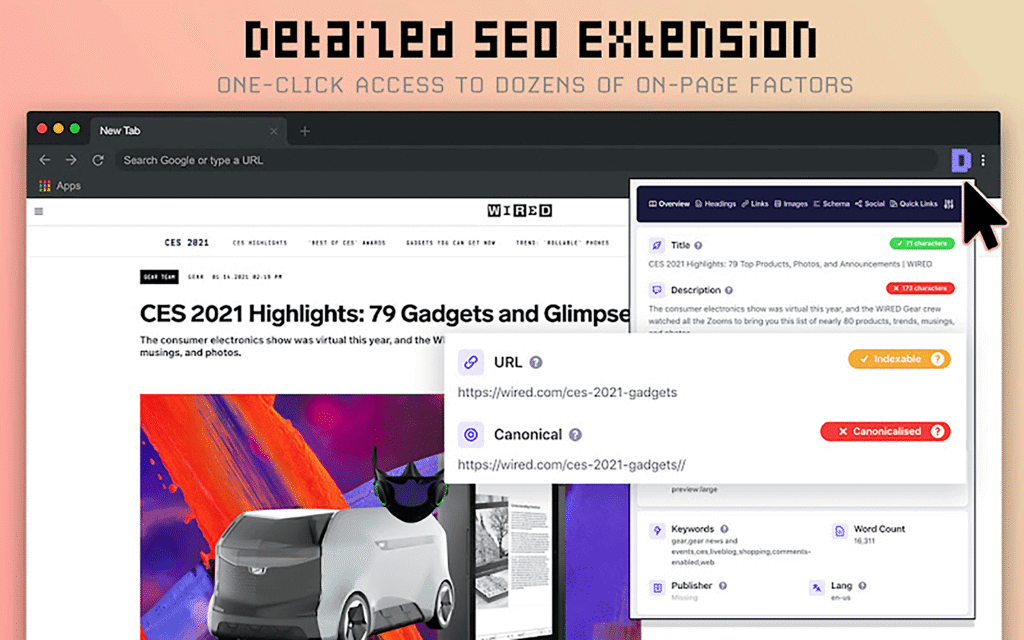
Built by Glen Allsopp of Detailed.com, this extension has become one of the most widely used on-page tools among SEO professionals specifically because of how clean and fast it is.
What It Does: Click the extension on any page and it instantly displays the title tag, meta description, headings in order, canonical URL, hreflang tags, Open Graph and Twitter card tags, and structured data, all in one compact panel.
Key Features: No login or API connection required, works entirely locally in your browser, and displays character counts for titles and descriptions so you can immediately see if either is too long.
Pricing: Completely free, with no premium tier.
Best for: Quick, on-the-fly on-page inspections during audits or competitor research, without needing to view page source manually.
2. SEO Minion
SEO Minion bundles several smaller on-page checks into a single extension, making it a genuine multi-tool rather than a single-purpose checker.
What It Does: Beyond basic on-page metadata, SEO Minion checks broken links, validates hreflang tag implementation across a site, previews how a page would appear in Google search results, and runs a basic on-page SEO analysis against a target keyword.
Key Features: Its hreflang validation is particularly valuable for anyone working on multilingual or multi-region sites, an area many competing extensions do not cover at all.
Pricing: Free, with all core features included.
Best for: SEO professionals working across international or multilingual sites who need hreflang validation alongside standard on-page checks.

Authority and Backlink Extensions
These extensions focus on link data and domain strength, essential for competitive research and outreach work.
3. MozBar
MozBar has been a staple in SEO toolkits for years, largely because of how quickly it surfaces Moz’s Domain Authority and Page Authority metrics directly in your browser.
What It Does: Activate MozBar on any page or search results list and it overlays Domain Authority, Page Authority, and a basic link count directly next to each result, letting you quickly gauge the competitive strength of ranking pages at a glance.
Key Features: Works directly on Google search results pages, letting you scan the relative authority of an entire page of competitors in seconds without clicking into each one individually.
Pricing: A limited free tier is available. Full access to detailed link data and additional metrics requires a Moz Pro subscription.
Best for: Quickly gauging competitive difficulty for a keyword by scanning the authority of pages already ranking.

4. Ahrefs SEO Toolbar
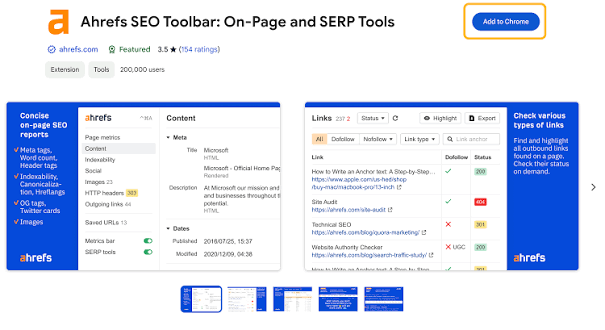
Ahrefs SEO Toolbar leans more heavily into backlink specific data and competitive research compared to MozBar’s broader authority snapshot.
What It Does: Overlays key SEO metrics on any page you visit, including Ahrefs Domain Rating, URL Rating, and referring domains count, along with a quick on-page check for broken links, redirects, and basic metadata.
Key Features: For anyone already using Ahrefs’ main platform, the toolbar syncs directly with your existing account data, giving a more accurate and detailed picture than tools relying on their own separate, smaller index.
Pricing: Free to install, but full metric access requires an active Ahrefs subscription, since it pulls data from Ahrefs’ own backlink index.
Best for: Link builders and competitive researchers already invested in the Ahrefs ecosystem.
Keyword Research Extensions
These extensions surface keyword data directly inside search results, cutting out the need to jump into a separate keyword research tool for a quick check.
5. Keywords Everywhere
Keywords Everywhere overlays search volume, cost-per-click, and competition data directly next to Google search results and several other supported platforms.
What It Does: Search any term on Google and Keywords Everywhere displays monthly search volume alongside related keyword suggestions and “People also search for” data, all without leaving the results page.
Key Features: Also works across other platforms beyond Google, including YouTube and Amazon, useful for SEO professionals who research keywords across multiple content formats.
Pricing: Operates on a prepaid credit system rather than a traditional free tier, where each keyword lookup consumes a small number of credits purchased in advance.
Best for: Quick keyword volume checks directly inside search results without switching tools.
6. Keyword Surfer
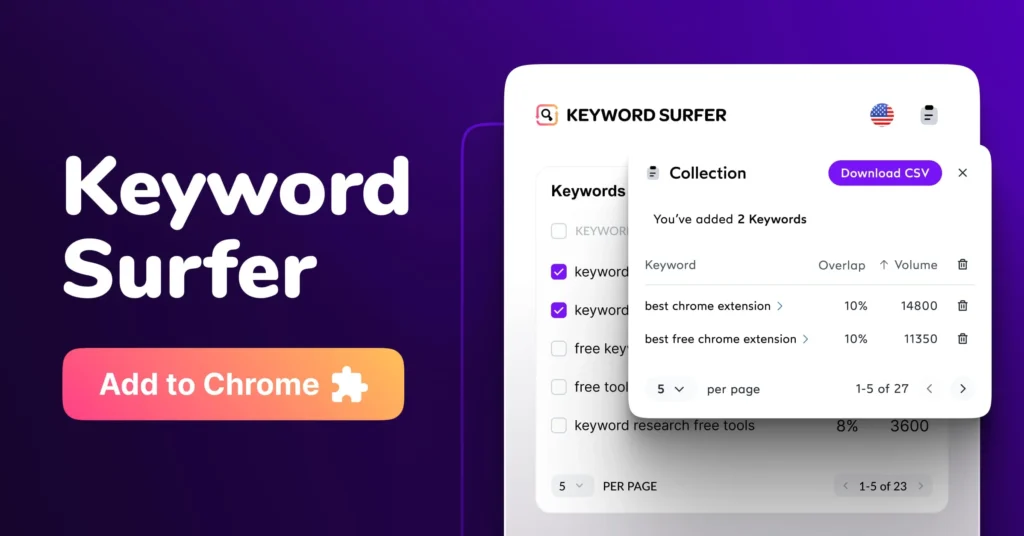
Keyword Surfer, made by the team behind Surfer SEO, provides a genuinely free alternative for basic keyword volume data directly in search results.
What It Does: Displays estimated monthly search volume and a list of related keywords directly in the Google search sidebar, along with a rough word count and domain data for each ranking result on the page.
Key Features: Unlike Keywords Everywhere’s credit system, Keyword Surfer’s core volume data remains genuinely free to use without ongoing credit purchases.
Pricing: Free for its core keyword volume features.
Best for: SEO professionals who want ongoing free keyword volume checks without managing a credit balance.
Technical and Link Auditing Extensions
These extensions focus on the more technical side of a page, load performance, broken links, and the underlying technology a site runs on.
7. Check My Links
Check My Links solves one very specific, very common problem quickly, finding broken links on any page.
What It Does: Run it on any page and it scans every link, highlighting working links in green and broken ones in red, with a summary count at the top showing exactly how many links were checked and how many failed.
Key Features: Extremely fast for its single purpose, making it ideal for a quick check during outreach prospecting or a content audit without needing a full site crawl.
Pricing: Completely free.
Best for: Fast, page-level broken link checks during outreach or content audits.

8. Wappalyzer
Wappalyzer identifies the technology stack behind any website, useful for both competitive research and technical troubleshooting.
What It Does: Click the extension on any site and it reveals the CMS, ecommerce platform, analytics tools, advertising networks, and various other technologies the site is running, pulled from detectable code patterns.
Key Features: Particularly useful when auditing a competitor’s site or diagnosing why a client’s site behaves a certain way, since knowing the underlying platform often explains specific technical limitations or opportunities.
Pricing: A free tier covers basic technology detection. Paid tiers add lead generation features and bulk technology lookups beyond individual page checks.
Best for: Competitive research and quickly identifying a site’s underlying technology stack.
9. Redirect Path
Redirect Path traces the full chain of redirects a URL goes through before reaching its final destination, a genuinely important technical check that is easy to overlook.
What It Does: Displays the complete redirect chain for any URL, including HTTP status codes at each step, making it easy to spot unnecessary redirect chains or incorrect redirect types that can quietly waste crawl budget or dilute link equity.
Key Features: The status code badge appears directly in the browser toolbar, so you can spot a redirect or error at a glance without even clicking into the extension.
Pricing: Completely free.
Best for: Auditing redirect chains during a technical SEO review or after a site migration.

10. Google Lighthouse
Lighthouse is built directly into Chrome’s Developer Tools, requiring no separate installation at all, and remains one of the most authoritative sources for technical performance data since it comes directly from Google.
What It Does: Run an audit on any page and Lighthouse scores performance, accessibility, best practices, and basic SEO, along with a detailed breakdown of specific opportunities to improve each category, complete with estimated impact.
Key Features: Because it is built by Google and used internally for various performance evaluations, its scoring closely reflects the same signals that factor into actual ranking considerations around page experience.
Pricing: Completely free, built into every Chrome installation with no extension needed.
Best for: In-depth technical performance audits directly tied to Google’s own evaluation criteria.

Quick Comparison Table
| Extension | Category | Free Tier | Best For |
| Detailed SEO Extension | On-Page | Fully free | Quick metadata inspection |
| SEO Minion | On-Page | Fully free | Hreflang and multi-check audits |
| MozBar | Authority | Limited free | Quick authority snapshot on SERPs |
| Ahrefs SEO Toolbar | Backlinks | Free install, paid data | Link building and competitive research |
| Keywords Everywhere | Keyword Research | Credit based | Volume data across multiple platforms |
| Keyword Surfer | Keyword Research | Fully free | Ongoing free keyword volume checks |
| Check My Links | Link Auditing | Fully free | Fast broken link checks |
| Wappalyzer | Technical | Limited free | Identifying a site’s tech stack |
| Redirect Path | Technical | Fully free | Auditing redirect chains |
| Google Lighthouse | Technical | Fully free, built-in | Performance and Core Web Vitals audits |
How to Build a Stack Without Slowing Down Chrome
More extensions do not automatically mean better results. Running too many active extensions at once, generally more than five to seven, can noticeably slow down your browser, since each one runs its own background processes on every page you visit.
A practical approach is to pick one extension per core category based on your primary work, one on-page checker, one authority or backlink tool, one keyword research tool, and one or two technical checkers, then enable additional ones only temporarily when a specific task calls for it. Most browsers let you pin frequently used extensions and disable the rest without fully uninstalling them, keeping your options available without the constant performance cost.
When to Trust an Extension vs a Full SEO Platform
Extensions are built for speed, a fast, in-browser snapshot rather than a comprehensive analysis. For quick page level checks during a call, an audit walkthrough, or competitor research, they are genuinely fast and often good enough. But for anything you plan to act on significantly, a major technical decision, a client report, a large scale content strategy, cross-check the data against a full platform like Google Search Console, GA4, or your primary paid SEO tool. Our roundup of the top 20 free SEO tools covers several of these deeper platforms that pair well alongside the extensions in this list.
Common Mistakes SEO Professionals Make With Extensions
Even experienced professionals fall into a few avoidable habits when it comes to browser extensions.
- Installing a dozen extensions during one enthusiastic setup session, then never actually using most of them regularly, while still paying the ongoing performance cost of having them active.
- Trusting an extension’s authority or volume metric as an exact figure rather than a directional estimate, when most of these numbers are modeled approximations rather than precise counts.
- Forgetting to disable unused extensions before screen sharing during a client call, accidentally revealing competitive research tools or unrelated data overlays.
- Never updating extensions, which can lead to outdated data displays or, in rarer cases, compatibility issues with newer Chrome versions.
- Relying entirely on extension data for a major report or strategic decision without cross-checking anything against a primary source like Search Console.
Avoiding these habits matters more than which specific extensions you choose, since even the best tool becomes a liability if it is outdated, misunderstood, or left cluttering your browser unused.
Frequently Asked Questions
- Top 20 Free SEO Tools Every Website Owner Should Use
- 8 Signs Your Website Has a Technical SEO Problem
- 8 On-Page SEO Mistakes New Bloggers Make (And How to Fix Them)
- Why Is My WordPress Page Stuck on Discovered, Not Indexed
Conclusion
The best Chrome extensions for SEO professionals are not the ones with the longest feature list, they are the ones that fit directly into your actual daily workflow without slowing down your browser. Detailed SEO Extension and Check My Links cover fast on-page and link checks, MozBar and Ahrefs SEO Toolbar handle authority research, Keywords Everywhere and Keyword Surfer bring keyword data into your search results, and Wappalyzer, Redirect Path, and Google Lighthouse round out the technical side.
Pick two or three that match the work you do most often rather than installing all ten at once, and keep the rest available to enable only when a specific task calls for them.
Ready to build your stack? Install Detailed SEO Extension and Check My Links today if you have not already, since together they cover two of the fastest, highest value checks any SEO professional runs on a daily basis.

Behind every post at digiinte.com is a team of experienced SEO analysts and digital growth specialists. Our insights are backed by real data, industry research, and hands-on campaign experience — so you get advice that actually moves the needle.