
Anchor text is three words. Understanding it deeply separates SEOs who build links that rank from those who build links that do nothing or worse, trigger a penalty.
Most people treat anchor text as a technical footnote. But it’s one of the clearest signals Google has for understanding what a page is about. Get a handle on how it really works, not the surface-level version and you’ll make smarter decisions about every single link you build or earn from here on out.
Key Fact : How Google Officially Describes Anchor Text
Google’s Search Central documentation describes anchor text as follows: “The anchor text, also known as link text, is the visible text of a link. Good anchor text tells the user and Google something about the page you’re linking to.” That’s Google spelling it out directly. Anchor text is not just a label — it is a communication signal between the linking site, the destination page, and Google’s understanding of both.
Summary
This guide gives you a complete working understanding of anchor text in SEO: what it is, how Google uses it as a ranking signal, all seven types explained with real examples, the common mistakes that turn anchor text from an asset into a liability, and what a healthy anchor text profile actually looks like in practice. Whether you’re brand new to link building or you’ve been doing it for years and want to sharpen your understanding, this is the foundational guide for the entire topic.
- Summary
- What Is Anchor Text?
- The HTML Behind Every Anchor Text
- How Google Uses Anchor Text as a Ranking
- The 7 Types of Anchor Text: Explained with Real Examples
- Type 5: Generic Anchor Text Risk: Very Low – healthy filler
- Anchor Text Risk Levels: Safe, Warning, Danger
- What Is a Natural Anchor Text Profile?
- The Most Common Anchor Text Mistakes And How to Avoid Them
- Internal vs. External Anchor Text: Do They Work Differently?
- FAQ: What Is Anchor Text
What Is Anchor Text?
Anchor text is the visible, clickable words in a hyperlink. It’s the text a user sees on a webpage and clicks to navigate to another page.
In HTML, anchor text is the content placed between the opening <a href> tag and the closing </a> tag. For SEO purposes, anchor text functions as a relevance signal: it tells Google what the destination page is about, how authoritative the linking page considers it, and when evaluated across many links whether those signals look natural or engineered.

The HTML Behind Every Anchor Text
Every hyperlink on the web is built from an HTML anchor element. The structure is: <a href=’destination URL’>anchor text here</a>. The href attribute tells the browser where the link goes. The text between the tags is what Google reads as the anchor text. When no visible text exists — such as with a linked image — Google falls back to the image’s alt attribute as the anchor text.
| Scenario | HTML Code | What Google Reads as Anchor Text |
| Text link | <a href=”/page”>anchor text checker</a> | “anchor text checker” |
| Branded link | <a href=”/page”>Digiinte</a> | “Digiinte” |
| Generic link | <a href=”/page”>click here</a> | “click here” |
| Naked URL | <a href=”https://digiinte.com”>https://digiinte.com</a> | “https://digiinte.com” |
| Image link | <a href=”/page”><img alt=”seo guide”/></a> | “seo guide” (from alt text) |
| No visible text | <a href=”/page”></a> | Empty — no anchor signal passed |
The Image Anchor Text Rule Most SEOs Miss
When an image links to your page, the alt attribute of that image becomes the anchor text Google reads. This means an image link with alt=’best accounting software for small businesses’ passes that phrase as an anchor text signal keyword-rich, with no visible text required. Check your image alt attributes on any linked images. They’re part of your anchor text profile whether you realize it or not.
How Google Uses Anchor Text as a Ranking
Google uses anchor text in two distinct ways. First, as a relevance signal: when many pages link to a URL using similar descriptive anchor text, Google takes this as evidence that the linked page is authoritative on that topic.
Second, as a spam detection signal: when anchor text patterns look coordinated for instance, dozens of different sites all linking with the exact same keyword phrase – Google’s Penguin algorithm treats this as evidence of link manipulation and reduces or reverses the ranking benefit of those links.
Here’s how this plays out in practice with two real scenarios:
| Scenario | Anchor Text Pattern | What Google Concludes | Result |
| Recipe blog gets 200 editorial links | Mix of: ‘amazing recipe site’, ‘Sarah’s Kitchen’, ‘sarahskitchen.com’, ‘great recipes here’, ‘this cooking blog’ | Natural, varied editorial links from real writers using their own words | Full ranking credit passed trust signal |
| SEO agency builds 80 guest post links | All 80 use: ‘best SEO agency in Chicago’ or ‘top SEO company Chicago’ | Coordinated, keyword-engineered anchor pattern – looks manipulated | Penguin discount or penalty reduced or reversed ranking benefit |
The critical insight: Google is not just reading individual anchors. It’s reading the pattern across your entire link profile. A handful of exact-match keyword links from credible editorial sources is fine. Fifty identical keyword anchors from low-quality guest post sites is a red flag regardless of how natural each individual link looks in isolation.
What John Mueller of Google Has Said : In a 2024 Google Search Central Q&A session, John Mueller confirmed that anchor text continues to be a meaningful signal, but emphasized that Google tries to understand context not just keywords. A link from a relevant, trusted page with descriptive anchor text carries far more weight than a keyword-matched anchor from an irrelevant or low-quality source. Quality of the linking page matters as much as the words used.
The 7 Types of Anchor Text: Explained with Real Examples
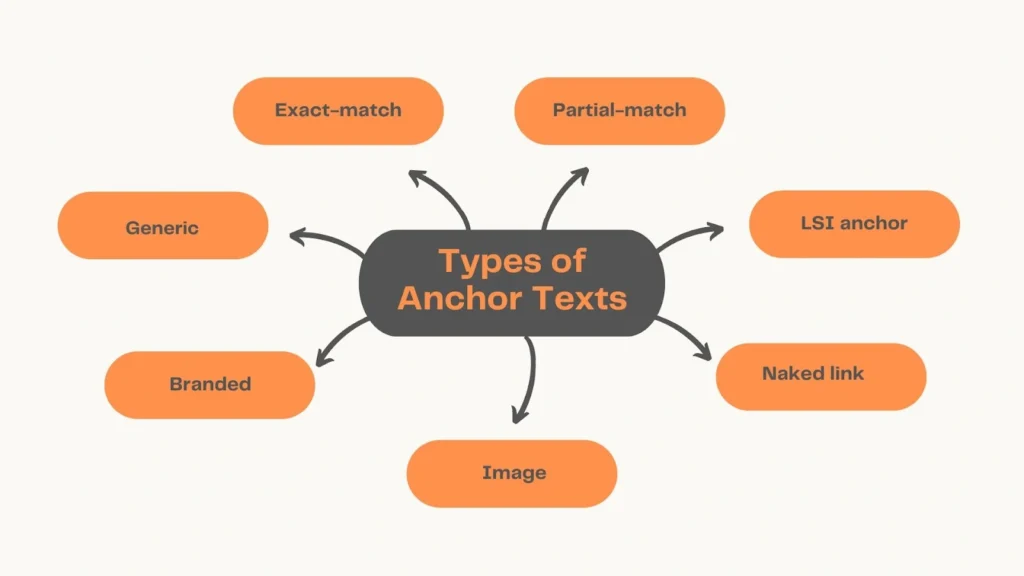
There are seven primary anchor text types: exact match, partial match, branded, naked URL, generic, LSI or semantic, and image (alt text). Each type carries a different level of SEO relevance signal and a different associated risk. Understanding all seven is essential for building a link profile that ranks without triggering Penguin. The most dangerous type is exact match when overused; the safest is branded; and the most underestimated is LSI or semantic.
Type 1: Exact Match Anchor Text Risk: High, use sparingly
Target: 5–10% of referring domains of referring domains
Real-World Example
| Link text: “anchor text checker” HTML: <a href=”https://digiinte.com/…”>anchor text checker</a> |
Why It Matters for SEO
Exact match anchor text uses the target keyword verbatim as the link text. It sends the strongest relevance signal to Google but also triggers the strongest spam filter when overused. Before Google’s Penguin update, SEOs stuffed exact-match anchors into every guest post and link exchange. Today, more than 10–15% exact-match in your profile is a penalty waiting to happen.
Usage Tip Reserve exact-match anchors for naturally earned editorial links think: a blogger genuinely recommending your tool and writing exactly what it does. Never use exact-match anchor text in a planned outreach campaign. If you’re building links intentionally, use branded or partial match instead.
Type 2: Partial Match Anchor Text Risk: Medium use moderately
Target: 10–15% of referring domains of referring domains
Real-World Example
| Link text: “check your anchor text profile here” HTML: <a href=”https://digiinte.com/…”>check your anchor text profile here</a> |
Why It Matters for SEO
Partial match anchors include your target keyword alongside other words. They pass strong relevance signals without the manipulation risk of exact match. A sentence like ‘you can check your anchor text profile here’ flows naturally in content a reader wouldn’t think twice about it. Google sees it the same way.
Usage Tip Partial match is the safest choice for outreach and guest post anchor text. Vary the surrounding words each time ‘use this tool to check backlink anchor text’, ‘how to analyze your anchor text profile’, ‘run an anchor text check here’ these all signal the same topic while looking natural across different sites.
Type 3: Branded Anchor Text Risk: Low, build actively
Target: 40–50% of referring domains of referring domains
Real-World Example
| Link text: “Digiinte” HTML: <a href=”https://digiinte.com/…”>Digiinte</a> |
Why It Matters for SEO
Branded anchors use your company or site name as the link text. They’re the safest anchor type because they’re what real editorial links almost always use. When TechCrunch writes about your company, they don’t say ‘best SEO tool’ , they say ‘Digiinte.’ Branded anchors are the foundation of a healthy profile and the clearest sign that your links are genuinely earned.
Usage Tip Branded anchors should make up the largest single portion of your profile. Build them through digital PR, business citations, brand mention monitoring (use tools like Google Alerts or Mention to find unlinked brand mentions and request links), podcast appearances, and press coverage. These are the links that build authority without risk.
Type 4: Naked URL Anchor Text Risk: Low- naturally occurring
Target: 10–15% of referring domains of referring domains
Real-World Example
| Link text: “https://digiinte.com/anchor-text-checker” HTML: <a href=”https://digiinte.com/…”>https://digiinte.com/anchor-text-checker</a> |
Why It Matters for SEO
Naked URL anchors use the raw URL as the link text. They look exactly like what they are: someone pasting a link without thinking about anchor text optimization. That’s why they’re such a natural-looking signal. Forum posts, social shares, resource lists, and quick references all tend to produce naked URL links organically.
Usage Tip Don’t try to ‘optimize’ naked URL links by requesting they be changed to keyword anchors. Their naturalness is their value. If you’re building a resource page presence or submitting to directories, naked URL anchors are perfectly appropriate and they add the variety your profile needs.
Type 5: Generic Anchor Text Risk: Very Low – healthy filler
Target: 10–15% of referring domains of referring domains
Real-World Example
| Link text: “click here” HTML: <a href=”https://digiinte.com/…”>click here</a> |
Why It Matters for SEO
Generic anchors ‘click here’, ‘read more’, ‘this article’, ‘here’, ‘learn more’, ‘visit site’ – pass minimal relevance signal to Google but add critical diversity to your profile. A profile with zero generic anchors looks suspicious. Real people who link to content spontaneously often use these phrases. Their presence signals organic linking behavior.
Usage Tip Don’t engineer generic anchors – you don’t need to. If you create content worth linking to, generic anchors will appear naturally. What matters is that you don’t have a profile where 100% of anchors are keyword-rich. Generic anchors are the sign that real humans, not just SEOs, are linking to you.
Type 6: LSI / Semantic Anchor Text Risk: Low-Medium- use freely
Target: 10–15% of referring domains of referring domains
Real-World Example
| Link text: “backlink profile analysis tool” HTML: <a href=”https://digiinte.com/…”>backlink profile analysis tool</a> |
Why It Matters for SEO
LSI (Latent Semantic Indexing) or semantic anchors use topically related phrases rather than your exact keyword. ‘Backlink profile analysis’, ‘link text SEO checker’, ‘how to audit anchor text’- all of these signal relevance to the topic of anchor text without using the exact keyword phrase. They’re Google’s favorite type of keyword-related anchor because they look like natural language.
Usage Tip Use semantic anchors freely in link outreach without worry. When pitching guest post ideas, suggest natural-sounding anchor text like ‘complete link-building guide’ or ‘backlink audit process’ rather than exact keywords. These pass strong topical signals while creating a varied, natural-looking profile.
Type 7: Image Alt Text Anchors Risk: Low- often overlooked
Target: Natural — no specific target of referring domains
Real-World Example
| Link text: “seo audit checklist [image]” HTML: <a href=”https://digiinte.com/…”><img alt=”seo audit checklist”/></a> |
Why It Matters for SEO
When a linked image has no text, Google uses the image’s alt attribute as the anchor text. Most SEOs never audit image link anchors which means keyword-rich alt attributes on linked images can quietly add to your exact-match anchor count without you realizing it. This is especially common on infographic links and icon/logo links.
Usage Tip Audit your image links in Ahrefs or SEMrush by filtering for links where the anchor text matches an image alt attribute. Make sure image alt texts on linked images are descriptive and natural not stuffed with target keywords. A logo linking to your homepage should have alt=’Digiinte logo’, not alt=’best anchor text checker tool 2026′.
Anchor Text Risk Levels: Safe, Warning, Danger
Each anchor type carries an inherent risk level but the actual risk in your profile depends on the percentage, not just the presence. A single exact-match anchor from a credible editorial source is fine. Fifty exact-match anchors from low-quality sites is not. The table below gives you the safe zone, warning zone, and danger zone for each anchor type, based on percentage of referring domains using that anchor type.
| Anchor Type | Safe Zone | Warning Zone | Danger Zone | Primary Risk |
| Exact Match | Under 10% | 10–15% | Over 15% | Penguin penalty- manual action risk |
| Partial Match | Under 15% | 15–20% | Over 25% | Looks coordinated if all keyword-heavy |
| Branded | 40–50% | 30–40% | Under 25% | Profile looks engineered, not earned |
| Naked URL | 10–15% | 5–10% | Under 3% | Too few looks suspicious- artificially clean |
| Generic | 10–15% | 5–10% | Under 3% | Same as above real people use generic phrases |
| LSI / Semantic | 10–15% | 15–20% | Over 30% | Keyword concentration even without exact match |
| Image / Alt | Natural | Review if keyword-heavy alt texts dominate | Treat as exact match risk | Invisible keyword anchors |
What Is a Natural Anchor Text Profile?
A natural anchor text profile reflects how real people link when they’re not thinking about SEO. The majority of links use a brand name or raw URL. Some use descriptive phrases naturally chosen by the writer. A handful happen to include keyword-rich text. Generic phrases like ‘click here’ appear occasionally. The overall picture has variety, no single anchor dominates beyond 40–50%, and keyword-rich anchors are clearly the minority.
The Most Common Anchor Text Mistakes And How to Avoid Them
The three most common anchor text mistakes are: building links with keyword-rich anchors across all outreach campaigns without varying them, not monitoring anchor text distribution after link campaigns so problems accumulate unnoticed, and optimizing anchor text only for keywords while neglecting to build branded anchors through PR and brand mentions. Each of these mistakes is recoverable but recovery is significantly more expensive than prevention.
| Mistake | What It Looks Like | Why It’s Dangerous | The Fix |
| Keyword anchor outreach | Every guest post uses ‘best [keyword]’ or ‘[keyword] tool’ as anchor | Creates obvious footprint – SpamBrain detects the pattern across the cluster | Rotate to branded, partial, and generic anchors in all outreach |
| No profile monitoring | Exact-match climbs from 8% to 22% over 6 months without anyone noticing | Silent over-optimization -discovered only after a ranking drop | Monthly anchor text check in GSC; quarterly full audit in Ahrefs |
| Ignoring branded link building | Profile has 12% branded, 35% keyword-related anchors | Profile looks engineered – no sign of organic brand recognition | Digital PR, citations, brand mention outreach for branded anchors |
| Same anchor text = same link | Outreach pitch says ‘please link to us using [keyword]’ | SEOs across industry end up with identical anchors -obvious coordination | Suggest natural phrasing; let writers use their own words |
| Mixing anchor types in one campaign | 50 guest posts: 30 exact match, 15 partial, 5 branded | Even with ‘variety,’ campaign footprint is visible | Decide on anchor strategy per campaign; keep exact-match campaigns minimal |
Internal vs. External Anchor Text: Do They Work Differently?
Yes, internal and external anchor text work differently in SEO. External anchor text (from other websites) carries Penguin-related risk when over-optimized with keyword-rich phrases. Internal anchor text (from your own site to your own pages) does not carry the same penalty risk , you can and should use descriptive, keyword-relevant anchor text on internal links to help Google understand your site architecture. The rules are different, and treating them the same is a missed opportunity.
| Factor | External Anchor Text | Internal Anchor Text |
| Source | Other websites linking to yours | Your own pages linking to your own pages |
| Penalty risk | High if over-optimized with exact-match keywords | Very low – you control it, and Google treats it differently |
| Best practice | Branded first, varied, natural language | Descriptive and keyword-relevant -use your target phrases |
| Monitoring needed | Yes — monthly/quarterly check recommended | Audit annually; fix broken or generic internal anchors |
| Impact on rankings | Direct — strong external anchor signal influences ranking | Indirect – helps Google understand page relevance and hierarchy |
| Common mistake | Too many exact-match anchors from guest posts | Using ‘click here’ for internal links instead of descriptive text |