
Most websites have never looked at the words sitting inside their backlinks.
Those words — called anchor text — are quietly determining whether Google rewards or penalises every single link pointing to your site. And right now, your profile is either working for you or working against you.
📊 Key Fact
Google’s Penguin algorithm — now running in real-time as part of Google’s core ranking system — specifically targets unnatural anchor text patterns. Google’s own Search Central documentation names anchor text as one of the strongest signals it uses to evaluate what a linked page covers. It is not a technicality. It is a primary ranking input.
Summary
An anchor text checker is an SEO tool that scans your backlink profile and reveals the exact words other websites use when linking to yours. It is one of the most critical — and most overlooked — elements of link building strategy.
In 2026, Google’s algorithms analyse anchor text distribution to detect over-optimisation, unnatural link patterns, and Penguin-style manipulation. The ideal anchor text profile uses 40–50% branded anchors, 25–30% generic/naked URL anchors, and limits exact-match keywords to no more than 10–15% of total backlinks.
This guide covers everything: what anchor text is, why it matters, the 7 types you must know, the best free and paid checker tools, safe ratio benchmarks, and step-by-step instructions for auditing and building a natural anchor text profile.
- Introduction: The Hidden Variable That Decides Your Rankings
- What Is Anchor Text?
- Why Anchor Text Still Matters for SEO in 2026
- The 7 Types of Anchor Text Every SEO Must Know
- What Is an Anchor Text Checker Tool?
- Best Backlink Anchor Text Checker Tools
- How to Check Your Anchor Text Profile (Step-by-Step)
- Anchor Text Ratio: The Safe Distribution Benchmarks
- Over-Optimisation: How to Identify and Fix It
- How to Build a Natural Anchor Text Profile
- Toxic Anchor Text: Identification and Disavow Process
- Common Anchor Text Mistakes SEOs Make
- FAQ: Anchor Text Checker Questions Answered
- Conclusion: Master Your Anchor Text, Master Your Rankings
Introduction: The Hidden Variable That Decides Your Rankings
There is a part of your backlink profile that most SEOs completely ignore. Not the number of links. Not the domain authority of linking sites. The actual words used to link to you. That is anchor text — and it is one of the most decisive, most misunderstood ranking signals in Google’s algorithm.
Here is what makes it so dangerous: you can be doing everything else right — great content, strong technical SEO, legitimate link building — and still tank your rankings because the anchor text distribution in your backlink profile looks unnatural to Google. Penalties from bad anchor text patterns are real, they are algorithmically applied in real-time, and they are entirely preventable once you know what to look for.
This guide covers the complete picture: what anchor text is, why the 7 types matter differently, how to check and audit your own profile using free and paid tools, the safe distribution ratios you need to stay within, and a clear system for building a natural anchor text profile that Google rewards in 2026 — not penalises.
What Is Anchor Text?
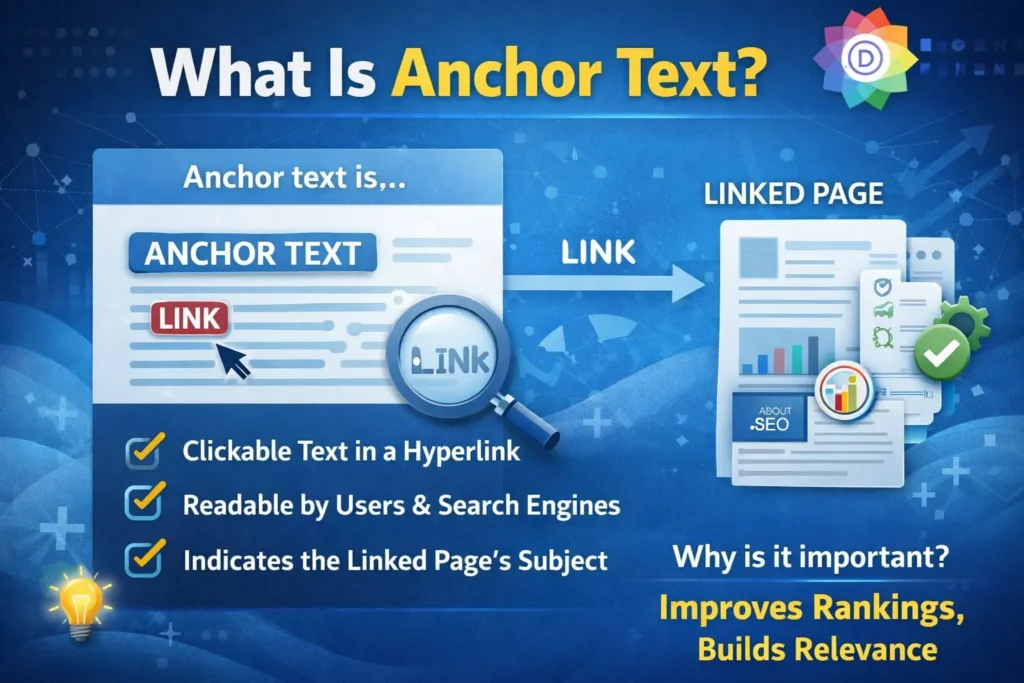
Anchor text is the visible, clickable text in a hyperlink. It is the words a user sees and clicks when navigating from one webpage to another. In HTML, anchor text sits between <a href=’…’> and </a> tags. From an SEO perspective, anchor text tells Google what the linked page is about — making it a direct relevance and ranking signal.
Think of anchor text as a recommendation letter. When a reputable website links to your page and writes ‘best anchor text checker tool’, they are telling Google: ‘this page is about anchor text checker tools.’ The more relevant and natural those recommendations look, the more Google trusts them.
Anchor Text — HTML Example
HTML: <a href=’https://digiinte.com/anchor-text-checker’>anchor text checker</a> What Google reads: ‘anchor text checker’ = what the linked page is about
Why Anchor Text Still Matters for SEO in 2026
Anchor text matters because Google uses it as a relevance signal to understand the topic and context of the destination page. When many authoritative websites link to a page using similar descriptive anchor text, Google interprets this as strong evidence that the page is a relevant authority on that topic. However, when anchor text appears manipulated or unnaturally concentrated, Google’s Penguin algorithm treats it as a spam signal and reduces the page’s rankings.
John Mueller of Google confirmed in a 2024 Search Central live session: ‘Anchor text is one of the strongest signals we have for understanding what a linked page covers. When it looks editorial and natural, it passes genuine value. When it looks manipulated, we discount it or apply a negative signal.’
Here is why this matters more in 2026 than ever:
- Penguin is now real-time: Since Google integrated Penguin into its core algorithm, penalties are applied continuously — not in batch updates. Any new spammy link can affect you immediately.
- AI-powered spam detection: Google’s SpamBrain AI now analyses link patterns at scale, detecting unnatural anchor text distributions that even manual reviewers would miss.
- Competitive advantage: Most websites in your niche have anchor text profiles they’ve never audited. Fixing yours gives you a direct edge over competitors who are unknowingly over-optimised.
- Featured snippet eligibility: Pages with clean, trustworthy link profiles are significantly more likely to earn featured snippets and AI Overview mentions.
The 7 Types of Anchor Text Every SEO Must Know
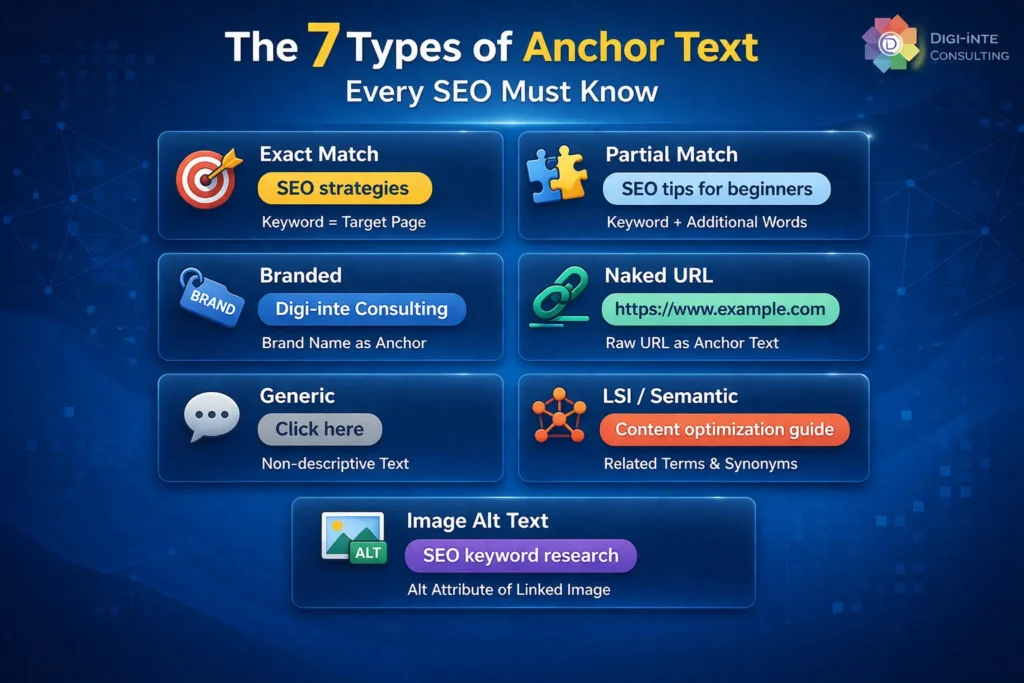
There are seven primary types of anchor text: exact match, partial match, branded, naked URL, generic, LSI/semantic, and image anchors. Each type carries a different weight of relevance signal, and each should appear in a specific proportion within a healthy backlink profile to avoid over-optimisation penalties.
| Anchor Type | Example | SEO Risk Level | Recommended % of Backlinks |
| Exact Match | anchor text checker | HIGH — use sparingly | 5–10% |
| Partial Match | check your anchor text here | MEDIUM | 10–15% |
| Branded | Digiinte / Digiinte SEO | LOW — safest | 35–45% |
| Naked URL | digiinte.com/anchor-text-checker | LOW | 10–15% |
| Generic | click here / read more / this article | VERY LOW | 10–15% |
| LSI / Semantic | backlink analysis / link profile checker | LOW–MEDIUM | 10–15% |
| Image Alt Text | [image with alt=’anchor text tool review’] | LOW | 5% or natural |
Let’s break down each type
1. Exact Match Anchor Text
This is the most powerful — and most dangerous — type. It uses your target keyword verbatim: ‘anchor text checker’, ‘backlink anchor text checker’. Historically, SEOs used these to rank pages overnight. Google’s Penguin update made this the riskiest category. If exact-match anchors make up more than 10–15% of your profile, you are in penalty territory.
2. Partial Match Anchor Text
Partial match anchors include your keyword alongside other words: ‘how to check anchor text’, ‘free anchor text checker tool’. These are safer than exact match and still pass strong relevance signals. Use them moderately — around 10–15% of your profile.
3. Branded Anchor Text
This is your safest anchor text type and should form the largest proportion of your profile. Examples: ‘Digiinte’, ‘Digiinte.com’, ‘Digiinte blog’. Branded anchors look completely editorial — because they usually are. They tell Google your brand is being referenced naturally across the web.
4. Naked URL Anchors
When someone links using just your URL as the anchor: ‘https://digiinte.com’ or ‘digiinte.com/blog’. These look extremely natural (people paste links without thought) and carry low risk. Aim for around 10–15% of your profile.
5. Generic Anchors
‘Click here’, ‘read more’, ‘learn more’, ‘this page’, ‘here’. These provide almost zero relevance signal — but they make your profile look natural. Every healthy link profile has generic anchors. Too few can actually look suspicious.
6. LSI and Semantic Anchors
Latent Semantic Indexing anchors are keyword variations and related terms: ‘backlink profile analysis’, ‘link text SEO checker’, ‘how to audit anchor text’. These signal topical relevance without the risk of exact-match over-optimisation.
7. Image Alt Text Anchors
When an image links to your page, Google uses the image’s alt attribute as the anchor text. Ensure your linked images have descriptive, keyword-relevant alt text — this is an easy, overlooked source of anchor text diversity.
What Is an Anchor Text Checker Tool?
An anchor text checker is an SEO software tool that crawls a website’s backlink profile and extracts the anchor text used in all incoming links. It displays a breakdown of anchor text types, frequencies, and referring domains — enabling SEOs to identify over-optimised keywords, detect toxic links, spot gaps, and benchmark their profile against best-practice ratios.
At its core, an anchor text checker answers three critical questions:
- What are people saying when they link to my pages?
- Is my anchor text distribution healthy or at risk of a penalty?
- Which specific anchors are toxic, over-used, or missing from my profile?
Without an anchor text checker, you are flying blind. You cannot see what your backlink profile actually looks like from Google’s perspective. And that blindness has ended the rankings of thousands of websites that violated anchor text best practices without ever realising it.
Most professional tools — Ahrefs, SEMrush, Moz, Google Search Console — include anchor text analysis as part of their backlink reporting suite. Several free-to-use tools also offer basic anchor text breakdowns, which we cover in the next section.
Best Backlink Anchor Text Checker Tools
The best anchor text checker tools in 2026 are Ahrefs (most comprehensive database), SEMrush (best for agency reporting), Moz Link Explorer (best free-tier access), Google Search Console (free, direct from Google), and Ubersuggest (best budget paid option). For free one-off checks, Small SEO Tools and SEOreviewtools.com offer basic anchor text lookups without account creation.
| Tool | Anchor Text Feature | Free Tier? | Best For | Pricing (2026) |
| Ahrefs | Full anchor text breakdown with filters, history, and trend graphs | Limited (10 queries/month) | Advanced analysis & audits | From $129/mo |
| SEMrush | Anchor text report, toxic anchor detection, anchor distribution chart | Limited (10 reports/day) | Agency reporting & audits | From $139/mo |
| Moz Link Explorer | Anchor text tab with referring domain counts and spam scores | 10 free queries/month | Mid-level SEOs | From $99/mo |
| Google Search Console | Top anchor texts section under Links report | 100% FREE | Quick checks & monitoring | Free |
| Ubersuggest | Backlink anchor text export with domain overview | 3 free searches/day | Freelancers & small businesses | From $29/mo |
| Majestic SEO | Anchor text cloud + summary breakdown | Very limited | Link prospecting | From $49/mo |
| Small SEO Tools | Basic anchor text counter per URL | 100% FREE | Quick one-off lookups | Free |
Pro Insight : For most website owners and small businesses, Google Search Console + one free Moz check per month is enough to keep your anchor text profile healthy. You only need a paid tool if you are actively building links at volume, managing multiple client sites, or recovering from a penalty where deep anchor text analysis is required.
How to Check Your Anchor Text Profile (Step-by-Step)
To check your anchor text profile: (1) Open your chosen SEO tool, (2) Enter your domain URL, (3) Navigate to the Backlinks or Link Profile section, (4) Select the Anchor Text tab or report, (5) Filter by referring domains — not raw backlinks — to avoid duplication, (6) Export the data and categorise each anchor into its type, (7) Calculate percentages and compare against the safe ratio benchmarks below.
Step-by-Step: Using Google Search Console (Free Method)
- Log in to Google Search Console and select your property.
- Click ‘Links’ in the left navigation panel.
- Under ‘Top linking sites’, click ‘More’ to see your full referring domain list.
- Under ‘Top anchor texts’, Google shows the most common anchors linking to your site. Download this list.
- Manually categorise each anchor into: Branded, Exact Match, Partial Match, Generic, Naked URL, LSI.
- Calculate percentages for each category against total linking root domains.
- Compare your distribution against the safe ratio benchmarks in Section 7.
Step-by-Step: Using Ahrefs or SEMrush (Professional Method)
- Go to Site Explorer and enter your domain.
- Click ‘Backlinks’ in the left panel, then select the ‘Anchors’ tab.
- Filter by ‘Dofollow’ links first to focus on active ranking signals.
- Sort by ‘Referring Domains’ — this gives you unique domain counts per anchor (not inflated raw link counts).
- Export to CSV. Open in Excel or Google Sheets.
- Add a column: manually classify each anchor type (Branded, Exact, Partial, etc.).
- Use COUNTIF to calculate how many anchors fall into each category.
- Calculate each category as a percentage of total referring domains.
- Flag any anchors with suspiciously high percentages or obviously spammy text.
- Compare against your benchmarks — and read Section 7 before you start.
Anchor Text Ratio: The Safe Distribution Benchmarks
The safest anchor text distribution for most websites in 2026 is: 40–50% branded anchors, 10–15% naked URL anchors, 10–15% generic anchors, 10–15% LSI/semantic anchors, 5–10% partial match, and no more than 5–10% exact match. These benchmarks apply to the backlinks pointing to your entire domain. Individual pages may have slightly different profiles depending on their authority and age.
| Anchor Type | Safe Range | Warning Zone | Danger Zone |
| Branded (site name/brand) | 40–50% | 30–40% | Under 25% |
| Naked URL (raw link) | 10–15% | 5–10% | Under 3% |
| Generic (click here, etc.) | 10–15% | 5–10% | Under 3% |
| LSI / Semantic (variations) | 10–15% | 15–20% | Over 25% |
| Partial Match (kw + words) | 5–10% | 10–15% | Over 20% |
| Exact Match (exact keyword) | 5–10% | 10–15% | Over 15% |
Important: Measure by Referring Domains, Not Raw Links Always calculate anchor text ratios using referring domain counts, never raw backlink counts. A single domain can send 50 links — counting each one inflates your metrics. What matters is how many unique websites use each anchor type. This is how Google thinks about it, and it should be how you think about it too.
Over-Optimisation: How to Identify and Fix It
Anchor text over-optimisation occurs when too high a percentage of backlinks use the same keyword-rich anchor text, particularly exact-match anchors. It signals to Google that links were built artificially to manipulate rankings rather than earned naturally. Warning signs include: a single anchor text making up more than 15% of dofollow backlinks, no branded or generic anchors in your profile, and a sudden spike in exact-match anchors over a short period.
Warning Signs of Over-Optimisation
- One anchor text phrase accounts for more than 15% of your dofollow link profile
- Your top 3 anchors are all exact-match keywords — zero branded or generic anchors visible
- You built 20+ guest posts all using the same anchor text within 60 days
- Ahrefs or SEMrush flags your anchor text distribution as ‘unnatural’ or ‘high risk’
- Your rankings dropped after a Google core update — especially between 2022–2025
- Your backlinks all come from low-DA, irrelevant websites with keyword-heavy anchor text
How to Fix Over-Optimised Anchor Text
- Audit your full anchor text profile and identify which anchors are over-represented.
- Stop building new links with exact-match anchors immediately.
- Actively pursue links with branded, naked URL, and generic anchors to dilute the ratio.
- For genuinely toxic links (spam sites, link farms, irrelevant foreign sites): use Google’s Disavow Tool.
- Reach out to webmasters of high-quality sites with over-optimised anchors and request an anchor text change.
- Monitor your anchor text profile monthly until your distribution enters the safe zone.
How to Build a Natural Anchor Text Profile
A natural anchor text profile is built by prioritising editorial link earning over anchor text manipulation. The foundation is: (1) produce content so valuable that people link using whatever words come naturally to them, (2) when you do outreach, vary your anchor text requests deliberately, (3) use your brand name as your primary anchor, and (4) monitor your ratio quarterly and adjust outreach strategy accordingly
The 7 Rules of Natural Anchor Text Building
- Rule 1 — Brand First: For every 10 links you build, at least 4–5 should use your brand name as the anchor. This is the hallmark of a legitimate web presence.
- Rule 2 — Rotate Deliberately: Never use the same exact anchor text twice in the same month when doing outreach. Keep a spreadsheet tracking what you’ve used.
- Rule 3 — Earn First, Build Second: Content that earns links naturally (data studies, original research, free tools, ultimate guides) will always have a healthier anchor profile than link-built content.
- Rule 4 — Context Matches Anchor: The anchor text should make sense in context. If your anchor is ‘anchor text checker’, the surrounding sentence must logically lead to a click on that phrase.
- Rule 5 — Avoid Anchor Footprints: When running a guest posting campaign, never use the same anchor text across multiple posts. This is an obvious footprint Google’s SpamBrain identifies.
- Rule 6 — Monitor Monthly: Your profile changes as new links arrive. Check your anchor distribution every 30 days and adjust your acquisition strategy if any category drifts into the warning zone.
- Rule 7 — Disavow Proactively: Do not wait for a penalty. If you spot toxic anchors from clearly spammy sites, add them to your disavow file now.
Toxic Anchor Text: Identification and Disavow Process
Toxic anchor text refers to anchor text from low-quality or spammy backlinks that carries negative SEO signals. Common examples include: keyword-stuffed anchors from irrelevant link farms, adult or gambling site anchors pointing to non-related pages, anchors written in foreign languages from irrelevant directories, and anchors that contain the exact keywords you rank for but come from clearly manipulative sources.
Red Flags: Toxic Anchor Text Patterns
- Anchors from websites with Domain Rating (DR) under 5 and no organic traffic
- Multiple links from the same IP or hosting block using identical keyword-rich anchors
- Anchors in a foreign language pointing to English-language money pages
- Adult, pharmaceutical, or gambling anchors pointing to unrelated websites
- Exact-match anchors from sites with zero topical relevance to your niche
- A sudden spike of 50+ new backlinks all using the same anchor text within 7 days
Common Anchor Text Mistakes SEOs Make
After auditing hundreds of backlink profiles, the many SEO research team has identified the same critical mistakes appearing again and again. Avoid these — they are avoidable and they are costing real rankings.
| Mistake | Why It Happens | The Risk | The Fix |
| Over-using exact match anchors in outreach | Trying to rank fast for target keywords | Penguin penalty, ranking drops | Rotate to branded + LSI anchors |
| Counting raw links, not referring domains | Tool default shows raw count | Skewed ratio analysis | Always filter by ‘referring domains’ |
| Ignoring internal links anchor text | Focus stays on external backlinks | Missed on-page signal opportunity | Audit internal links quarterly |
| Not monitoring after link campaigns | Set it and forget it mindset | Gradual profile degradation | Monthly anchor text health checks |
| Using exact anchor text in all guest posts | Consistent messaging logic | Obvious link footprint | Vary every guest post anchor |
| Ignoring GSC anchor text report | Underrating free tools | Missing early warning signs | Check GSC Links report monthly |
FAQ: Anchor Text Checker Questions Answered
Conclusion: Master Your Anchor Text, Master Your Rankings
Anchor text is one of the oldest ranking signals in SEO — and in 2026, it remains one of the most decisive. The difference between a backlink profile that builds authority and one that triggers a Penguin signal comes down to distribution, diversity, and deliberate strategy.
Here are the three principles that separate sites that rank from sites that get penalised:
3 Key Takeaways
- Brand first, keyword second: 40–50% of your backlinks should use your brand name as the anchor. This is the single most reliable protection against over-optimisation penalties.
- Measure by referring domains, not raw links: One spammy site sending 100 keyword-rich links is far more damaging than 100 different sites each sending one. Always analyse your profile at the domain level.
- Audit quarterly, act monthly: A backlink profile is not a one-time task. New links arrive, old links disappear, and your ratio shifts. The SEOs who maintain clean profiles are the ones who check them regularly.