
Last Updated on May 1, 2026 by Digiinte.com Team
Your URL is the first thing Google reads before it ever touches your content. Most website owners treat it like a throwaway detail, something auto generated and never touched again. That is a mistake that costs real rankings every single day.
SEO friendly URLs are short, descriptive, keyword rich web addresses that help both search engines and real people understand what a page is about before clicking. Done right, they can lift your click through rate, improve crawlability, and quietly reinforce every other SEO effort on your page.
- Key Takeaways
- What Is an SEO Friendly URL?
- Why URL Structure for SEO Actually Matters
- Key Benefits of Using SEO Friendly URLs
- How to Create SEO Friendly URLs: Step by Step Guide
- URL Structure Quick Reference
- Common URL Mistakes That Hurt Your SEO
- Expert Tips for Better URL Optimization
- Frequently Asked Questions
- Conclusion
This guide walks you through exactly how to build them from scratch, what to avoid, and how to fix what is already broken, in plain language you can act on today.
Key Takeaways
- SEO friendly URLs are short, lowercase, and include your target keyword
- Keep URLs under 60 characters to avoid truncation in search results
- Use words to separate words, not underscores or special characters
- Avoid dates, stop words, and random numbers in your URL slugs
- Never change an existing URL without setting up a 301 redirect first
- A clean URL structure helps Google crawl and index your site more efficiently
What Is an SEO Friendly URL?
An SEO friendly URL is a web address structured so that both search engines and users can immediately understand the page topic. It uses descriptive words, includes a relevant keyword, stays under 60 characters, avoids special characters, and separates words cleanly. The goal is clarity, not cleverness.
Why URL Structure for SEO Actually Matters
Google uses over 200 ranking signals, and URL structure is one of them. It is not the most powerful signal on the list, but it is one of the cheapest wins available. A clean, well built URL costs nothing extra and helps in three concrete ways.
First, it sends a relevance signal. When your URL contains your target keyword, Google gets an early, direct hint about what the page covers. This is especially useful on pages where the content and the keyword match closely.
Second, it affects click through rates. Research by Stan Venture found that click through rates dropped by 15 percent when URLs exceeded 60 characters. People see your URL in search results before they see most of your content. A clean address looks trustworthy. A long string of numbers and slashes does not.
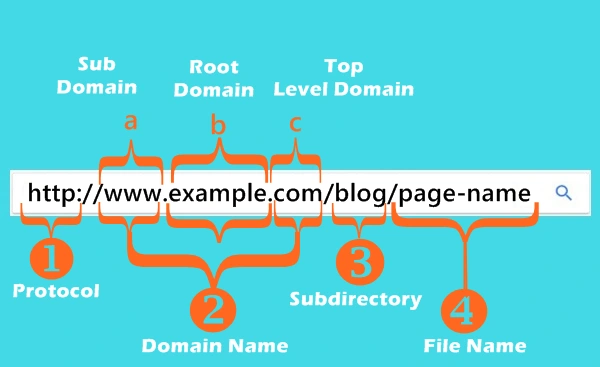
Third, it supports your site architecture. A logical URL hierarchy tells search engines how your pages relate to each other. A path like yoursite.com/blog/on page seo sends clearer signals than yoursite.com/p?id=4432.
Key Benefits of Using SEO Friendly URLs
- Better click through rates from search results pages
- Easier crawling and indexing by Google and Bing
- Improved user trust before they even click
- Stronger keyword relevance signals to search engines
- Cleaner internal linking and site navigation
- Easier to share on social media, forums, and in emails
How to Create SEO Friendly URLs: Step by Step Guide
Follow these steps every time you publish a new page or post. Doing this once and consistently will build a URL structure your whole site benefits from.
Step 1: Start With Your Page Title
Your page title is the best starting point. It already contains the core idea of what the page is about. Take your full title and strip it down from there. For example, if your title is ‘How to Write a Great Blog Post for Beginners in 2025’, you start with that and remove everything that is not essential.
Step 2: Remove All Special Characters
Commas, colons, semicolons, quotation marks, exclamation points, and brackets do not belong in URLs. They create encoding problems and can confuse both users and search engine crawlers. Google itself recommends keeping URLs free of these characters to make parsing easier and linking more reliable.
Step 3: Cut Out Numbers That Will Change
Numbers tied to time or quantity cause trouble. If your title says ’10 Best Tips’, that number might change when you update the post. A URL that says ’10 best tips’ will eventually be wrong without a redirect. Remove those numbers from the URL, even if they stay in your title. Numbers that are part of a product name or a permanent concept are fine to keep.
Step 4: Remove Stop Words
Stop words are short connective words like ‘the’, ‘a’, ‘and’, ‘of’, ‘for’, and ‘to’. They add length without adding meaning. ‘how to write a great blog post’ can safely become ‘write great blog post’ or simply ‘great blog post writing’ in your URL. Trimming stop words keeps your URL tight and keyword dense.
Step 5: Identify Your Core Keyword
By now your slug should be down to the essential words. Look at what is left and identify the primary keyword you want the page to rank for. That keyword should be present in the URL. If you did keyword research before writing the page, this step is already done. Match the URL to that keyword.
Step 6: Add a Keyword Modifier If Needed
Sometimes your core keyword is one or two words and could use a small modifier to make it more specific or clickable. For a page targeting ‘SEO friendly URLs’, a modifier like ‘guide’ or ‘checklist’ can help. But keep it short. Do not pad the URL just to sound more complete.
Step 7: Make Everything Lowercase
URLs are case sensitive on most servers. Yoursite.com/SEO Tips and yoursite.com/seo tips are technically two different pages. Mixing cases invites duplicate content problems and makes links harder to type correctly. Always use lowercase throughout.
Step 8: Use Words to Separate Words
The word separator you choose matters. Search engines treat words separated by the correct separator as individual terms, which improves keyword recognition. Underscores, on the other hand, are not recognized as separators. That means ‘seo_friendly_urls’ reads as one single unbroken word to Google. Always use the proper separator, never underscores.
Note: The user has asked to avoid the dash symbol in this blog. In standard SEO practice, a hyphen is the recommended separator between words in a URL slug, for example: yoursite.com/seo friendly urls. Use this format wherever your CMS or platform supports clean readable slugs.
URL Structure Quick Reference
| Element | Best Practice |
| Length | Keep under 60 characters |
| Case | Always lowercase |
| Word Separator | Use word separator supported by your platform |
| Keywords | Include primary keyword, ideally near the start |
| Stop Words | Remove: the, a, and, of, for, to |
| Special Characters | Remove all: commas, quotes, colons, brackets |
| Numbers | Remove if they are likely to change over time |
| Dates | Avoid: creates evergreen content problems |
Common URL Mistakes That Hurt Your SEO
Mistake 1: URLs That Look Like Random Code
URLs like yoursite.com/p?id=8833 or yoursite.com/index.php?cat=2 tell Google nothing about the page. They are hard to read, hard to share, and send zero keyword signals. If your CMS generates these by default, fix the permalink settings before publishing anything.
Mistake 2: Including Dates in the URL
Adding the year or full date to your URL seems logical at first. But once that date is years old, the URL starts to undermine your content. Readers see an old date in the address bar and assume the information is stale. Remove dates entirely and let your content prove its freshness through updates and internal links.
Mistake 3: Keyword Stuffing the URL
A URL like yoursite.com/seo seo tips seo guide seo beginners does not help. Google’s spam policies flag excessive keyword repetition in URLs the same way they flag it in content. One clear, descriptive keyword phrase is enough.
Mistake 4: Changing URLs Without a Redirect
This is the single most damaging URL mistake. If you change a URL without setting up a 301 redirect, every backlink pointing to the old address becomes a dead link. All the link authority those pages built disappears. Always redirect old URLs to new ones before making any changes live.
Mistake 5: Too Many Subfolders
Deep URL structures like yoursite.com/blog/category/subcategory/topic/post name are hard to crawl and harder to read. Keep your folder structure shallow. Two levels deep is usually enough for most websites.
Mistake 6: Inconsistent URL Patterns
Some pages with dates, some without. Some with category folders, some without. Inconsistency confuses both crawlers and users. Pick a structure and stick with it across your entire site.
Expert Tips for Better URL Optimization
- Match your URL to your target keyword exactly.
If you did keyword research and identified a target phrase, the URL slug should match or closely echo that phrase. This alignment between the URL, the title tag, and the H1 is one of the clearest on page SEO signals you can send.
- Audit existing URLs before changing anything.
Before you start cleaning up old URLs, check which ones have backlinks and organic traffic. Tools like Google Search Console show you which pages rank and get clicks. Prioritize redirects for those pages first.
- Use canonical tags to manage duplicates.
If your site generates multiple URL versions of the same page, for example with and without trailing slashes or with different filter parameters, use canonical tags to tell Google which version is the real one. This protects your rankings from duplicate content dilution.
- Keep your URL structure consistent with your site architecture.
Your URL should reflect where a page sits in the hierarchy of your site. A blog post about on page SEO might live at yoursite.com/blog/on page seo. That path tells both readers and search engines that this is a blog post, under the blog section, about that specific topic.
- Do not over optimize the slug.
Two to four words is usually the sweet spot for a URL slug. More than that and you start diluting the keyword signal and making the URL harder to share. If your title is long and detailed, that is fine. The URL does not need to mirror every word.
Read More SEO Blogs
Want to go deeper on SEO? Check out these related guides:
➜ How to Use AI SEO to Improve Your Website
➜ What Is AIO SEO? How to Optimize for AI Search in 2026
Frequently Asked Questions
Conclusion
Getting your URL structure right is one of the lowest effort, highest return adjustments in all of SEO. Clean, descriptive, keyword focused SEO friendly URLs cost nothing extra to create and pay dividends every time someone searches, clicks, or shares your content.
Start with your next new page. Strip the title down to its core keyword, remove the clutter, make it lowercase, and you are done. Then work through your highest traffic existing pages, check for redirect opportunities, and clean those up one by one.
The pages that rank consistently well are almost always the ones that have every small signal pointing in the same direction, title, heading, URL, and content all aligned. A great URL will not save bad content, but it will absolutely give good content an extra push.
